




Here's how it works



How to use or fill out vaecc' with our platform

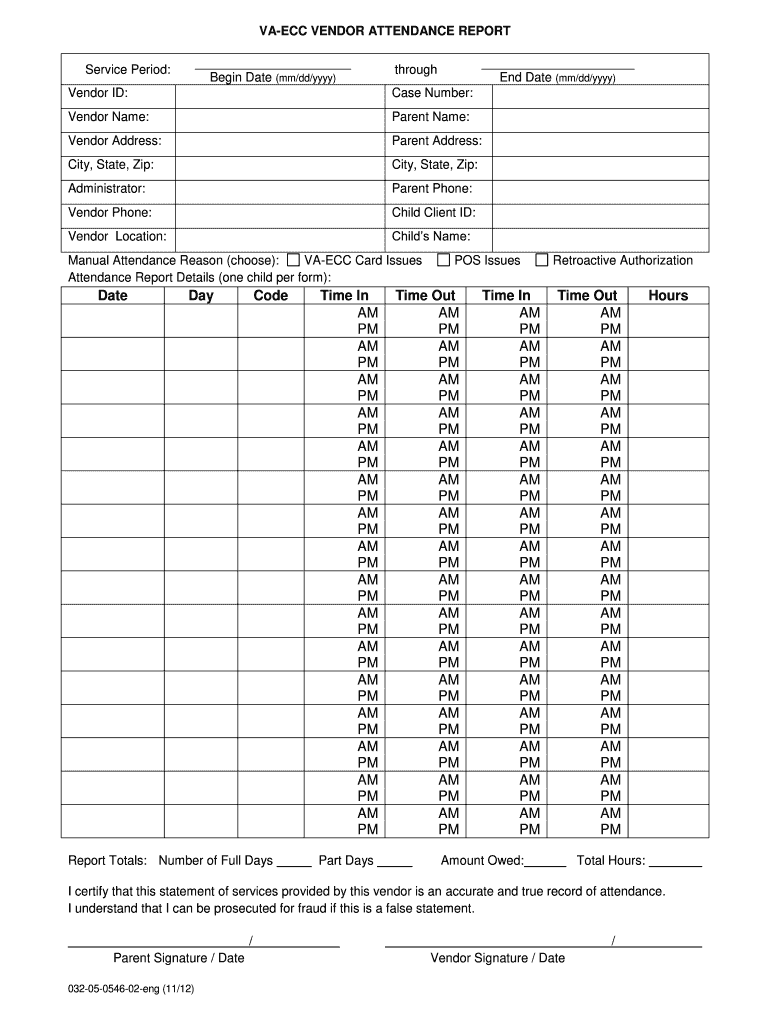
- Click ‘Get Form’ to open the VA-ECC Vendor Attendance Report in the editor.
- Fill in the Service Period by entering the Begin Date and End Date in mm/dd/yyyy format. Ensure it aligns with the specified periods.
- Complete the Vendor Information section, including your Vendor ID, Name, Address, City, State, Zip, Administrator's name, and contact numbers.
- Provide Parent Information by entering the Case Number, Parent Name, Address, City, State, Zip, and Phone number.
- Input Child's Information: enter the Child Client ID and Child’s Name. Remember that this form is for one child only.
- Select a Manual Attendance Reason by checking the appropriate box based on attendance reporting issues.
- Fill out Attendance Report Details for each day of service during the period. Include Date, Day of the week, Code (for attendance status), Time In/Out and total Hours.
- Calculate and enter Report Totals: Number of Full Days and Part Days attended along with Amount Owed and Total Hours.
- Ensure both Parent and Vendor signatures are included at the bottom of the form before submission.
Start filling out your VA-ECC Vendor Attendance Report today using our platform for free!
It's free
See more vaecc' versions
| Versions | Form popularity | Fillable & printable |
|---|---|---|
| 2012 | 4.7 Satisfied (49 Votes) |
Got questions?
Is it secure to sign my virginia ecc electronically?
You should use only trustworthy software solutions with strong data protection compliance to approve your paperwork electronically. DocHub is just the type of editor you need! It stores data on Amazon Web Servers and complies with all required security standards and eSignature regulations, so it’s a reliable way to eSign your virginia ecc or other documents with this tool.
How to fill out and sign vaecc online?
You can quickly complete, edit, and even eSign your vaecc using DocHub. Create a new account and begin your free trial. After that, you may upload the file with the form and simply make all the needed edits. No need to print on paper or use a third-party application to sign it, as you can place your electronic signature on your document faster through DocHub.
What is the phone number for Virginia ECC card?
Who regulates daycares in VA?
How do I create a VA ECC account?
Security and compliance
At DocHub, your data security is our priority. We follow HIPAA, SOC2, GDPR, and other standards, so you can work on your documents with confidence.
Learn more


