Dd 771 2026

Get Form
dd form 771 Preview on Page 1

Here's how it works

01. Edit your dd form 771 online
Type text, add images, blackout confidential details, add comments, highlights and more.
02. Sign it in a few clicks
Draw your signature, type it, upload its image, or use your mobile device as a signature pad.
03. Share your form with others
Send dd771 via email, link, or fax. You can also download it, export it or print it out.

How to use or fill out dd 771 with our platform

Form edit decoration
9.5
Ease of Setup
DocHub User Ratings on G2
9.0
Ease of Use
DocHub User Ratings on G2
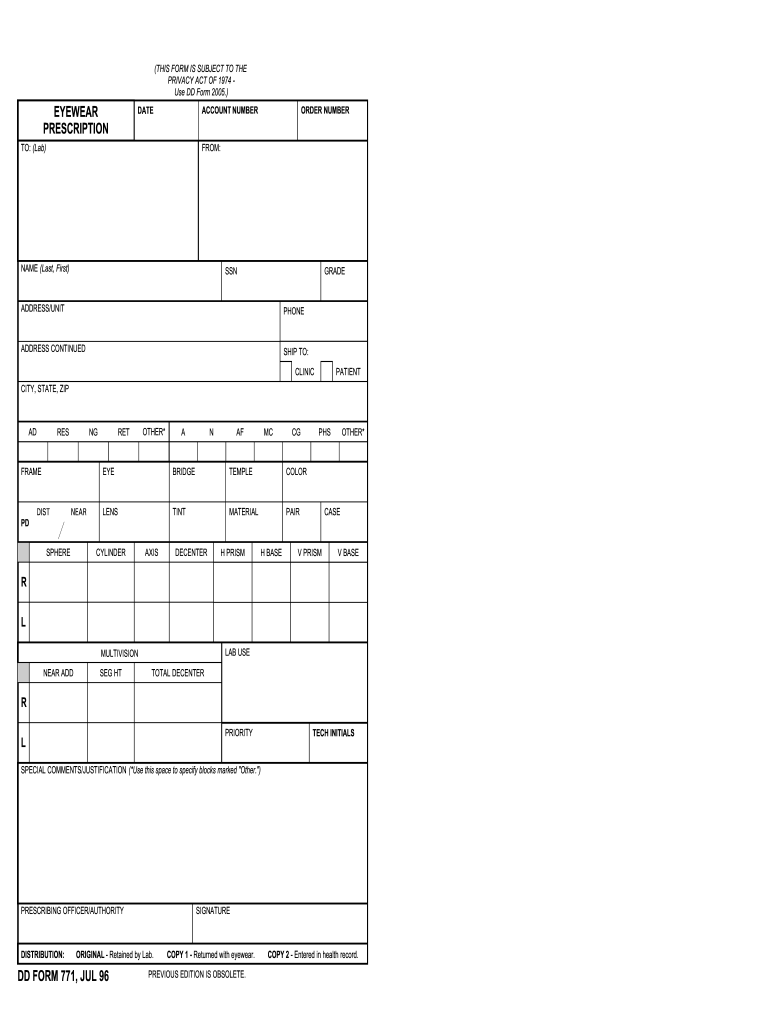
  1. Click ‘Get Form’ to open the DD 771 in the editor.
  2. Begin by entering the account number and date at the top of the form. This information is crucial for tracking your eyewear prescription.
  3. Fill in the 'To' section with the lab's name and order number, ensuring accurate processing of your request.
  4. In the 'From' section, provide your full name, Social Security Number (SSN), grade, address/unit, and phone number. This identifies you as the patient.
  5. Complete the 'Ship To' section with details about where to send your eyewear, including clinic name and complete address.
  6. Proceed to fill out specific eyewear details such as frame type, lens specifications (sphere, cylinder, axis), and any special comments or justifications in the designated area.
  7. Finally, ensure that you sign as the prescribing officer/authority before submitting your form for processing.

Start using our platform today to effortlessly fill out your DD 771 form online for free!

See more dd 771 versions

We've got more versions of the dd 771 form. Select the right dd 771 version from the list and start editing it straight away!
Versions Form popularity Fillable & printable
1996 4.9 Satisfied (507 Votes)
be ready to get more

Complete this form in 5 minutes or less

Get form

Got questions?

We have answers to the most popular questions from our customers. If you can't find an answer to your question, please contact us.
Contact us
For bi-focal and progressive lenses, Add specifies how much magnifying power to add to the bottom of the lens to correct your vision for viewing nearby objects. For example, if the prescription is for +1.00, and you have an Add of +2.00, the nearsighted portion of the lens is set to +3.00.
These numbers can be positive (+) or negative (-), ranging from -5 to +3. A negative number means that the prescription is correcting nearsightedness, or myopia, with -5 being severe and -1 being more minimal. A positive number indicates farsightedness. The higher the number, the more correction is needed.
Nearsightedness is categorized into mild, moderate, high, and extreme: Mild: -0.50 to -3. Moderate: -3.25 to -5.00. High: -5.25 to -10.
Lens power is measured in diopters, so you may see the sphere field above written as 9.00 Dthis means there are 9 diopters of nearsightedness. Think of the measuring system as an integer number line, with zero in the middle needing no correction.
Thats just a technical way of saying that the lens will correct your vision differently in different areas of the eye. The cylinder portion of your contact prescription is measured in diopters and represents the severity of your astigmatism. It can be a positive or negative number.

Security and compliance

At DocHub, your data security is our priority. We follow HIPAA, SOC2, GDPR, and other standards, so you can work on your documents with confidence.

Learn more
ccpa2
pci-dss
gdpr-compliance
hipaa
soc-compliance

People also ask

What does a +0.25 eye prescription mean? A +0.25 eye prescription indicates a person has mild farsightedness (hyperopia), meaning they have a slight difficulty seeing objects up close.

dd form 771 printable