






Definition and Meaning
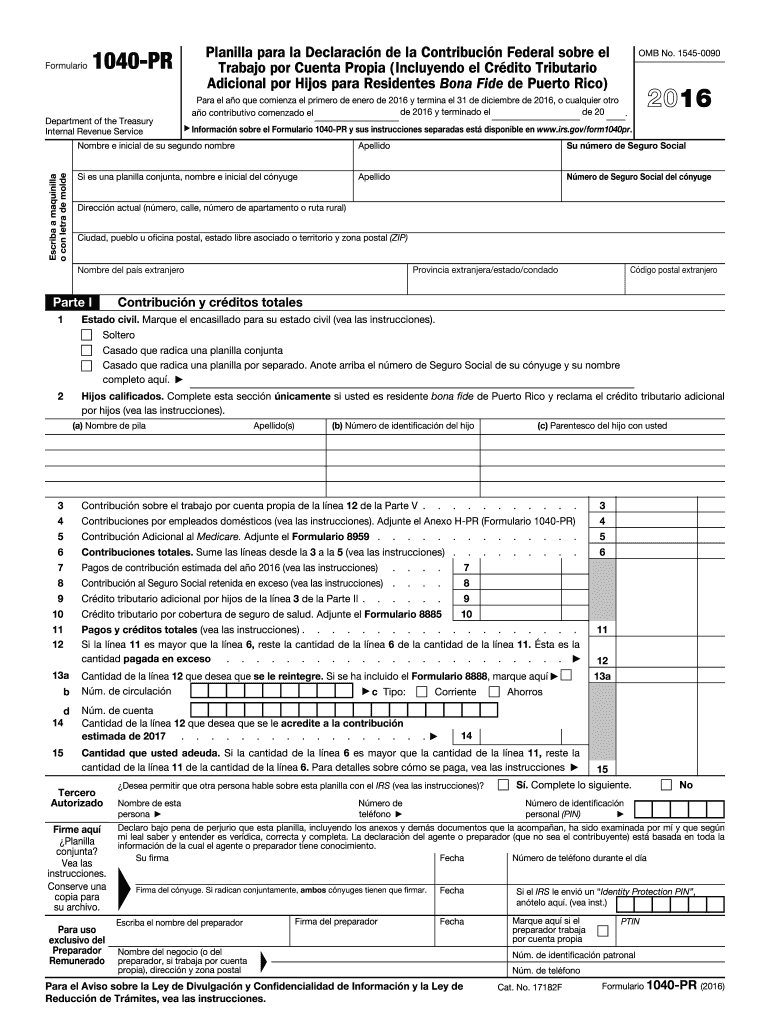
The 2016 Form 1040-PR is a crucial tax document tailored for self-employed individuals residing in Puerto Rico. It serves the specific purpose of allowing these individuals to report their income, deductions, and credits, with a particular focus on the Additional Child Tax Credit. This form also requires detailed reporting of contributions owed to Social Security and Medicare, thus ensuring compliance with U.S. tax obligations while addressing tax responsibilities in Puerto Rico.
Components of the Form
- Personal Information: Includes taxpayer's name, address, and social security number.
- Income Reporting: Sections for declaring self-employment income.
- Tax Credits: Specifically emphasizes the Additional Child Tax Credit.
- Social Security Contributions: Calculations pertaining to owed amounts.
- Medicare Contributions: Essential to ensure accurate contributions are recorded.
How to Use the 1040-PR 2016 Form
Filing the Form 1040-PR entails careful attention to several components tailored for self-employed taxpayers in Puerto Rico. The process begins with gathering necessary personal and financial information.
-
Gather Required Information:
- Income statements, such as 1099 forms, reflecting self-employment earnings.
- Details on deductions and applicable tax credits.
- Accurate records of Social Security and Medicare contribution calculations.
-
Complete the Form:
- Start with personal information.
- Accurately report all sources of income.
- Calculate deductions and credits.
-
Review and Submit:
- Ensure all entries are correct and complete.
- Submit the form either online or via mail as per IRS submission methods.
How to Obtain the 1040-PR 2016 Form
Securing a copy of the 2016 Form 1040-PR is an essential first step in the tax filing process for self-employed individuals in Puerto Rico.
- Download from IRS Website: Available for download to ensure you are using the most updated version.
- Request by Mail: If online access is not feasible, the IRS provides an option to have forms mailed.
- Local IRS Office: Hard copies can also be collected directly, which may be useful for those preferring an in-person visit.
Steps to Complete the 1040-PR 2016 Form
Accurately completing the Form 1040-PR requires following specific steps to ensure compliance and precision.
-
Start with Personal Details:
- Fill in your name, address, and SSN.
-
Income Reporting:
- Compile data on all self-employment earnings.
-
Calculate Deductions and Credits:
- Ensure accurate entry of applicable deductions.
- Special attention to claiming the Additional Child Tax Credit.
-
Detail Social Security and Medicare Contributions:
- Calculate and enter required contributions accurately.
-
Finalize and Review:
- Check for accuracy in all sections.
- Sign your completed form.
Important Terms Related to 1040-PR 2016 Form
Understanding specific terminology associated with Form 1040-PR is critical for correctly managing tax obligations.
Key Terms
- Self-Employment Income: Earnings derived from personal business activities.
- Additional Child Tax Credit: A refundable credit specific to families with qualifying children.
- Social Security Contribution: Payments into Social Security based on income.
- Medicare Contribution: A calculated percentage of income for Medicare funding.
Filing Deadlines / Important Dates
Adhering to filing deadlines is crucial to remaining compliant and avoiding penalties.
- Typical Deadline: Generally, self-employment forms must be filed by April 15, aligning with the broader tax deadline for U.S. individuals.
- Extensions: Taxpayers should be aware of extension provisions available if needed.
Form Submission Methods (Online / Mail / In-Person)
Various submission methods for the 1040-PR offer flexibility based on individual preferences.
- Online Submission: The most convenient method, accessible directly through the IRS portal.
- Mail: Traditional postal submission is an option for those who prefer or require hard copy records.
- In-person: Visiting a local IRS office might be beneficial for personalized tax assistance or to obtain confirmation of submission.
Penalties for Non-Compliance
Failing to comply with the requirements of the Form 1040-PR can incur various penalties.
- Failure to File Penalty: Applies if the form is not submitted by the deadline.
- Underpayment Penalty: Charged if the taxpayer underpays the owed tax amount.
- Interest on Unpaid Taxes: Accumulates on any unpaid balance due.
Understanding these penalties underscores the importance of timely and accurate filing.