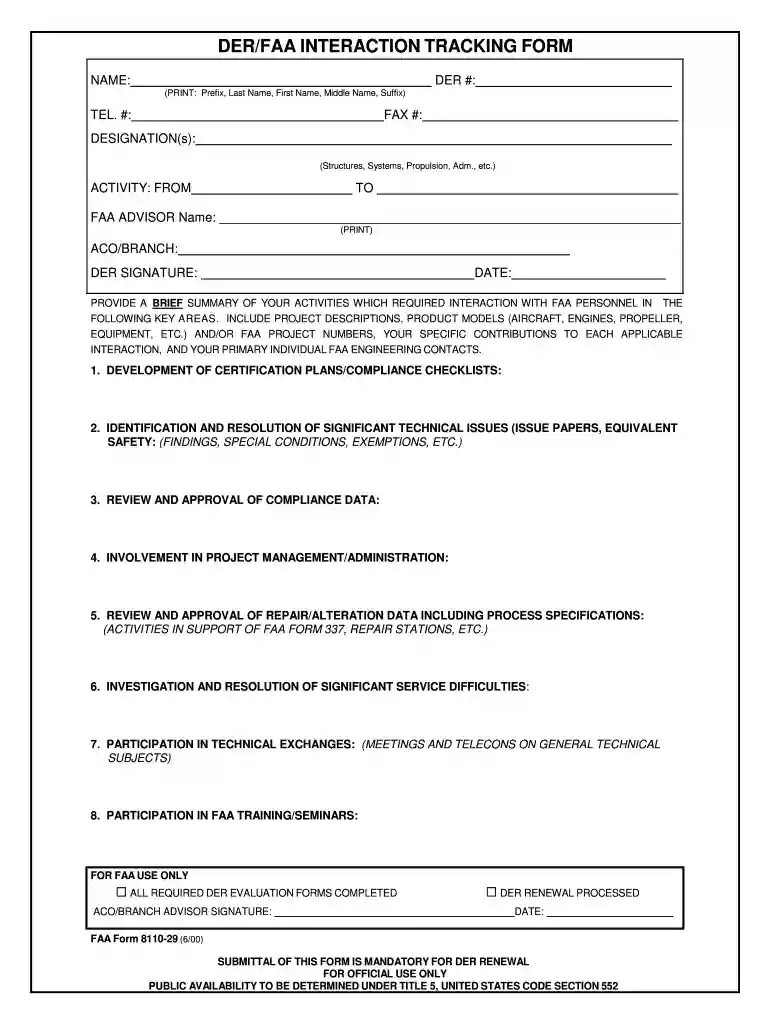
8110 29 Preview on Page 1

8110 29-2026

Here's how it works

  • 01. Edit your form online

    Type text, add images, blackout confidential details, add comments, highlights and more.

  • 02. Sign it in a few clicks

    Draw your signature, type it, upload its image, or use your mobile device as a signature pad.

  • 03. Share your form with others

    Send it via email, link, or fax. You can also download it, export it or print it out.

How to use or fill out 8110 29 with our platform

Form edit decoration
9.5
Ease of Setup
DocHub User Ratings on G2
9.0
Ease of Use
DocHub User Ratings on G2
  1. Click ‘Get Form’ to open the 8110 29 in the editor.
  2. Begin by entering your name and DER number at the top of the form. Ensure that you print your full name clearly, including any suffixes.
  3. Fill in your telephone and fax numbers for easy communication. This information is crucial for follow-ups.
  4. Specify your designations such as Structures, Systems, or Propulsion. This helps categorize your expertise.
  5. Indicate the activity period by filling in the 'FROM' and 'TO' dates accurately.
  6. Provide the name of your FAA advisor and their ACO/Branch details. This section is essential for proper documentation.
  7. In the summary section, detail your activities with FAA personnel across various key areas. Be specific about project descriptions and contributions.
  8. Finally, sign and date the form to validate it before submission. Ensure all required fields are completed to avoid delays.

Start using our platform today to fill out your forms online for free!

See more 8110 29 versions

We've got more versions of the 8110 29 form. Select the right 8110 29 version from the list and start editing it straight away!

VersionsForm popularityFillable & printable
20164.8 Satisfied (271 Votes)
20004 Satisfied (52 Votes)

be ready to get more

Complete this form in 5 minutes or less

Got questions?

We have answers to the most popular questions from our customers. If you can't find an answer to your question, please contact us.

Form 8100 9 is a document to be issued when an ODA approves or recommends approving the repair design that conforms to the FAR criteria.
TYPE INSPECTION AUTHORIZATION, FAA FORM 8110-1. The Type Inspection Authorization (TIA) is prepared by the ACO on FAA Form 8110-1 and is used to authorize. official conformity, airworthiness inspections, and flight tests necessary to fulfill certain requirements for Type.
Form 8100 9 is a document to be issued when an ODA approves or recommends approving the repair design that conforms to the FAR criteria. With regard to the scope of ODAs approval, the category (structural, power plant, radio, etc.) and the content of the certificate (static analysis, safety analysis, etc.)
Form 8500-9 is a medical certificate that is issued to applicants by the program office and is not accessible from this website. Make an appointment with an Aviation Medical Examiner (AME).
As a DER you are authorized to find that engineering data complies with appropriate airworthiness standards. A DER signs and issues FAA Form 8110-3 to indicate compliance. This document describes FAA Form 8110-3, Statement of Compliance with Airworthiness Standards, its usage and distribution.

Security and compliance

At DocHub, your data security is our priority. We follow HIPAA, SOC2, GDPR, and other standards, so you can work on your documents with confidence.

Related links

MacBook Pro A2159 Not turning on, 200 mA current draw

Oct 29, 2023 This is a signature fault on the 820-01598 logic board. The VCCIO (U8110) and EDRAM (U7710) buck converter controller ICs fail in unison,Read more

Learn more
38 U.S. Code 8110 - Operation of medical facilities

The Secretary shall establish the total number of hospital beds and nursing home beds in medical facilities over which the Secretary has direct jurisdiction.Read more

Learn more
Form FAA 8110-29 - DER/FAA Interaction Tracking Form

Document Information ; Number: FAA 8110-29 ; Title: DER/FAA Interaction Tracking Form ; Status: Active ; Edition date: 2016-11-29 ; Orientation: PortraitRead more

Learn more
If you believe that this page should be taken down, please follow our DMCA take down process here