Type text, add images, blackout confidential details, add comments, highlights and more.
02. Sign it in a few clicks
Draw your signature, type it, upload its image, or use your mobile device as a signature pad.
03. Share your form with others
Send itd registration via email, link, or fax. You can also download it, export it or print it out.
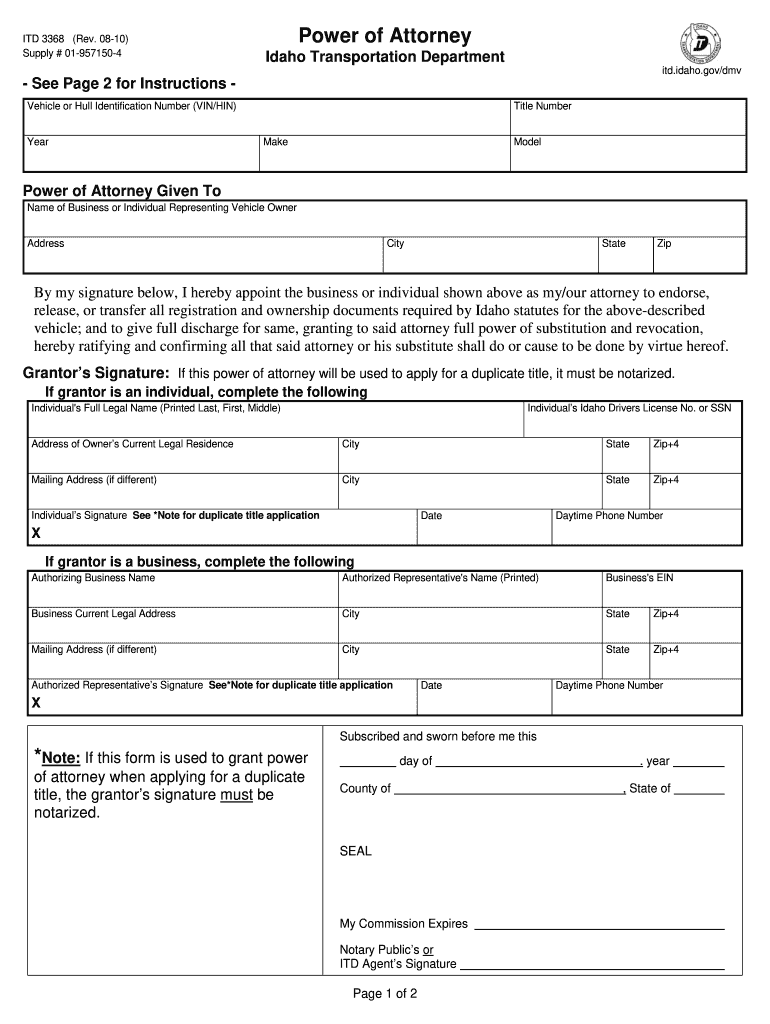
How to use or fill out the ITD 3368 Power of Attorney Form
Ease of Setup
DocHub User Ratings on G2
Ease of Use
DocHub User Ratings on G2
Click ‘Get Form’ to open it in the editor.
Begin by entering the Vehicle or Hull Identification Number (VIN/HIN), Year, Title Number, Make, and Model of the vehicle in the designated fields.
In the 'Power of Attorney Given To' section, input the name of the business or individual who will represent you as the vehicle owner, along with their address details.
Sign in the 'Grantor’s Signature' field. If this form is for a duplicate title application, ensure that your signature is notarized.
If you are an individual grantor, complete your full legal name, Idaho Driver's License number or SSN, and current legal residence address. Include your mailing address if different.
For business grantors, provide the authorizing business name, authorized representative's name, EIN, and both current and mailing addresses.
Finally, ensure all required signatures are completed and check that any necessary notarization is done before submission.
Start using our platform today to easily fill out your Power of Attorney form for free!
Idaho Transportation Department - Division of Highways
Jan 19, 2021 Products are categorized based on their use as defined in the ITD Standard Specification for Highway Construction (Standard Specifications).Read more
OHS used media to promote traffic safety activities and worked with ITDs Office of Communications to conceptualize, develop, and deliver safe driving messagesRead more
ITD is rebuilding I-15 structures at three locations in and near Inkom. East Idaho US-20 Idaho Falls to Arco. Improvements are being planned for US-20 west ofRead more
Cookie consent notice
This site uses cookies to enhance site navigation and personalize your experience.
By using this site you agree to our use of cookies as described in our Privacy Notice.
You can modify your selections by visiting our Cookie and Advertising Notice.