Type text, add images, blackout confidential details, add comments, highlights and more.
02. Sign it in a few clicks
Draw your signature, type it, upload its image, or use your mobile device as a signature pad.
03. Share your form with others
Send it via email, link, or fax. You can also download it, export it or print it out.
How to use or fill out probation with our platform
Ease of Setup
DocHub User Ratings on G2
Ease of Use
DocHub User Ratings on G2
Click ‘Get Form’ to open the probation document in the editor.
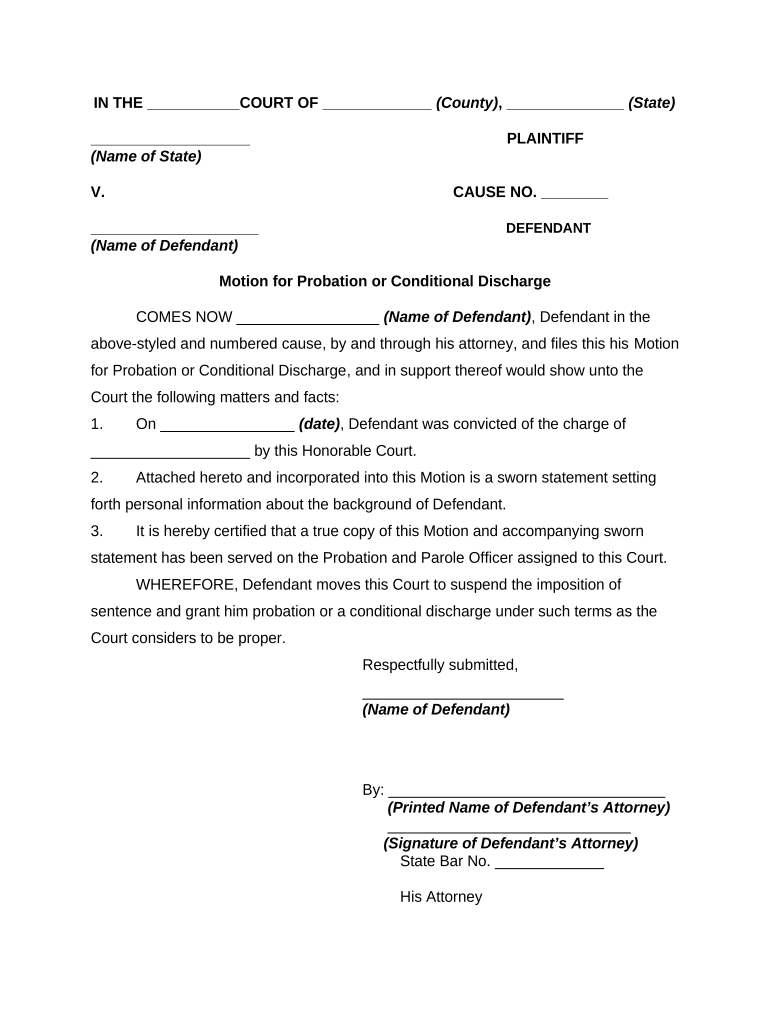
Begin by filling in the court name and county at the top of the form. This sets the context for your motion.
Next, enter the name of the plaintiff and defendant in their respective fields. Ensure accuracy as this information is crucial for legal identification.
In the section labeled 'Motion for Probation or Conditional Discharge', provide your name as the defendant. This personalizes your motion.
Fill in the date of conviction and specify the charge you were convicted of. This information supports your request for probation.
Attach a sworn statement detailing your background information. Use our platform’s upload feature to include this document seamlessly.
Finally, certify that a copy of this motion has been served to your Probation and Parole Officer by checking the appropriate box or adding a note.
Start using our platform today to complete your probation form easily and efficiently!
Probation vs paroleProbation in jobProbation OfficeProbation meaning in lawThe probation Act of 1925Probation OfficerWhat is probation and how does it workProbation period
Security and compliance
At DocHub, your data security is our priority. We follow HIPAA, SOC2, GDPR, and other standards, so you can work on your documents with confidence.
probation | Wex | US Law | LII / Legal Information Institute
Probation is a criminal sentence that allows a convicted defendant to remain in the community under supervision instead of serving time in jail or prison. ARead more
US Probation and Pretrial Services officers are responsible for pretrial services, presentence investigations, and post-conviction supervision for the federalRead more
Cookie consent notice
This site uses cookies to enhance site navigation and personalize your experience.
By using this site you agree to our use of cookies as described in our Privacy Notice.
You can modify your selections by visiting our Cookie and Advertising Notice.