Type text, add images, blackout confidential details, add comments, highlights and more.

02. Sign it in a few clicks
Draw your signature, type it, upload its image, or use your mobile device as a signature pad.

03. Share your form with others
Send it via email, link, or fax. You can also download it, export it or print it out.

How to use or fill out standard subcontract agreement with our platform
Ease of Setup
DocHub User Ratings on G2
Ease of Use
DocHub User Ratings on G2
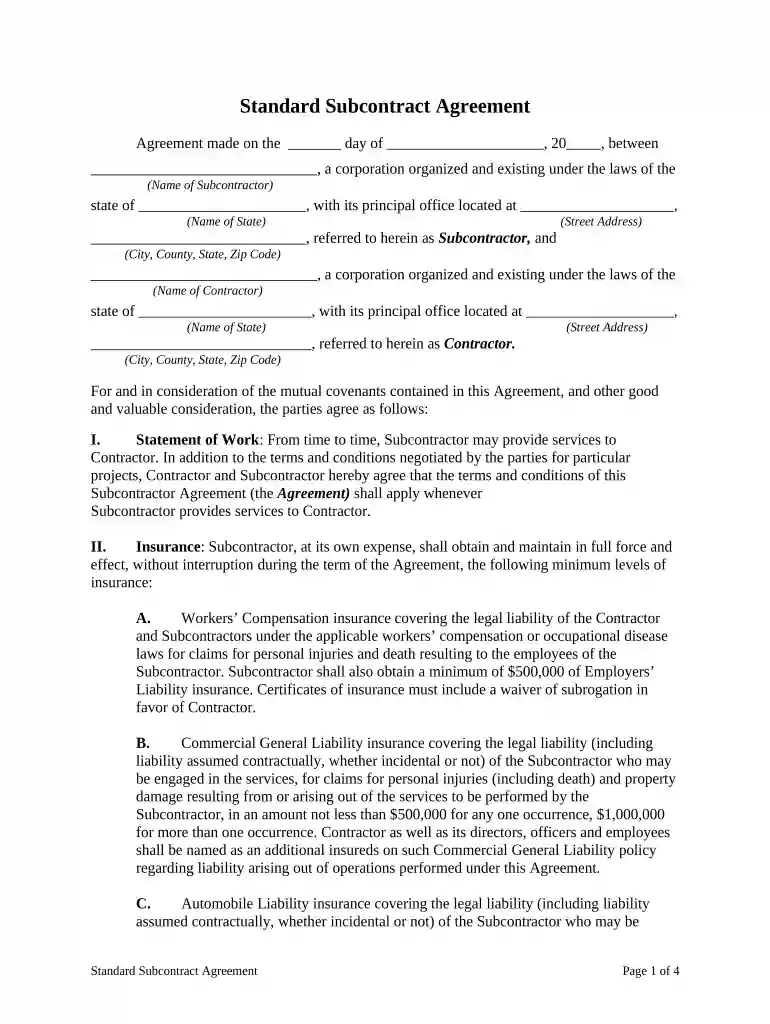
Click ‘Get Form’ to open the standard subcontract agreement in the editor.
Begin by filling in the date at the top of the document, specifying the day and year of the agreement.
Enter the name of the Subcontractor and their corporate details, including state and address. Ensure accuracy for legal purposes.
Next, input the Contractor's information in a similar manner, including their name, state, and address.
Proceed to Section I, where you will outline the Statement of Work. Clearly describe services that will be provided by the Subcontractor.
In Section II, provide details regarding insurance coverage. Fill in required amounts for Workers’ Compensation and General Liability insurance as specified.
Continue through each section, ensuring all fields are completed accurately. Pay special attention to indemnification clauses and warranty periods.
Finally, review all entries for correctness before signing. Use our platform’s signature feature to finalize your agreement electronically.
Start using our platform today to streamline your subcontract agreement process for free!
Fill out standard subcontract agreement online It's free
Subcontractor agrees to provide the necessary personnel, facilities, equipment, materials and data to perform the work in accordance with its proposal, which isRead more
Cookie consent notice
This site uses cookies to enhance site navigation and personalize your experience.
By using this site you agree to our use of cookies as described in our Privacy Notice.
You can modify your selections by visiting our Cookie and Advertising Notice.