Social security fotm 0960 0105 2009 form-2026

Get Form
social security fotm 0960 0105 2009 form Preview on Page 1

Here's how it works

01. Edit your form online
Type text, add images, blackout confidential details, add comments, highlights and more.
02. Sign it in a few clicks
Draw your signature, type it, upload its image, or use your mobile device as a signature pad.
03. Share your form with others
Send it via email, link, or fax. You can also download it, export it or print it out.

How to use or fill out social security fotm 0960 0105 2009 form with our platform

Form edit decoration
9.5
Ease of Setup
DocHub User Ratings on G2
9.0
Ease of Use
DocHub User Ratings on G2
  1. Click ‘Get Form’ to open the social security fotm 0960 0105 2009 form in the editor.
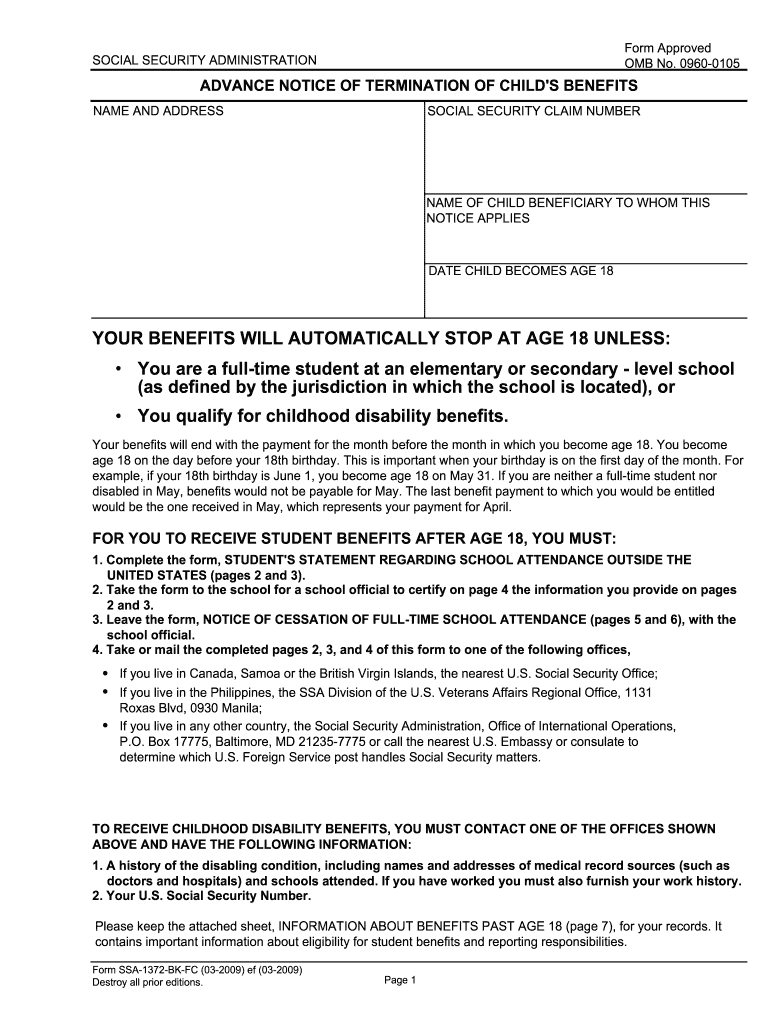
  2. Begin by entering the name and address of the child beneficiary at the top of the form. Ensure that you also include their Social Security claim number.
  3. Fill in the date when the child will turn 18, as this is crucial for determining benefit eligibility.
  4. Review the conditions under which benefits may continue after age 18, such as full-time student status or qualifying for childhood disability benefits.
  5. Complete pages 2 and 3 by providing details about school attendance, including current and past school information, and ensure a school official certifies this information on page 4.
  6. If applicable, complete page 5, which is a notice of cessation of full-time attendance, and ensure it is signed by a school official before submission.

Start using our platform today to easily fill out your social security forms online for free!

See more social security fotm 0960 0105 2009 form versions

We've got more versions of the social security fotm 0960 0105 2009 form form. Select the right social security fotm 0960 0105 2009 form version from the list and start editing it straight away!
Versions Form popularity Fillable & printable
2018 4.8 Satisfied (174 Votes)
2009 4.2 Satisfied (52 Votes)
be ready to get more

Complete this form in 5 minutes or less

Get form

Got questions?

We have answers to the most popular questions from our customers. If you can't find an answer to your question, please contact us.
Contact us

Signing documents on a mobile device is quick, straightforward, and doesn’t require software installation if you have an account with DocHub. Log in from any browser, fill in your empty fields with your information, and click on Sign → Create your signature. You can draw your eSignature the same way you usually do on paper, add its picture to your social security fotm 0960 0105 2009 form, or type in your name and stylize its look. Whatever option you select, your form will be valid.

When you edit your social security fotm 0960 0105 2009 form with DocHub, you will not need to look for other applications or services to eSign it. An electronic signature is part of DocHub’s comprehensive editing toolset, which allows you to implement changes in your form without switching between websites. Just complete your form, double-check the correctness of the data and place your electronic signature at the end to make it submission-ready in minutes.

Within a family, a child can receive up to half of the parent's full retirement or disability benefits. If a child receives survivors benefits, they can get up to 75% of the deceased parent's basic Social Security benefit.
Just log in to your personal my Social Security account to get instant access to your Benefit Verification letter.
SSA-1372-BK, page 1. Page 1 informs the child that his/her benefits will stop at age 18 unless he/she qualifies for childhood disability benefits or is a full-time student at an elementary or secondary school. It also states what the child should do to receive student or childhood disability benefits.

Security and compliance

At DocHub, your data security is our priority. We follow HIPAA, SOC2, GDPR, and other standards, so you can work on your documents with confidence.

Learn more
ccpa2
pci-dss
gdpr-compliance
hipaa
soc-compliance

People also ask

Go to your local Social Security Administration office and ask for a BPQY, form number SSA-2459 (See SAMPLE attached). Call the Social Security Administration at 1-800-772-1213 between 7 a.m. and 7 p.m. and ask them to mail your BPQY to you.

Related links