Wr i 485 2026

Get Form
immigration visa Preview on Page 1

Here's how it works

01. Edit your immigration visa online
Type text, add images, blackout confidential details, add comments, highlights and more.

02. Sign it in a few clicks
Draw your signature, type it, upload its image, or use your mobile device as a signature pad.

03. Share your form with others
Send i 485 approval notice sample via email, link, or fax. You can also download it, export it or print it out.

How to use or fill out wr i 485 with DocHub

Form edit decoration
9.5
Ease of Setup
DocHub User Ratings on G2
9.0
Ease of Use
DocHub User Ratings on G2
  1. Click ‘Get Form’ to open the wr i 485 in our editor.
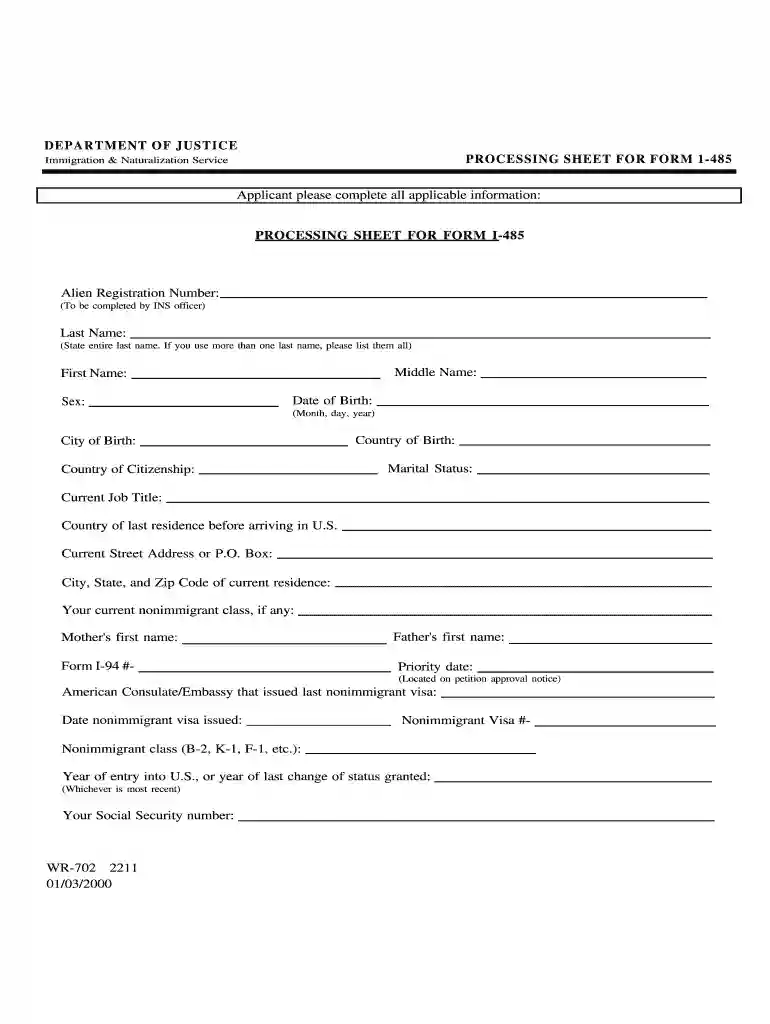
  2. Begin by entering your Alien Registration Number, which will be filled out by the INS officer later.
  3. Fill in your Last Name completely. If you have multiple last names, ensure all are listed.
  4. Provide your Middle Name and First Name as required.
  5. Enter your Sex, Date of Birth (Month, Day, Year), City of Birth, Country of Citizenship, and Country of Birth accurately.
  6. Indicate your Marital Status and Current Job Title.
  7. List the Country of last residence before arriving in the U.S., along with your Current Street Address or P.O. Box, City, State, and Zip Code.
  8. If applicable, provide your current nonimmigrant class and Mother's and Father's first names.
  9. Complete additional fields such as Form I-94 number, Priority date from petition approval notice, American Consulate/Embassy details for the last nonimmigrant visa issued, Nonimmigrant Visa number, Nonimmigrant class (e.g., B-2), and Year of entry into the U.S. or year of last change of status granted.
  10. Finally, enter your Social Security number if you have one.

Start using our platform today to fill out your wr i 485 form online for free!

See more wr i 485 versions

We've got more versions of the wr i 485 form. Select the right wr i 485 version from the list and start editing it straight away!
Versions Form popularity Fillable & printable
2000 4.9 Satisfied (244 Votes)
1993 4.4 Satisfied (34 Votes)
be ready to get more

Complete this form in 5 minutes or less

Get form

Got questions?

We have answers to the most popular questions from our customers. If you can't find an answer to your question, please contact us.
Contact us
If you properly file Form I-485, Application to Register Permanent Residence or Adjust Status, the green card timeline has begun. USCIS will initially respond by mailing you a receipt notice that confirms receipt of your application.
The Form I-485 examines the beneficiarys prior immigration history, any criminal history, and any other reason that the beneficiary might be inadmissible as a permanent resident. USCIS will take the beneficiarys fingerprints, mandate a medical examination, and conduct a background check.
I-485, Application to Register Permanent Residence or Adjust Status.
In the address section at the left of the money order, write USCIS on the top line. Below, write the direct filing address for the Form I-765 as indicated on the USCIS website.
The government filing fee for an I-485 application is $1440. In some situations, the fee for an I-485 might be lower or waived entirely (see the filing fee section of the I-485 instructions for details).

Security and compliance

At DocHub, your data security is our priority. We follow HIPAA, SOC2, GDPR, and other standards, so you can work on your documents with confidence.

Learn more
ccpa2
pci-dss
gdpr-compliance
hipaa
soc-compliance