New jersey renunciation 2026

Get Form
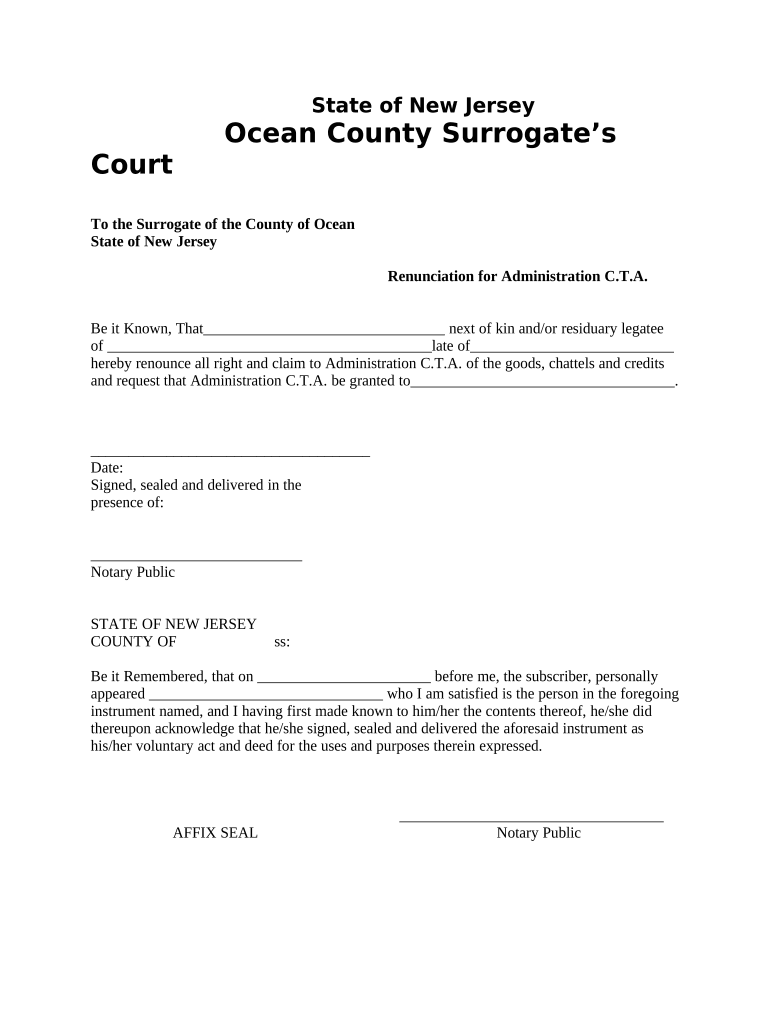
new jersey renunciation Preview on Page 1

Here's how it works

01. Edit your form online
Type text, add images, blackout confidential details, add comments, highlights and more.
02. Sign it in a few clicks
Draw your signature, type it, upload its image, or use your mobile device as a signature pad.
03. Share your form with others
Send it via email, link, or fax. You can also download it, export it or print it out.

How to use or fill out New Jersey Renunciation with Our Platform

Form edit decoration
9.5
Ease of Setup
DocHub User Ratings on G2
9.0
Ease of Use
DocHub User Ratings on G2
  1. Click ‘Get Form’ to open the New Jersey Renunciation form in the editor.
  2. Begin by filling in your name as the next of kin or residuary legatee in the designated field. This identifies you as the individual renouncing rights.
  3. In the next section, enter the name of the deceased and their date of death. This information is crucial for validating your claim.
  4. Specify who you are requesting Administration C.T.A. to be granted to by entering their name in the appropriate field.
  5. Sign and date the document where indicated. Ensure that your signature is clear and matches your printed name.
  6. Finally, arrange for a Notary Public to witness your signature and complete their section, including affixing their seal.

Start using our platform today to fill out your New Jersey Renunciation form online for free!

be ready to get more

Complete this form in 5 minutes or less

Get form

Got questions?

We have answers to the most popular questions from our customers. If you can't find an answer to your question, please contact us.
Contact us
If you lack a spouse or children, your parents inherit everything. Without a spouse, children, or parents, your siblings inherit everything. A spouse inherits everything if no children, parents, or siblings are present.
It generally takes 10 to 12 months (on average) to finalize a divorce from the date a spouse files the complaint. Divorce is an emotional process just as much as a legal process, and a case resolves when all parties are able to get their emotions in order so they can come to the table and be reasonable.
If you die with no surviving spouse, your children will inherit everything. If you have a surviving spouse, but no children or parents, your spouse inherits everything. If there is a surviving spouse and children from that spouse, the spouse inherits everything.
Without a spouse, children, or parents, your siblings inherit everything. A spouse inherits everything if no children, parents, or siblings are present. If you have children but no spouse, the children inherit everything.
If you die without leaving a valid will, your estate will devolve according to the Intestate Succession Act, 1987 (Act 81 of 1987). This means that your estate will be divided amongst your surviving spouse, children, parents or siblings according to a set formula. Find out more: intestate succession.

Security and compliance

At DocHub, your data security is our priority. We follow HIPAA, SOC2, GDPR, and other standards, so you can work on your documents with confidence.

Learn more
ccpa2
pci-dss
gdpr-compliance
hipaa
soc-compliance

People also ask

The 30-day notice must inform the tenant that because the tenant either violated the lease or rental agreement or habitually paid rent late, the tenancy will end in 30 days. If the tenant doesnt move out, the landlord can file an eviction lawsuit. (New Jersey Stat. 2A:18-61.1 and 2A:18-61.2(b) (2025).)
Once a parent is certain about giving up their rights, they must prove before both NJDCPP and a local court that doing so is in their childs best interests. They must also complete a Voluntary Surrender of Parental Rights Form communicating that idea.
The children of the person who has died inherit the whole estate. This applies however much the estate is worth. If there are 2 or more children, the estate will be divided equally between them.

Related links