California opposition 2026

Get Form
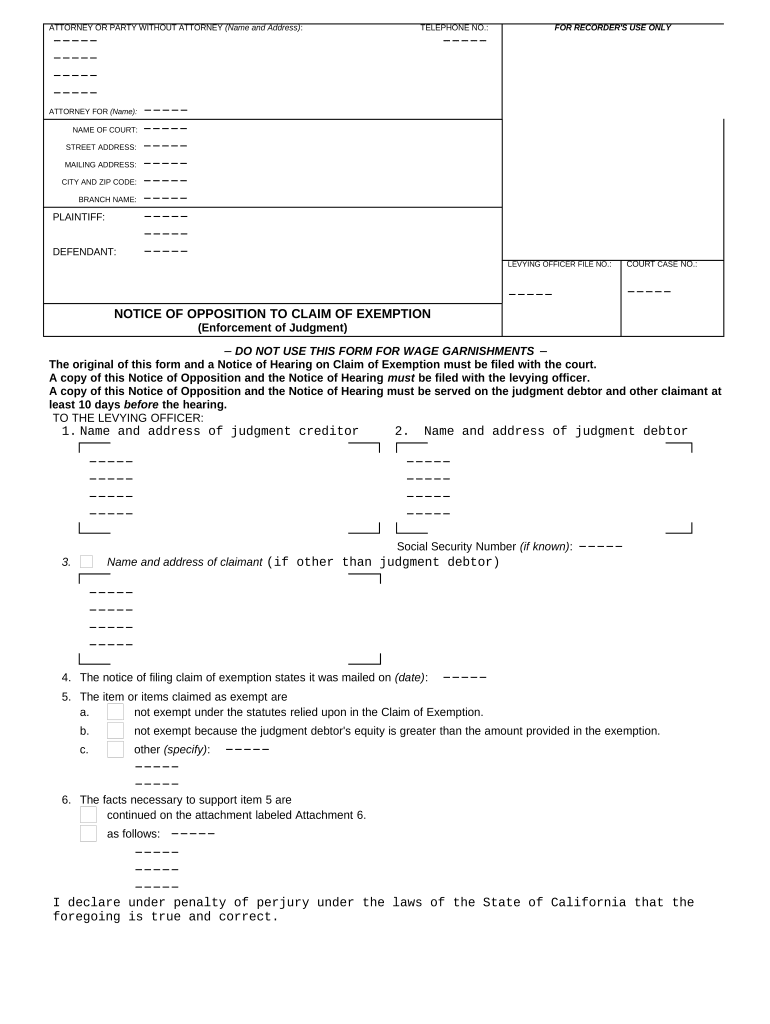
california opposition Preview on Page 1

Here's how it works

01. Edit your form online
Type text, add images, blackout confidential details, add comments, highlights and more.
02. Sign it in a few clicks
Draw your signature, type it, upload its image, or use your mobile device as a signature pad.
03. Share your form with others
Send it via email, link, or fax. You can also download it, export it or print it out.

How to use or fill out California Opposition with Our Platform

Form edit decoration
9.5
Ease of Setup
DocHub User Ratings on G2
9.0
Ease of Use
DocHub User Ratings on G2
  1. Click ‘Get Form’ to open the California Opposition document in the editor.
  2. Begin by entering your name and address in the 'Attorney or Party Without Attorney' section. This identifies who is filing the opposition.
  3. Fill in the 'Attorney For' field with the name of the party you represent, if applicable.
  4. Complete the court information, including the name of the court, street address, mailing address, city, zip code, and branch name.
  5. Identify both the plaintiff and defendant by entering their names in the respective fields.
  6. Provide your telephone number for contact purposes.
  7. In section 1, enter the name and address of the judgment creditor. In section 2, do the same for the judgment debtor.
  8. Specify any claims of exemption in item 5 and provide supporting facts in item 6. Attach additional documentation if necessary.
  9. Finally, declare under penalty of perjury by signing and dating at the bottom of the form.

Start using our platform today to easily complete your California Opposition form online for free!

be ready to get more

Complete this form in 5 minutes or less

Get form

Got questions?

We have answers to the most popular questions from our customers. If you can't find an answer to your question, please contact us.
Contact us
Motions. (1) Except as these rules provide otherwise, a party wanting to make a motion in a reviewing court must serve and file a written motion stating the grounds and the relief requested and identifying any documents on which the motion is based.
Format of electronic documents. (1) Text-searchable portable document format: Electronic documents must be in text-searchable portable document format (PDF) while maintaining the original document formatting.
New Authorities. If a party learns of docHub new authority, including new legislation, that was not available in time to be included in the last brief that the party filed or could have filed, the party may inform the Court of Appeal of this authority by letter.
All papers opposing a motion so noticed shall be filed with the court and a copy served on each party at least nine court days, and all reply papers at least five court days before the hearing. The court, or a judge thereof, may prescribe a shorter time.
A Response or Reply to the Opposing Partys Pleadings is your answer to the opposing partys document filed with the court.

Security and compliance

At DocHub, your data security is our priority. We follow HIPAA, SOC2, GDPR, and other standards, so you can work on your documents with confidence.

Learn more
ccpa2
pci-dss
gdpr-compliance
hipaa
soc-compliance