




Here's how it works

01. Edit your lic 9163 online
Type text, add images, blackout confidential details, add comments, highlights and more.

02. Sign it in a few clicks
Draw your signature, type it, upload its image, or use your mobile device as a signature pad.

03. Share your form with others
Send lic 9163 form via email, link, or fax. You can also download it, export it or print it out.
How to use or fill out lic 9163 with our platform

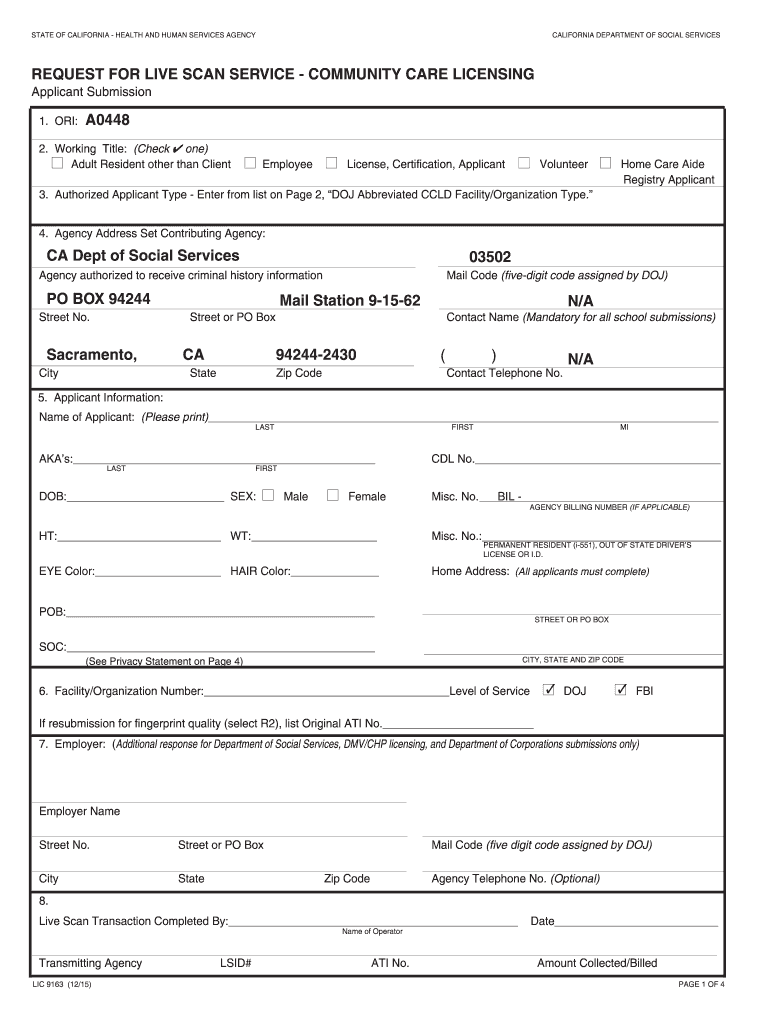
- Click ‘Get Form’ to open the lic 9163 in the editor.
- Begin by filling in the ORI field, which is preprinted as A0448. This identifies your request.
- Select your Working Title by checking the appropriate box for your role, such as Employee or Volunteer.
- In the Authorized Applicant Type section, refer to Page 2 of the form and enter the corresponding DOJ abbreviated facility type based on your working environment.
- Complete the Agency Address section with the preprinted information, ensuring accuracy in details like Mail Code and Agency Name.
- Fill out your personal information in the Applicant Information section, including your name, date of birth, sex, height, weight, and other identifiers.
- If applicable, provide your Employer's details in Section 7. Ensure all fields are filled accurately for processing.
- Finally, take two copies of this form to your Live Scan appointment. The operator will complete their section during your visit.
Start using our platform today for free to streamline your lic 9163 completion!
Fill out lic 9163 online
It's free
It's free
Got questions?
We have answers to the most popular questions from our customers. If you can't find an answer to your question, please contact us.
Contact us
What is a Live Scan form for Identogo?
Livescan fingerprinting is the process of capturing fingerprints electronically with our advanced LiveScan machine. With LiveScan fingerprinting, there is no ink or card. Your fingerprints are rolled across a glass plate and scanned. It is faster, cleaner and more accurate than the old ink-and-roll method.
What is lic 9163?
Individuals can obtain a Request for Live Scan form LIC 9163 or from any local Community Care Licensing Division office. This form will automatically request a Child Abuse Central Index (CACI) check if needed.
How to fill out a request for Live Scan form?
0:31 2:22 Number you can go ahead and leave that blank it does not apply. But be sure to include the eye.MoreNumber you can go ahead and leave that blank it does not apply. But be sure to include the eye. Color the hair color the place of birth. And the social security number or item.
How long does Live Scan take to process?
The Live Scan Process takes approximately 3-7 days once DOJ/FBI receives your 41-LS form. Out-of-state applicants must complete the FD-258 hard-Card manual fingerprint process, which takes approximately 10-12 weeks to complete.
What shows up on a Live Scan?
A live scan will reveal all your criminal history. Live scan fingerprinting can even include your federal record. Typically, the summary of your criminal history record will include various things like arrests, charges, dispositions, convictions, dismissals, diversions, and others.
Security and compliance
At DocHub, your data security is our priority. We follow HIPAA, SOC2, GDPR, and other standards, so you can work on your documents with confidence.
Learn more


Related forms

Sign Language Interpreter Request Form UnitedHealthcare State of - cdhh ri
The document is a Sign Language Interpreter Request Form for UnitedHealthcare members in Rhode Island. It collects infor ...

7 Restraining Order - Washington State Courts
The document is a Motion for Temporary Family Law Order (MTTO) and Restraining Order (MTTMO) used in the Superior Court ...

OMC contractor Registration Form - Oman Methanol
The document is a Contractor Registration/Update Form for Oman Methanol Company L.L.C, intended for vendors to register ...

Art lesson plan
The document outlines an art lesson plan that includes course objectives, student responsibilities, and background infor ...
Monthly counseling template
The document discusses the DA Form 4856, a key tool for documenting counseling sessions for soldiers in the military. It ...
People also ask
How much is a Live Scan in California?
Live Scan Service Fee: The fee charged by the Live Scan provider for capturing and submitting your fingerprints usually ranges from $20 to $50, depending on the location.
Does IHSS pay for fingerprinting?
Who pays for the fingerprinting/CBI process? State law requires that you, the IHSS provider, pay for the fingerprinting and CBI process.


