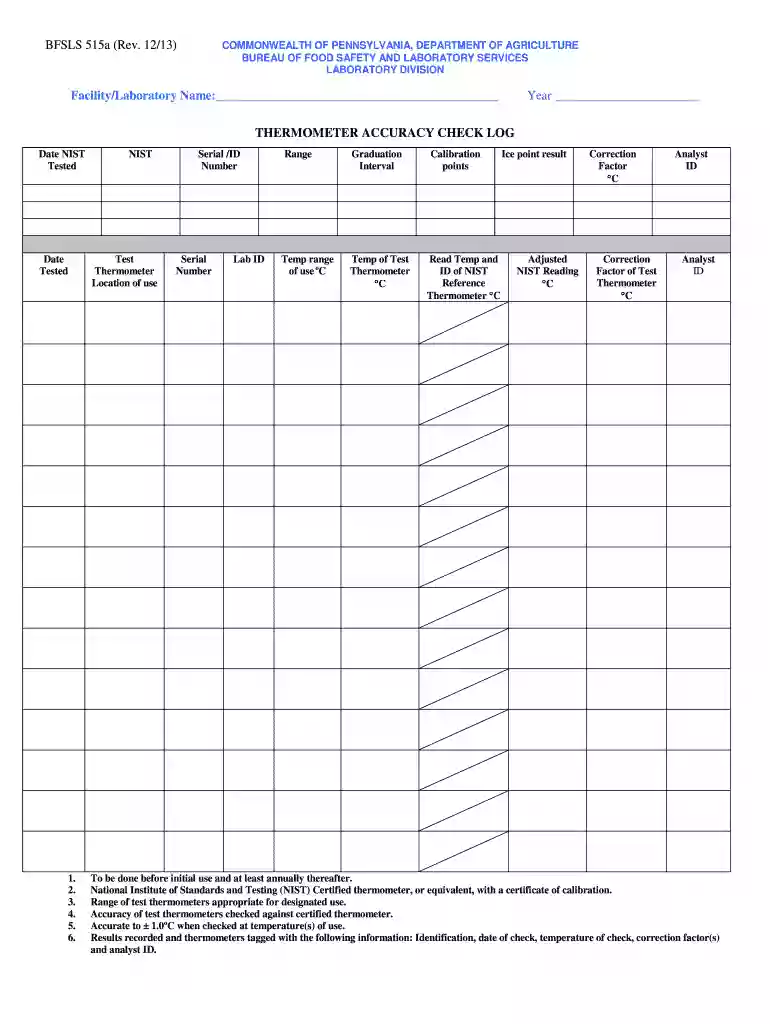
FacilityLaboratory Name THERMOMETER ACCURACY CHECK LOG 2026

Get Form
FacilityLaboratory Name THERMOMETER ACCURACY CHECK LOG Preview on Page 1

Here's how it works

01. Edit your form online
Type text, add images, blackout confidential details, add comments, highlights and more.

02. Sign it in a few clicks
Draw your signature, type it, upload its image, or use your mobile device as a signature pad.

03. Share your form with others
Send it via email, link, or fax. You can also download it, export it or print it out.

How to use or fill out FacilityLaboratory Name THERMOMETER ACCURACY CHECK LOG

Form edit decoration
9.5
Ease of Setup
DocHub User Ratings on G2
9.0
Ease of Use
DocHub User Ratings on G2
  1. Click ‘Get Form’ to open it in the editor.
  2. Begin by entering the Facility/Laboratory Name and Year at the top of the form. This identifies your specific laboratory and the year of calibration.
  3. In the 'Date Tested' section, record the dates when each thermometer was tested. Ensure you have multiple entries for thorough documentation.
  4. Fill in the 'NIST Test Thermometer' details, including its Serial/ID Number and Lab ID. This information is crucial for tracking and verification purposes.
  5. Document the temperature range of use and graduation interval for each thermometer to ensure they meet operational standards.
  6. Record the temperature readings from both the test thermometer and NIST reference thermometer, along with any necessary correction factors.
  7. Finally, include your Analyst ID to authenticate the testing process. Make sure all results are accurately recorded before finalizing.

Start using our platform today to streamline your thermometer accuracy checks for free!

See more FacilityLaboratory Name THERMOMETER ACCURACY CHECK LOG versions

We've got more versions of the FacilityLaboratory Name THERMOMETER ACCURACY CHECK LOG form. Select the right FacilityLaboratory Name THERMOMETER ACCURACY CHECK LOG version from the list and start editing it straight away!
Versions Form popularity Fillable & printable
2013 4.8 Satisfied (141 Votes)
be ready to get more

Complete this form in 5 minutes or less

Get form

Got questions?

We have answers to the most popular questions from our customers. If you can't find an answer to your question, please contact us.
Contact us
0:15 1:07 Water. This bottom part of the thermometer is the area that takes the reading. Just below the faceMoreWater. This bottom part of the thermometer is the area that takes the reading. Just below the face of the thermometer.
Luckily, testing a digital or meat thermometer is pretty simple. The ice bath method is the quickest and easiest. You can also try the boiling water method for another test. Either way, youll know if your thermometer is measuring correctly or needs an adjustment.
How to check the accuracy of a food thermometer Fill a large glass with crushed ice. Add water to the top of the ice and stir well. Let stand for 3 minutes. Place the thermometer stem at least 2 inches into the ice water. The thermometer should read 32˚F after 30 seconds.
0:43 2:33 Now take out the thermometer. And dip it in cold water observe the change in the mercury level andMoreNow take out the thermometer. And dip it in cold water observe the change in the mercury level and note down the readings.
Potentially hazardous foods must be cooled from 135 F to 70 F within 2 hours. These food items must then be chilled from 70 F to 41 F or below within 4 hours. Record temperatures every hour during the cooling cycle. Record corrective actions, if applicable.

Security and compliance

At DocHub, your data security is our priority. We follow HIPAA, SOC2, GDPR, and other standards, so you can work on your documents with confidence.

Learn more
ccpa2
pci-dss
gdpr-compliance
hipaa
soc-compliance

People also ask

Direct sunlight, cold temperatures or a sweaty forehead can affect temperature readings. Variations on user technique, such as holding the scanner too far away from the forehead, also may affect accuracy.

Related links