




Here's how it works



How to use or fill out the CITY OF HIGHLAND PARK Animal Control Complaint Form

- Click ‘Get Form’ to open it in the editor.
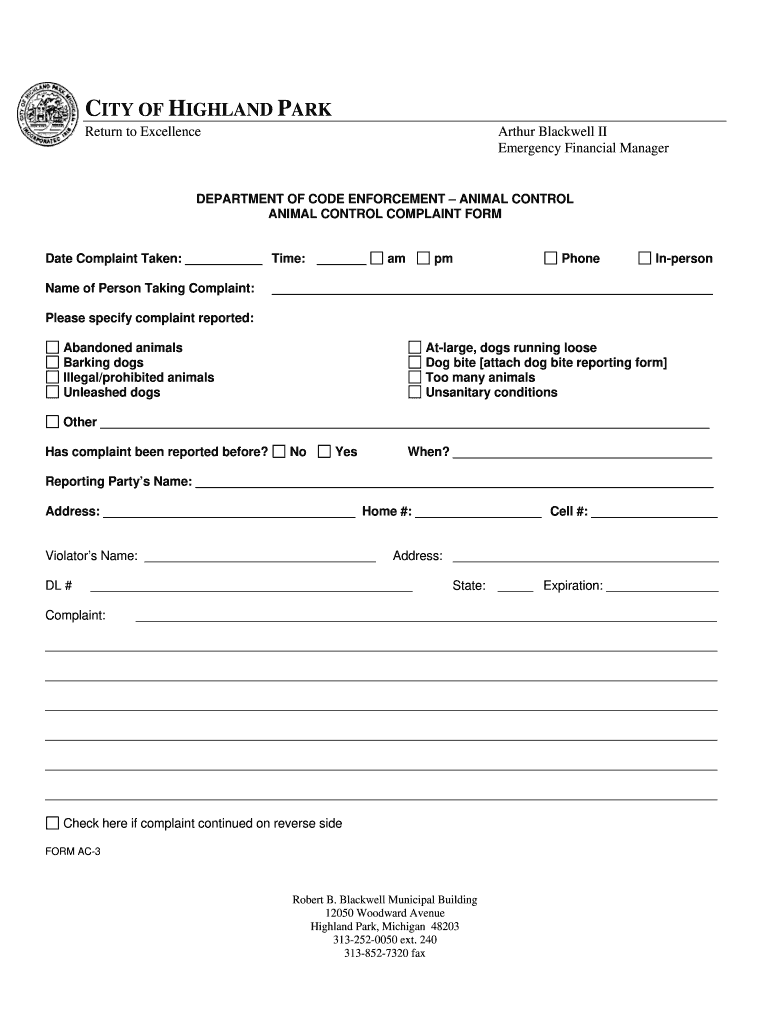
- Begin by entering the 'Date Complaint Taken' and 'Time' fields. Select either 'am' or 'pm' as appropriate.
- Fill in the 'Name of Person Taking Complaint' and their contact 'Phone' number.
- Specify the nature of your complaint by checking the relevant box, such as 'Abandoned animals' or 'Barking dogs'. If your issue is not listed, select 'Other' and provide details.
- Indicate whether this complaint has been reported before by selecting 'Yes' or 'No'. If yes, provide the date of the previous report.
- Complete your personal information under 'Reporting Party’s Name', including your address and both home and cell phone numbers.
- If applicable, fill in details about the violator, including their name and address.
- Describe the complaint in detail in the provided space. If more room is needed, check the box indicating that additional information continues on the reverse side.
Start filling out your complaint form online for free today!
It's free
See more CITY OF HIGHLAND PARK Return to Excellence Arthur Blackwell II Emergency Financial Manager DEPARTMENT OF CODE ENFORCEMENT ANIMAL CONTROL ANIMAL CONTROL COMPLAINT FORM Date Complaint Taken: Time: Name of Person Taking Complaint: am pm Phone versions
| Versions | Form popularity | Fillable & printable |
|---|---|---|
| 2008 | 4 Satisfied (52 Votes) |
Got questions?
How can I eSign my CITY OF HIGHLAND PARK Return to Excellence Arthur Blackwell II Emergency Financial Manager DEPARTMENT OF CODE ENFORCEMENT ANIMAL CONTROL ANIMAL CONTROL COMPLAINT FORM Date Complaint Taken: Time: Name of Person Taking Complaint: am pm Phone in Word?
Microsoft Word doesn’t have signing tools to generate legitimate electronic signatures and enforceable paperwork. Fortunately, DocHub is an online eSignature-compliant editor that supports different document formats, including .doc files. Sign in to your account and upload the Word edition of your CITY OF HIGHLAND PARK Return to Excellence Arthur Blackwell II Emergency Financial Manager DEPARTMENT OF CODE ENFORCEMENT ANIMAL CONTROL ANIMAL CONTROL COMPLAINT FORM Date Complaint Taken: Time: Name of Person Taking Complaint: am pm Phone from your device and cloud, or URL - our editor will automatically convert it into an editable PDF. Make all necessary changes in your form and click Sign to generate your own legally-binding electronic signature. There are four signing options from which to choose.
How to complete and sign CITY OF HIGHLAND PARK Return to Excellence Arthur Blackwell II Emergency Financial Manager DEPARTMENT OF CODE ENFORCEMENT ANIMAL CONTROL ANIMAL CONTROL COMPLAINT FORM Date Complaint Taken: Time: Name of Person Taking Complaint: am pm Phone online?
You may quickly fill out, edit, and even eSign your CITY OF HIGHLAND PARK Return to Excellence Arthur Blackwell II Emergency Financial Manager DEPARTMENT OF CODE ENFORCEMENT ANIMAL CONTROL ANIMAL CONTROL COMPLAINT FORM Date Complaint Taken: Time: Name of Person Taking Complaint: am pm Phone utilizing DocHub. Create a new profile and start your free trial. After that, you can upload the document with the form and easily make all the required edits. No need to print on paper or use a third-party application to sign it, as you can put your electronic signature on your document faster via DocHub.
Security and compliance
At DocHub, your data security is our priority. We follow HIPAA, SOC2, GDPR, and other standards, so you can work on your documents with confidence.
Learn more




