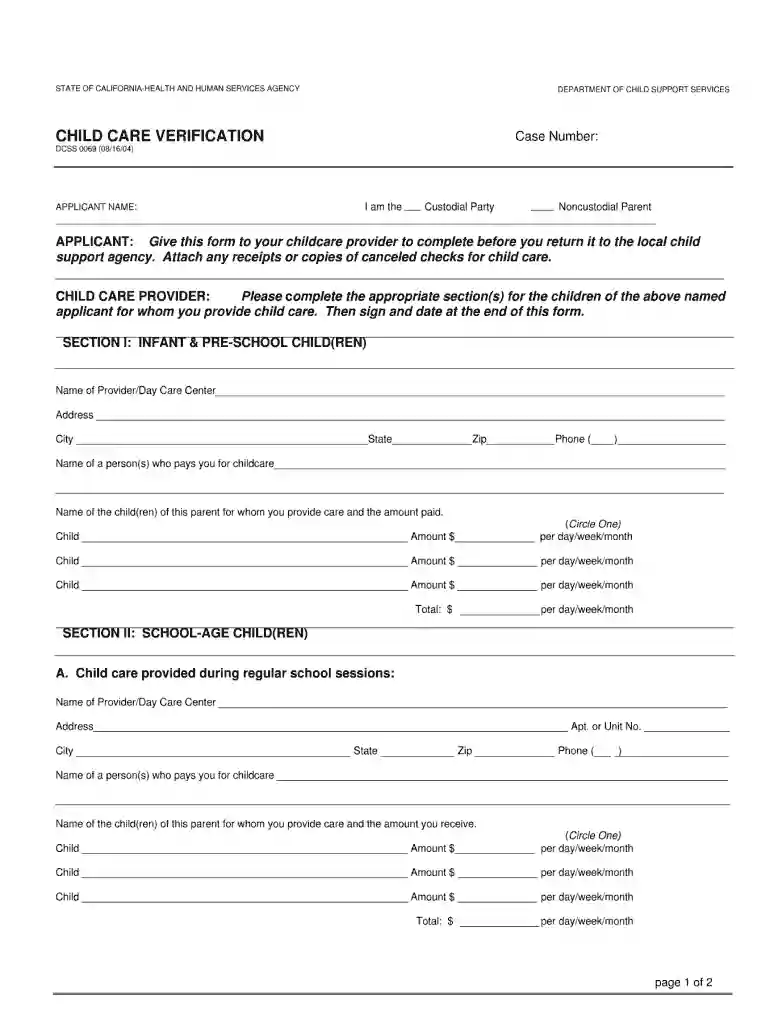
child care verification form dcss 0069 Preview on Page 1

Dcss 0069 2004 form-2026

Here's how it works

  • 01. Edit your child care verification form dcss 0069 online

    Type text, add images, blackout confidential details, add comments, highlights and more.

  • 02. Sign it in a few clicks

    Draw your signature, type it, upload its image, or use your mobile device as a signature pad.

  • 03. Share your form with others

    Send dcss 0069 via email, link, or fax. You can also download it, export it or print it out.

How to use or fill out dcss 0069 2004 form with our platform

Form edit decoration
9.5
Ease of Setup
DocHub User Ratings on G2
9.0
Ease of Use
DocHub User Ratings on G2
  1. Click ‘Get Form’ to open the dcss 0069 2004 form in the editor.
  2. Begin by entering your personal information in the designated fields, including your name, address, and contact details. Ensure accuracy for effective processing.
  3. Next, navigate to the section that requires you to provide specific details related to your case. Carefully read each prompt and fill in the required information as instructed.
  4. If applicable, attach any necessary documents by using the upload feature within our platform. This ensures all relevant information is submitted together.
  5. Review all entered data for completeness and correctness. Utilize our platform’s editing tools to make any adjustments before finalizing your submission.
  6. Once satisfied with your entries, proceed to sign the document electronically. This step is crucial for validating your submission.

Start using our platform today for free and streamline your form completion process!

See more child care verification form dcss 0069 versions

We've got more versions of the child care verification form dcss 0069 form. Select the right child care verification form dcss 0069 version from the list and start editing it straight away!

VersionsForm popularityFillable & printable
20094.8 Satisfied (225 Votes)
20044.4 Satisfied (361 Votes)
20014 Satisfied (58 Votes)

be ready to get more

Complete this form in 5 minutes or less

Security and compliance

At DocHub, your data security is our priority. We follow HIPAA, SOC2, GDPR, and other standards, so you can work on your documents with confidence.

Related links

Seismic assessment and retrofit of two heritage-listed R/C

A seismic assessment and advanced retrofit study on two heritage-listed reinforced concrete (R/C) elevated water storage tanks is presented in this paper.

Learn more
State and Consumer Services

Jul 1, 2006 The State and Consumer Services Agencys mission is to help educate consumers and make government more efficient, effective and.Read more

Learn more
If you believe that this page should be taken down, please follow our DMCA take down process here