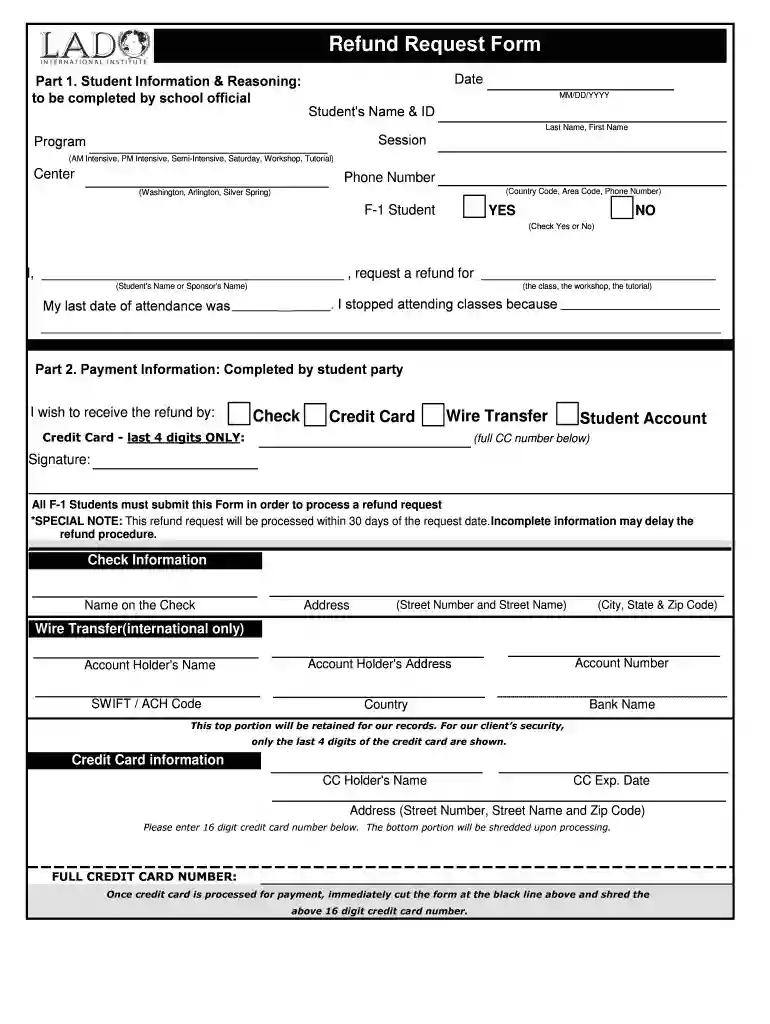
Refund Request Form - LADO International Institute 2026

Get Form
student registration form Preview on Page 1

Here's how it works

01. Edit your student registration form online
Type text, add images, blackout confidential details, add comments, highlights and more.

02. Sign it in a few clicks
Draw your signature, type it, upload its image, or use your mobile device as a signature pad.

03. Share your form with others
Send lado student access via email, link, or fax. You can also download it, export it or print it out.

How to use or fill out Refund Request Form - LADO International Institute with DocHub

Form edit decoration
9.5
Ease of Setup
DocHub User Ratings on G2
9.0
Ease of Use
DocHub User Ratings on G2
  1. Click ‘Get Form’ to open the Refund Request Form in our editor.
  2. Begin by filling out the 'Student Information & Reasoning' section. Enter the date, student's name and ID, session, program type, center, and phone number. Indicate if you are an F-1 student by checking 'Yes' or 'No'.
  3. In the reasoning area, clearly state your request for a refund along with the class or workshop name and your last date of attendance. Provide a brief explanation for stopping attendance.
  4. Proceed to the 'Payment Information' section. Choose how you wish to receive your refund (Credit Card, Check, Wire Transfer, etc.) and provide necessary details such as credit card digits or account information.
  5. Complete any additional required fields like check information or wire transfer details. Ensure all information is accurate to avoid delays.
  6. Finally, sign the form where indicated. Remember that incomplete forms may delay processing.

Start using our platform today to easily complete your Refund Request Form!

See more Refund Request Form - LADO International Institute versions

We've got more versions of the Refund Request Form - LADO International Institute form. Select the right Refund Request Form - LADO International Institute version from the list and start editing it straight away!
Versions Form popularity Fillable & printable
2014 4.8 Satisfied (123 Votes)
be ready to get more

Complete this form in 5 minutes or less

Get form

Got questions?

We have answers to the most popular questions from our customers. If you can't find an answer to your question, please contact us.
Contact us

Yes, electronically drawing your signature is appropriate, but only if you utilize a tool that complies with industry laws and regulations. Consider DocHub, which ensures eSignature validity under ESIGN and UETA requirements. All you need to eSign your request form requested is an account with DocHub and an internet connection. After you open your paperwork in our editor, click Sign and select the Draw tool.

If you need to edit your workshop registration form on the internet swiftly, it does not matter what browser you use. DocHub’s straightforward editing tools are available using any internet browser. Simply open the appropriate tab in the editor, add your document, and fill it out without stress.

Use Form 843 to claim a refund or request an abatement of certain taxes, interest, penalties, fees, and additions to tax.
Basic refund letter template: I am writing to request a refund for [product/service name] purchased on [Date] with order number [Order Number]. Unfortunately, the [product/service] did not meet my expectations due to [reason for dissatisfaction], and I believe a refund is warranted.
Follow the common format for best results. Senders address and date. Recipients address (Principal, Head, Registrar) Subject line (Application for Refund of Fees) Salutation (Respected Sir/Madam) Body (State reason, details, request) List enclosed documents. Polite closing (Thank you, Yours sincerely)

Security and compliance

At DocHub, your data security is our priority. We follow HIPAA, SOC2, GDPR, and other standards, so you can work on your documents with confidence.

Learn more
ccpa2
pci-dss
gdpr-compliance
hipaa
soc-compliance
be ready to get more

Complete this form in 5 minutes or less

Get form

People also ask

Refund requests must be submitted through the online form, and refunds will not be issued once a program has ended. All refunds are subject to a $5 administration service fee except under the following circumstances: A request due to dissatisfaction that is approved by the program supervisor.
1. If you originally paid via Convera, you must have your ID number and the Convera Reference number ready from the original transaction. 2. If the payment was made outside Convera, you must have the information ready, including the banking details of the account where the requested refund will be sent.
A refund request form is used to request a refund for a previous transaction or purchase. Individuals usually use this type of form when they arent satisfied with the item or service they received, made a payment in error, or returned a purchase for other reasons.
Refund Request means a Merchant generated request to transfer funds to a Customer.

workshop attendance