Sag exhibit g pdf 2026

Get Form
sag exhibit g pdf Preview on Page 1

Here's how it works

01. Edit your sag exhibit g pdf online
Type text, add images, blackout confidential details, add comments, highlights and more.

02. Sign it in a few clicks
Draw your signature, type it, upload its image, or use your mobile device as a signature pad.

03. Share your form with others
Send exhibit g form via email, link, or fax. You can also download it, export it or print it out.

How to use or fill out sag exhibit g pdf with our platform

Form edit decoration
9.5
Ease of Setup
DocHub User Ratings on G2
9.0
Ease of Use
DocHub User Ratings on G2
  1. Click ‘Get Form’ to open the SAG Exhibit G PDF in the editor.
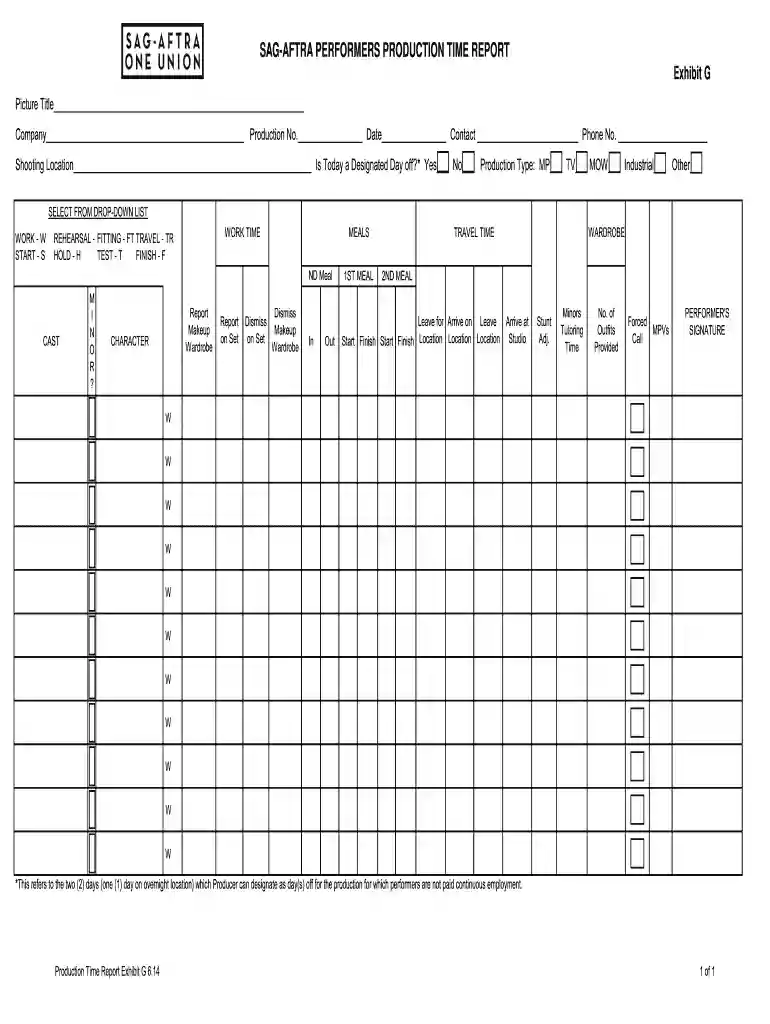
  2. Begin by filling in the 'Picture Title', 'Company', 'Production No.', and 'Date' fields at the top of the form. Ensure all information is accurate for proper documentation.
  3. Next, indicate if today is a designated day off by selecting 'Yes' or 'No'. Then, choose the production type from the drop-down list (MP, TV, MOW, Industrial, Other).
  4. In the WORK TIME section, select appropriate codes for activities such as REHEARSAL (R), FITTING (FT), TRAVEL (TR), etc., and fill in corresponding times.
  5. Complete the MEALS section by indicating meal times and any relevant notes regarding cast members. Be sure to specify if minors are involved and their tutoring time.
  6. Finally, ensure that all signatures are collected where required. Use our platform’s signature feature for easy signing.

Start using our platform today to streamline your document editing and signing process for free!

be ready to get more

Complete this form in 5 minutes or less

Get form

Got questions?

We have answers to the most popular questions from our customers. If you can't find an answer to your question, please contact us.
Contact us

Of course, it is possible with DocHub. This secure and compliant online solution features a phone-based signing option. After you log in to your DocHub account and add your exhibit g template to our editor, complete all necessary areas and use the Sign feature on the top barf. Click on Create your signature and choose Phone from the available options. Here, you scan a QR code using your smartphone and draw your signature on your phone screen, as you usually do when approving hard copies. If you access DocHub right from your mobile device, you can eSign your template by drawing your eSignature, uploading its picture, or simply with a typed name.

You can find and edit your exhibit g sag pdf online with the help of DocHub. Its straightforward yet feature-rich design enables you to begin effective work right after you register your account. Create your account and add your file, and then our user interface will guide you via our stress-free form completion experience.

Generally, a 12 hour break (i.e. turnaround time) must be given to actors after leaving set and before returning the next day. If this full time is not give, then you must mark this as a forced call.
Exhibit G is SAG-AFTRAs specialized timecard that you must fill out every day. At the end of the week, you will have a packet of Exhibit Gs that needs to be approved by each performer and then submitted to the union for review.
How to get a SAG card Confirm eligibility. To apply to the union, simply use the SAG-AFTRA eligibility checker. Gather documents. Round up the required documentation. Submit documents. Make an appointment. Pay the fee.

Security and compliance

At DocHub, your data security is our priority. We follow HIPAA, SOC2, GDPR, and other standards, so you can work on your documents with confidence.

Learn more
ccpa2
pci-dss
gdpr-compliance
hipaa
soc-compliance

People also ask

Generally, a 12 hour break (i.e. turnaround time) must be given to actors after leaving set and before returning the next day. If this full time is not give, then you must mark this as a forced call.
How To Fill Out the SAG Exhibit G Form Fill out the header. SAG-AFTRA Agreement Finder. Add your actors and their status. Add work time. Insert meal breaks. Add travel times. Fill in speciality events. Collect signatures. Send it to your SAG payroll company.
SAG-AFTRAs Performers with Disabilities Committees mission is to achieve full access for and inclusion of performers and broadcasters with disabilities by working to increase employment opportunities and improve working conditions in all areas of entertainment and news media.
Exhibit G is SAG-AFTRAs specialized timecard that you must fill out every day. At the end of the week, you will have a packet of Exhibit Gs that needs to be approved by each performer and then submitted to the union for review.
SAGs Basic Theatrical Agreement applies to films with budgets greater than $2,000,000. While premium talent is usually paid far above the SAG minimum, this is the rate actors can expect to make on a low budget studio project or a moderate indie film. The SAG day rate is $1,082, and $3,756 for the week.

sag exhibit g form