




Here's how it works



How to use or fill out PROTECTION CLASS 8B 9 10 QUESTIONNAIRE UTZ-QUES-1 4-14 with our platform

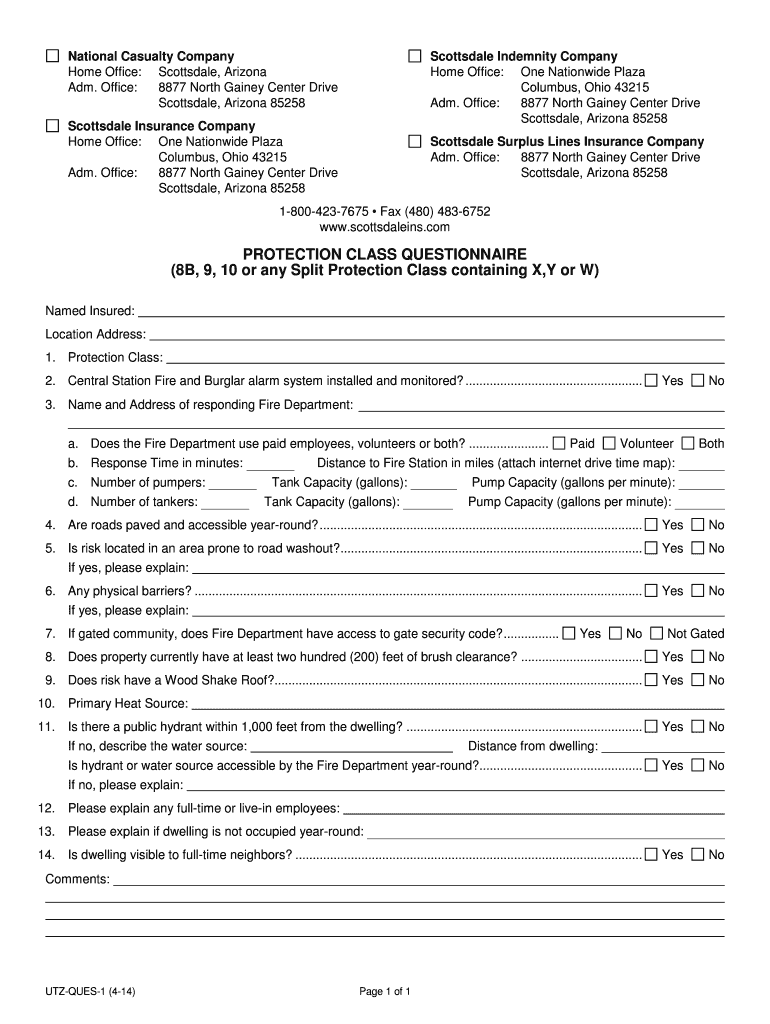
- Click ‘Get Form’ to open the PROTECTION CLASS 8B 9 10 QUESTIONNAIRE in the editor.
- Begin by entering the 'Named Insured' and 'Location Address' at the top of the form. This information is crucial for identifying the insured property.
- Proceed to Section 1, where you will select the appropriate Protection Class from the options provided.
- In Section 2, indicate whether a Central Station Fire and Burglar alarm system is installed and monitored by selecting 'Yes' or 'No'.
- Fill out Section 3 with details about the responding Fire Department, including their name, address, response time, and equipment available.
- Continue through Sections 4 to 14, answering questions regarding road accessibility, fire safety measures, and any physical barriers that may affect emergency response.
- Review all entered information for accuracy before saving your completed questionnaire.
Start filling out your PROTECTION CLASS questionnaire today for free using our platform!
It's free
See more PROTECTION CLASS 8B 9 10 QUESTIONNAIRE UTZ-QUES-1 4-14 versions
| Versions | Form popularity | Fillable & printable |
|---|---|---|
| 2014 | 4.8 Satisfied (41 Votes) |
Got questions?
How can I eSign my PROTECTION CLASS 8B 9 10 QUESTIONNAIRE UTZ-QUES-1 4-14 in Word?
Microsoft Word doesn’t have signing tools to create legitimate eSignatures and enforceable forms. Fortunately, DocHub is an online eSignature-compliant editor that supports various document formats, including .doc files. Log in to your account and add the Word version of your PROTECTION CLASS 8B 9 10 QUESTIONNAIRE UTZ-QUES-1 4-14 from your device and cloud, or URL - our editor will automatically transform it into an editable PDF. Make all required modifications in your form and click Sign to create your own legally-binding electronic signature. You will find four signing options from which to choose.
How do you edit PROTECTION CLASS 8B 9 10 QUESTIONNAIRE UTZ-QUES-1 4-14 on iOS?
You can easily edit fill out your PROTECTION CLASS 8B 9 10 QUESTIONNAIRE UTZ-QUES-1 4-14 on any iOS device. Open an internet browser of your liking, go to the DocHub website, authorize or create a new account, add your file for editing, and make your desired alterations. Our service is mobile-friendly, so using its features on your phone will be a no-brainer, even on the first try.
What is a good ISO rating?
What does an ISO rating of 3 mean?
What is a good ISO rating?
Security and compliance
At DocHub, your data security is our priority. We follow HIPAA, SOC2, GDPR, and other standards, so you can work on your documents with confidence.
Learn more


