Application for Accessible Parking Permit - Bill Walker MPP 2026

Get Form
Application for Accessible Parking Permit - Bill Walker MPP Preview on Page 1

Here's how it works

01. Edit your form online
Type text, add images, blackout confidential details, add comments, highlights and more.
02. Sign it in a few clicks
Draw your signature, type it, upload its image, or use your mobile device as a signature pad.
03. Share your form with others
Send it via email, link, or fax. You can also download it, export it or print it out.

How to use or fill out Application for Accessible Parking Permit - Bill Walker MPP

Form edit decoration
9.5
Ease of Setup
DocHub User Ratings on G2
9.0
Ease of Use
DocHub User Ratings on G2
  1. Click ‘Get Form’ to open it in the editor.
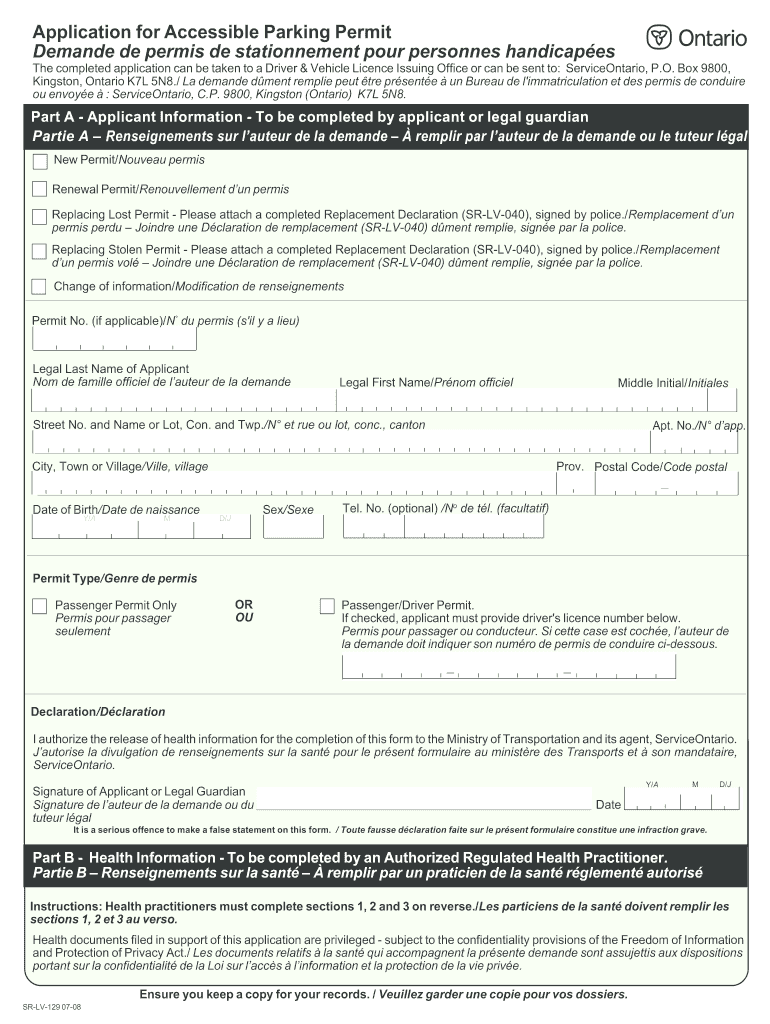
  2. Begin with Part A - Applicant Information. Fill in your legal last name, first name, and middle initial. Provide your street address, city, date of birth, and postal code.
  3. Indicate whether you are applying for a new permit, renewing an existing one, or replacing a lost or stolen permit. If applicable, include your current permit number.
  4. Select the type of permit you need: Passenger Permit Only or Passenger/Driver Permit. If choosing the latter, provide your driver's license number.
  5. Sign the declaration authorizing the release of health information and date your application.
  6. Proceed to Part B - Health Information. This section must be completed by an authorized health practitioner who will assess your condition.
  7. Ensure all sections are filled accurately and keep a copy for your records before submission.

Start using our platform today to fill out your Application for Accessible Parking Permit easily and for free!

See more Application for Accessible Parking Permit - Bill Walker MPP versions

We've got more versions of the Application for Accessible Parking Permit - Bill Walker MPP form. Select the right Application for Accessible Parking Permit - Bill Walker MPP version from the list and start editing it straight away!
Versions Form popularity Fillable & printable
2010 4.8 Satisfied (48 Votes)
2008 4.4 Satisfied (71 Votes)
be ready to get more

Complete this form in 5 minutes or less

Get form

Got questions?

We have answers to the most popular questions from our customers. If you can't find an answer to your question, please contact us.
Contact us

Yes, and it’s really easy! DocHub is a web-based PDF editor with advanced document processing capabilities that allow you quickly adjust your forms, complete blank fields and insert new ones for other people to fill out, and create electronic signatures in several ways. Import your Application for Accessible Parking Permit - Bill Walker MPP, give information as required, and select how you want to eSign your document - by typing your name, drawing your signature, uploading its picture, or using a QR code.

When you edit your Application for Accessible Parking Permit - Bill Walker MPP with DocHub, you will not need to look for other software or solutions to sign it. An electronic signature is part of DocHub’s comprehensive editing toolset, which enables you to implement changes in your form without switching between websites. Simply complete your form, double-check the correctness of your information and put your electronic signature at the end to make it submission-ready quickly.

Applications can be submitted online at .accesscanberra.act.gov.au/disabilityparking, by mail to PO Box 582 DICKSON ACT 2602 or submitted in person at an Access Canberra Service Centre.
Ask your health-care provider to fill out and sign the portion that certifies disability. (Again, in some states, certification requirements might be waived if youre visibly disabled and appear in person at the DMV.) Submit the application by mail or in person.
The applicant must meet one or more of the following criteria ( 49-4-301, MCA): cannot walk 200 feet without stopping to rest; is severely limited in ability to walk because of an arthritic, neurological, or orthopedic condition; is so severely disabled that the person cannot walk without the use of or

Security and compliance

At DocHub, your data security is our priority. We follow HIPAA, SOC2, GDPR, and other standards, so you can work on your documents with confidence.

Learn more
ccpa2
pci-dss
gdpr-compliance
hipaa
soc-compliance