




Here's how it works



How to use or fill out MARKEL MARINE TRADESMAN INSURANCE APPLICATION AGENT INFORMATION with our platform

- Click ‘Get Form’ to open the MARKEL MARINE TRADESMAN INSURANCE APPLICATION in the editor.
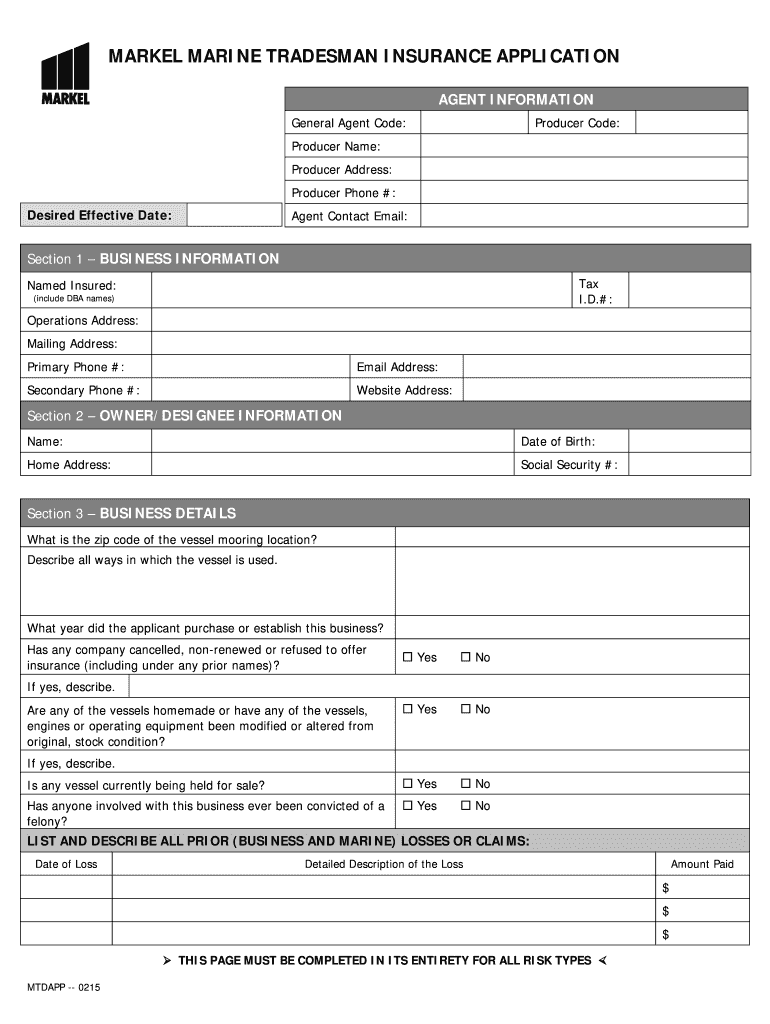
- Begin by filling in the Agent Information section. Enter your General Agent Code, Producer Code, Producer Name, Address, Phone Number, Desired Effective Date, and Agent Contact Email.
- Proceed to Section 1 – BUSINESS INFORMATION. Input your Tax I.D. number, Named Insured (including DBA names), Operations Address, Mailing Address, Primary Phone Number, Email Address, and Secondary Phone Number.
- Continue through the form by completing Sections 2 through 10 as applicable. Ensure all questions are answered accurately and completely for a smooth application process.
- Review all entered information for accuracy before submitting the application. Use our platform's features to save your progress or make edits as needed.
Start using our platform today to streamline your document editing and form completion!
It's free
See more MARKEL MARINE TRADESMAN INSURANCE APPLICATION AGENT INFORMATION General Agent Code: Producer Code: Producer Name: Producer Address: Producer Phone #: Desired Effective Date: Agent Contact Email: Section 1 BUSINESS INFORMATION Tax I versions
| Versions | Form popularity | Fillable & printable |
|---|---|---|
| 2015 | 4.8 Satisfied (286 Votes) |
Got questions?
What is the optimum way to electronically sign my MARKEL MARINE TRADESMAN INSURANCE APPLICATION AGENT INFORMATION General Agent Code: Producer Code: Producer Name: Producer Address: Producer Phone #: Desired Effective Date: Agent Contact Email: Section 1 BUSINESS INFORMATION Tax I?
Many software applications are available out there for document modifying and signing. DocHub is one of the most in-demand online solutions that comply with all data protection and compliance standards and ensures your electronically signed documentation is legally enforceable. All you need to give it a try is to create an account, add your MARKEL MARINE TRADESMAN INSURANCE APPLICATION AGENT INFORMATION General Agent Code: Producer Code: Producer Name: Producer Address: Producer Phone #: Desired Effective Date: Agent Contact Email: Section 1 BUSINESS INFORMATION Tax I, provide the required details, and click Sign. Generate your eSignature by typing, drawing it, uploading its image to your template, or scanning a unique QR code.
How do you fill out MARKEL MARINE TRADESMAN INSURANCE APPLICATION AGENT INFORMATION General Agent Code: Producer Code: Producer Name: Producer Address: Producer Phone #: Desired Effective Date: Agent Contact Email: Section 1 BUSINESS INFORMATION Tax I on iOS?
You need only a web connection and a browser to fill out your MARKEL MARINE TRADESMAN INSURANCE APPLICATION AGENT INFORMATION General Agent Code: Producer Code: Producer Name: Producer Address: Producer Phone #: Desired Effective Date: Agent Contact Email: Section 1 BUSINESS INFORMATION Tax I by using an iOS phone. Open the DocHub website and authenticate. Then, add your document or select it from the list in your dashboard. Then use our editing tools to fill out your form and save all your adjustments. You may also send it to a specified recipient immediately.
Security and compliance
At DocHub, your data security is our priority. We follow HIPAA, SOC2, GDPR, and other standards, so you can work on your documents with confidence.
Learn more




