




Here's how it works



How to use or fill out CUT0124 Outpatient Pre-Treatment Authorization Program OPAP Initial Request

- Click ‘Get Form’ to open it in the editor.
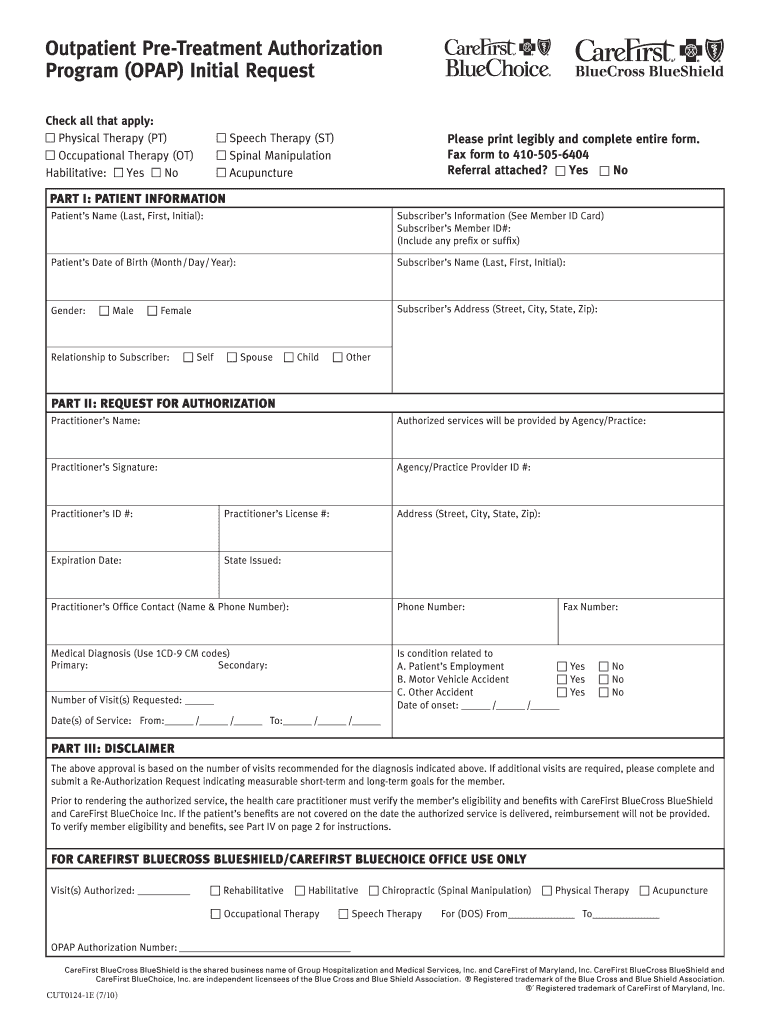
- Begin with Part I: Patient Information. Fill in the patient's name, date of birth, and subscriber's information including Member ID and address. Ensure all fields are completed legibly.
- Move to Part II: Request for Authorization. Enter the practitioner's name, agency details, and contact information. Specify the medical diagnosis using ICD-9-CM codes and indicate if the condition is related to employment or an accident.
- Complete the number of visits requested and the dates of service. Make sure these align with your claims to avoid processing delays.
- Review Part III: Disclaimer for any additional requirements regarding authorization and eligibility verification before submitting.
- Finally, fax the completed form to 410-505-6404 within five days of evaluation to ensure timely processing.
Start using our platform today for free to streamline your form completion process!
It's free
See more CUT0124 Outpatient Pre-Treatment Authorization Program OPAP Initial Request versions
Got questions?
Can I sign my bcbs plans must obtain approval from their respective state insurance commissioners for in electronic format?
Based on eSignature laws, documents approved digitally have the same validity as traditionally approved ones. You can eSign almost any business and personal documentation. Four types of paperwork still demand handwritten signatures only - wills and testamentary trusts, court orders and other court papers, state statutes regulating divorce, adoption, or other family law, and notice of cancellation of utility services. If you adhere to the regulations and use a safe and compliant software solution, like DocHub, you can eSign your bcbs plans must obtain approval from their respective state insurance commissioners for without printing it.
What internet browser do I need to edit carefirst opap form online?
If you need to edit your carefirst opap form online swiftly, it does not matter what web browser you employ. DocHub’s straightforward editing instruments are available using any internet browser. Just open the appropriate tab within our editor, add your file, and fill it out without stress.
Security and compliance
At DocHub, your data security is our priority. We follow HIPAA, SOC2, GDPR, and other standards, so you can work on your documents with confidence.
Learn more


