




Here's how it works



How to use or fill out Day Care Home Menu CACFP-171 - health ny with our platform

- Click ‘Get Form’ to open the Day Care Home Menu CACFP-171 in the editor.
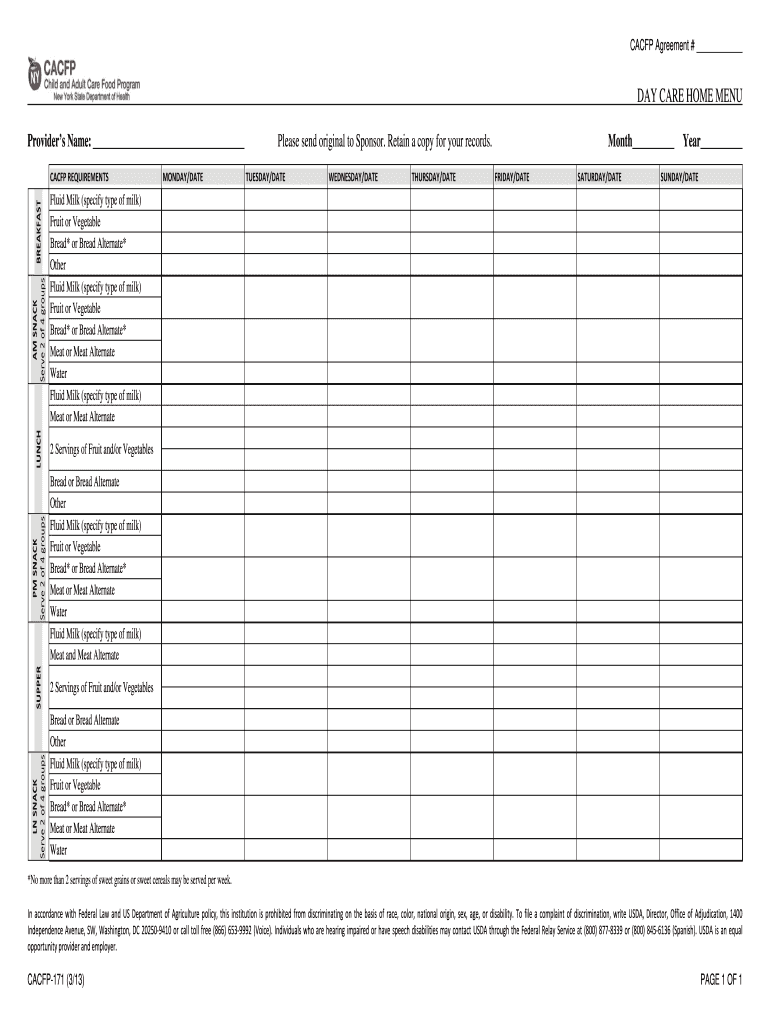
- Begin by entering the Provider’s Name at the top of the form. This identifies who is responsible for the menu.
- For each day of the week, fill in the date and specify the meals served, ensuring you serve 2 of 4 food groups for snacks and meals as required.
- In each meal section, indicate the type of fluid milk, fruits or vegetables, bread or bread alternate, and meat or meat alternate as applicable.
- Review your entries for accuracy and completeness before saving your work. Ensure compliance with CACFP requirements.
- Once completed, download a copy for your records and send the original to your Sponsor as instructed.
Start using our platform today to streamline your form completion process for free!
It's free
See more Day Care Home Menu CACFP-171 - health ny versions
Got questions?
How can I sign my Day Care Home Menu CACFP-171 - health ny on iOS?
With DocHub, you can rapidly sign your Day Care Home Menu CACFP-171 - health ny or any other document on iOS, even without installing extra programs. You can access your DocHub account from any web-connected browser and fill out and sign your document in any way you like with just a couple of clicks.
How to manage my Day Care Home Menu CACFP-171 - health ny from Gmail?
In case your go-to electronic mail service is Gmail, it is simple to integrate your DocHub editor in your work. Modify your Day Care Home Menu CACFP-171 - health ny with DocHub tools and attach it to your drafts in Gmail. See how easy it can be to exchange files and collaborate having a swift PDF editing solution at hand.
Security and compliance
At DocHub, your data security is our priority. We follow HIPAA, SOC2, GDPR, and other standards, so you can work on your documents with confidence.
Learn more




