Fcp vetpro org 2026

Get Form
vetpro login Preview on Page 1

Here's how it works

01. Edit your vetpro login online
Type text, add images, blackout confidential details, add comments, highlights and more.

02. Sign it in a few clicks
Draw your signature, type it, upload its image, or use your mobile device as a signature pad.

03. Share your form with others
Send http fcp vetpro org via email, link, or fax. You can also download it, export it or print it out.

How to use or fill out fcp vetpro org with our platform

Form edit decoration
9.5
Ease of Setup
DocHub User Ratings on G2
9.0
Ease of Use
DocHub User Ratings on G2
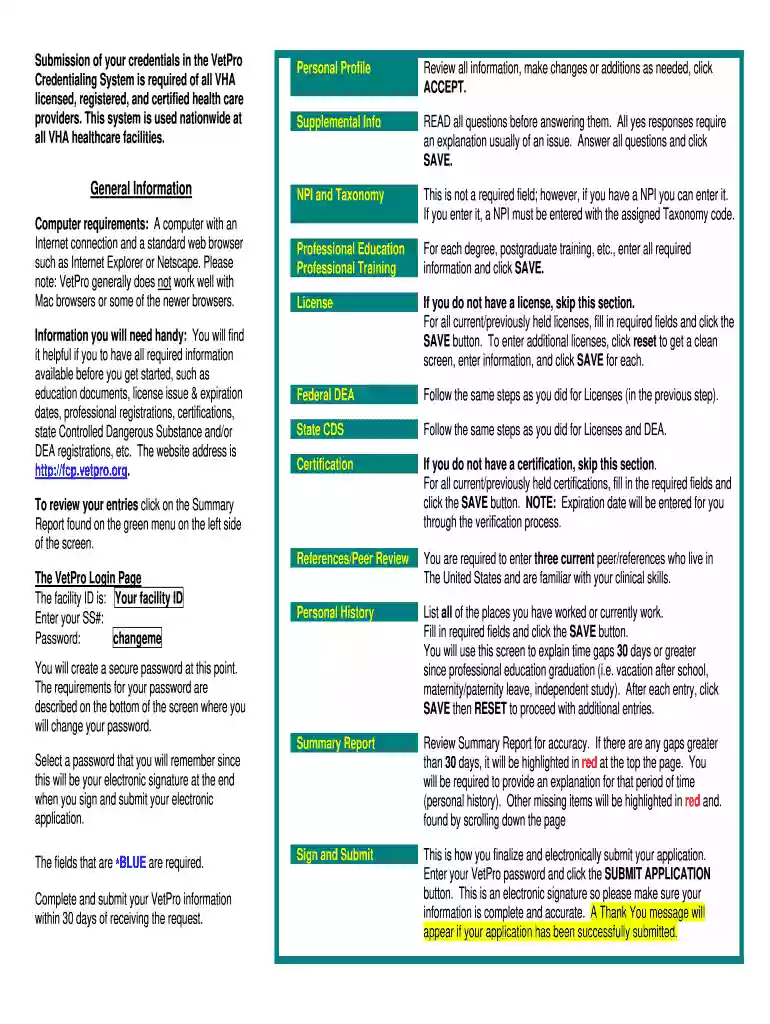
  1. Click ‘Get Form’ to open the fcp vetpro org document in the editor.
  2. Begin with the Personal Profile section. Review all pre-filled information, make any necessary changes or additions, and click ACCEPT to proceed.
  3. In the Supplemental Info section, read each question carefully. Provide explanations for any 'yes' responses and ensure all questions are answered before clicking SAVE.
  4. For NPI and Taxonomy, if you have an NPI, enter it along with the assigned Taxonomy code. This field is optional but recommended for accurate processing.
  5. Fill out the Professional Education and Professional Training sections by entering all required information for each degree or training program, then click SAVE.
  6. Gather your license information before proceeding. Fill in details for current or previously held licenses and click SAVE after each entry. Use RESET to clear fields for additional licenses.
  7. Repeat similar steps for Federal DEA and State CDS sections as done for Licenses.
  8. If applicable, complete the Certification section by entering required fields and clicking SAVE. Note that expiration dates will be auto-filled during verification.
  9. Enter three references familiar with your clinical skills in the References/Peer Review section.
  10. Document your work history in the Personal History section, explaining any gaps greater than 30 days since graduation. Click SAVE after each entry.
  11. Review your entries in the Summary Report for accuracy. Address any highlighted gaps before finalizing your application.
  12. To submit your application, enter your VetPro password and click SUBMIT APPLICATION. A confirmation message will appear upon successful submission.

Start using our platform today to streamline your credentialing process effortlessly!

See more fcp vetpro org versions

We've got more versions of the fcp vetpro org form. Select the right fcp vetpro org version from the list and start editing it straight away!
Versions Form popularity Fillable & printable
2007 4 Satisfied (54 Votes)
be ready to get more

Complete this form in 5 minutes or less

Get form

Got questions?

We have answers to the most popular questions from our customers. If you can't find an answer to your question, please contact us.
Contact us
However, notwithstanding any other points of contact that are designated in this privacy policy, should you have any queries, requests or require further clarifications on the processing of your personal data, you may send an email or letter to the following addresses: hello@affinity-petcare.com /Affinity Petcare, S.A.
It has over 400 independent trials supporting its use and allows the benefits of Vetpro to be noticeable, on average within ONE week of administration.
The VetPro application stores information necessary for credentialing of all VHA licensed, registered, or certified health care providers. This includes name, SSN, date of birth address, licenses, certification, registration with DEA (Drug Enforcement Agency), and other licensing organizations.
If you are a pet parent that needs support assistance, you can call (877) 999-2838 or send an email to support@covetrus.com and receive an answer back ASAP.
Helps maintain normal digestive function. Supports friendly bacteria. Replenishes natural balance of gut bacteria. Binds toxins.

Security and compliance

At DocHub, your data security is our priority. We follow HIPAA, SOC2, GDPR, and other standards, so you can work on your documents with confidence.

Learn more
ccpa2
pci-dss
gdpr-compliance
hipaa
soc-compliance
be ready to get more

Complete this form in 5 minutes or less

Get form

People also ask

Read All Rules! add noreply@vettixer.org and support@vettixer.org to your contacts now!
Managed Service VetPro Assessing (VetPro) is a Veterans Affairs (VA) Government Off-The-Shelf credentialing software system used to credential healthcare providers. VetPro is an enterprise-level web- based application with a relational database and image processing components.
Have a question or need some advice? Our family-operated team of pet experts is happy to help you with any questions you may have. Weve love to hear from you and are always looking for feedback on our products. Feel free to email us at feedback@vetprocomplete.com and we will get back to you as soon as possible.

vetpro credentialing