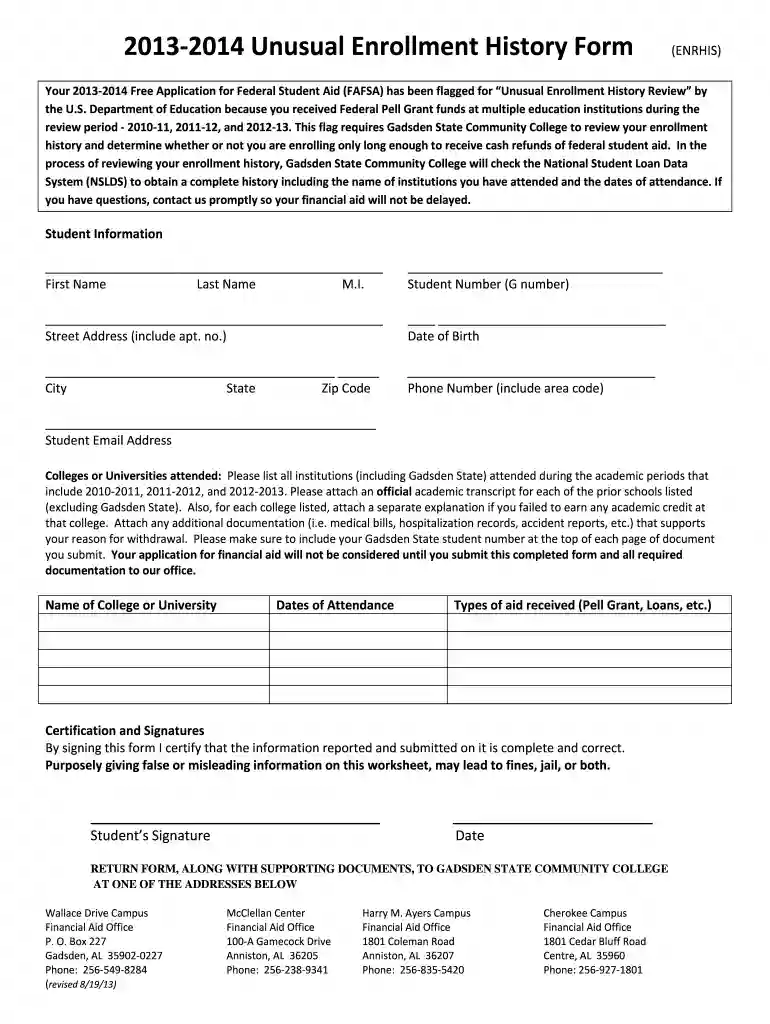
gadsden homepage Preview on Page 1

Unusual Enrollment History Form - Homepage - Gadsden State ... - gadsdenstate 2026

Here's how it works

  • 01. Edit your gadsden homepage online

    Type text, add images, blackout confidential details, add comments, highlights and more.

  • 02. Sign it in a few clicks

    Draw your signature, type it, upload its image, or use your mobile device as a signature pad.

  • 03. Share your form with others

    Send oneaccs gadsden state via email, link, or fax. You can also download it, export it or print it out.

How to use or fill out Unusual Enrollment History Form - Homepage - Gadsden State with Our Platform

Form edit decoration
9.5
Ease of Setup
DocHub User Ratings on G2
9.0
Ease of Use
DocHub User Ratings on G2
  1. Click ‘Get Form’ to open it in the editor.
  2. Begin by entering your personal information in the 'Student Information' section. Fill in your first name, last name, middle initial, and student number (G number).
  3. Next, provide your street address, date of birth, city, state, zip code, phone number, and email address. Ensure all details are accurate for effective communication.
  4. In the 'Colleges or Universities attended' section, list all institutions you attended during the specified academic periods. Attach official transcripts for each institution listed (excluding Gadsden State).
  5. If you did not earn academic credit at any college listed, include a separate explanation for each instance. Also attach any relevant documentation that supports your reason for withdrawal.
  6. Finally, sign and date the form in the 'Certification and Signatures' section to confirm that all information is complete and correct.

Start filling out your Unusual Enrollment History Form today using our platform for free!

See more gadsden homepage versions

We've got more versions of the gadsden homepage form. Select the right gadsden homepage version from the list and start editing it straight away!

VersionsForm popularityFillable & printable
20134 Satisfied (20 Votes)

be ready to get more

Complete this form in 5 minutes or less

Security and compliance

At DocHub, your data security is our priority. We follow HIPAA, SOC2, GDPR, and other standards, so you can work on your documents with confidence.

Related links

Gadsden Elementary District - AZ School Report Cards

View school district information, location, contact and list of schools. This page also gives a breakdown of student enrollment, teacher qualifications,

Learn more
Student Catalog Handbook 2025-2026

At Gadsden State, our priority is providing a high-quality education that prepares you for successwhether that means entering the workforce, advancing inRead more

Learn more
If you believe that this page should be taken down, please follow our DMCA take down process here