




Here's how it works



How to use or fill out ASCENT Agreement and Registration Form - frh psdschools with our platform

- Click ‘Get Form’ to open it in the editor.
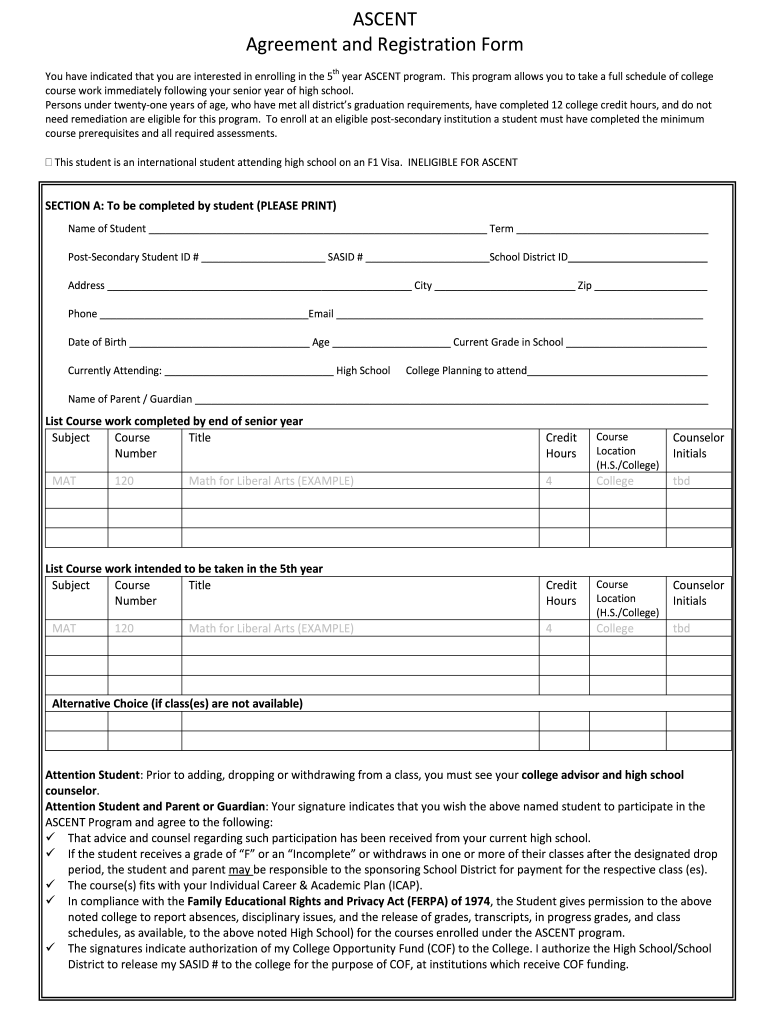
- Begin with SECTION A. Fill in your name, term, post-secondary student ID, SASID, and school district ID. Ensure all information is accurate.
- Complete your address, phone number, email, date of birth, age, current grade, and the high school you are attending.
- List the coursework completed by the end of your senior year in the designated fields. Include subject titles and course numbers.
- In the section for intended coursework during the fifth year, repeat the process for subjects and course titles.
- Review the agreement statements carefully. Both you and your parent/guardian must sign at the bottom of SECTION B to confirm understanding and consent.
- SECTION C requires completion by your high school counselor or principal. Ensure they check all applicable eligibility criteria.
- Finally, SECTION D needs approval from both school district and college administrators. Make sure all signatures are obtained before submission.
Start using our platform today to easily complete your ASCENT Agreement and Registration Form for free!
It's free
See more ASCENT Agreement and Registration Form - frh psdschools versions
| Versions | Form popularity | Fillable & printable |
|---|---|---|
| 2010 | 4.7 Satisfied (51 Votes) |
Got questions?
How do I sign my ASCENT Agreement and Registration Form - frh psdschools online?
Sign in to your DocHub account and add your ASCENT Agreement and Registration Form - frh psdschools to our editor using one of its upload options - from your device, cloud storage, secure URL, or your DocHub folders if you have already managed your document before. Open our editor, click the Sign button in the upper toolbar, and decide on your signing method. You can upload a picture of your handwritten signature, draw it, enter your name, or use a QR code instead.
How to fill out and sign ASCENT Agreement and Registration Form - frh psdschools online?
You can easily complete, edit, and even eSign your ASCENT Agreement and Registration Form - frh psdschools using DocHub. Create a new account and start your free trial. After that, you can add the document with the form and easily make all the needed edits. No need to print on paper or use a third-party application to sign it, as you can place your electronic signature on your document faster through DocHub.
Security and compliance
At DocHub, your data security is our priority. We follow HIPAA, SOC2, GDPR, and other standards, so you can work on your documents with confidence.
Learn more


