Form certificate personal statutory print 2026

Get Form
shc p 01 Preview on Page 1

Here's how it works

01. Edit your shc p 01 online
Type text, add images, blackout confidential details, add comments, highlights and more.

02. Sign it in a few clicks
Draw your signature, type it, upload its image, or use your mobile device as a signature pad.

03. Share your form with others
Send it via email, link, or fax. You can also download it, export it or print it out.

How to use or fill out form certificate personal statutory print with our platform

Form edit decoration
9.5
Ease of Setup
DocHub User Ratings on G2
9.0
Ease of Use
DocHub User Ratings on G2
  1. Click ‘Get Form’ to open it in the editor.
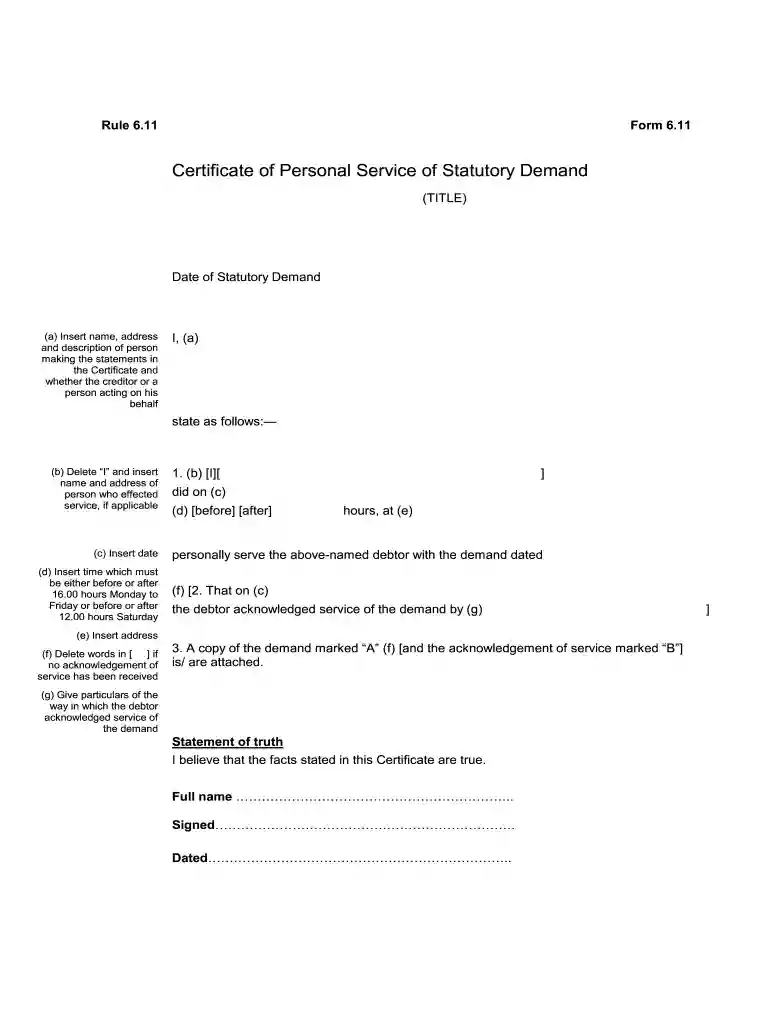
  2. Begin by entering the date of the statutory demand at the top of the form. This is crucial for establishing the timeline of service.
  3. In section (a), provide your name, address, and specify whether you are the creditor or acting on their behalf.
  4. For section (b), if applicable, replace 'I' with the name and address of the person who served the demand.
  5. Fill in section (c) with the date when service was effected and section (d) with either 'before' or 'after' 16:00 hours on weekdays or 12:00 hours on Saturdays.
  6. In section (e), indicate where you personally served the debtor with the demand dated in section (f).
  7. If applicable, complete section (g) detailing how the debtor acknowledged receipt of the demand.
  8. Attach a copy of the demand marked 'A' and any acknowledgment marked 'B', as indicated in section 3.
  9. Finally, sign and date at the bottom of the form to affirm that all information provided is true.

Start using our platform today to fill out your Certificate of Personal Service easily and for free!

See more form certificate personal statutory print versions

We've got more versions of the form certificate personal statutory print form. Select the right form certificate personal statutory print version from the list and start editing it straight away!
Versions Form popularity Fillable & printable
2013 4.7 Satisfied (42 Votes)
2004 4.3 Satisfied (20 Votes)
be ready to get more

Complete this form in 5 minutes or less

Get form

Got questions?

We have answers to the most popular questions from our customers. If you can't find an answer to your question, please contact us.
Contact us

You need to use only reliable software solutions with strong security compliance to sign your paperwork electronically. DocHub is just the type of software you need! It stores data on Amazon Web Servers and complies with all essential security requirements and eSignature regulations, so it’s a trustworthy way to electronically sign your form certificate personal statutory print or other paperwork with this tool.

You need only an internet connection and a browser to fill out your form certificate personal statutory print by using an iOS phone. Open the DocHub website and authenticate. Then, add your file or select it from the list in your dashboard. Then use our editing instruments to fill out your form and preserve all your adjustments. You may also send it to a dedicated recipient right away.

You can either: download the form, fill it in on screen and then print it. download the form, print it and fill it in with a pen.
Details. You can use this form (SC2) to ask your employer for Statutory Sick Pay ( SSP ). You must have been off work due to sickness for more than 3 days in a row to be eligible. When you've filled in the form give it to your employer, it will help them decide if you can get SSP . Keep a copy for your own information.
If you select either the \u201cEA\u201d or \u201cEI\u201d box, you will be able to keep your CDL without submitting a current medical card. If/When you return to driving a commercial vehicle and you need to carry a medical card, you must resubmit a DL-11CD, Self-Certification Form, along with a copy of your valid medical card.

People also ask

Self-certification When they return to work, their employer can ask them to confirm they've been off sick. This is called 'self-certification'. The employer and employee will agree on how the employee should do this. They might need to fill in a form or send details of their sick leave by email.
Employers must fill in the SSP1 form when an employee is not entitled to Statutory Sick Pay (SSP) or when their SSP is ending.
What happens when SSP payments stop? SSP stops being payable on the earlier of when the employee comes back to work, after 28 weeks, or when the employee no longer qualifies for any other reason. If an employee's SSP is going to end before they are well you have to send them a form SSP1.
An SSP1(L) Form is issued to an employee on request when leaving. However, the form must be issued within a certain time limit. This time limit is either seven days after the SSP1(L) has been requested, or the first payday in the tax month following the one in which it was requested by the employee.
Commercial Driver License Self-Certification, form TC 94-169. Download the form here from Kentucky Transportation Cabinet Division of Driver Licensing. Copy of your valid DOT medical card (Medical card only, not the long form). Provide a legible copy of both front and back of the medical card.

Related links