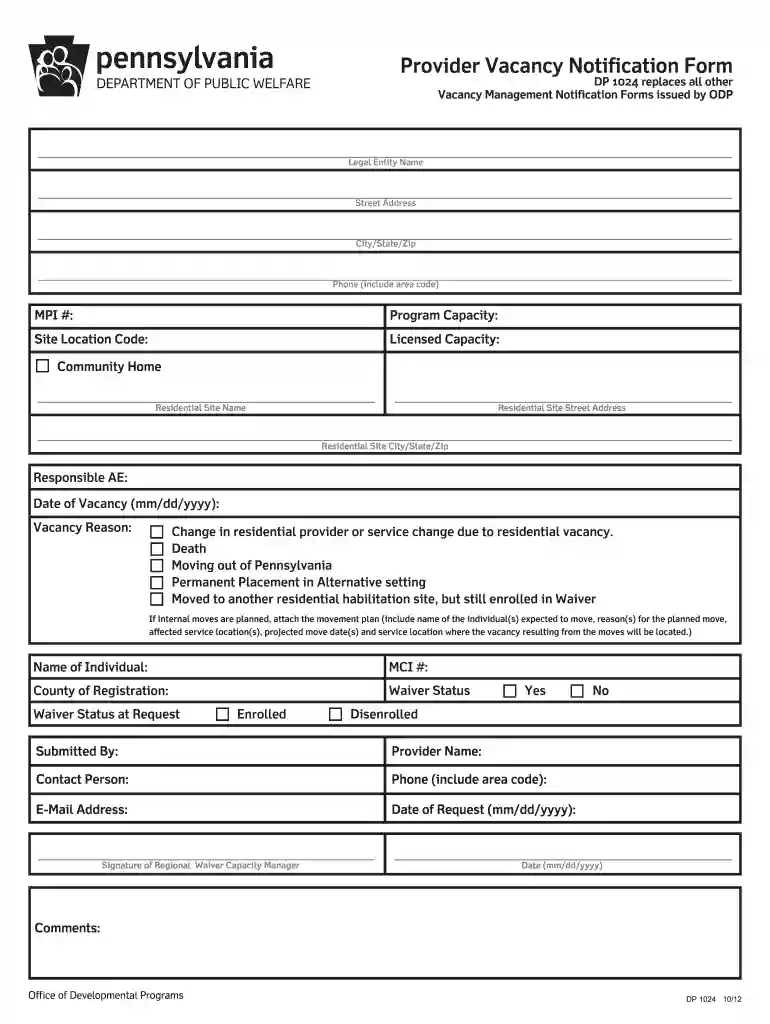
vacancy form fill Preview on Page 1

Pennsylvania dp form 2026

Here's how it works

  • 01. Edit your vacancy form fill online

    Type text, add images, blackout confidential details, add comments, highlights and more.

  • 02. Sign it in a few clicks

    Draw your signature, type it, upload its image, or use your mobile device as a signature pad.

  • 03. Share your form with others

    Send vacancy notification form via email, link, or fax. You can also download it, export it or print it out.

How to use or fill out Pennsylvania DP Form with our platform

Form edit decoration
9.5
Ease of Setup
DocHub User Ratings on G2
9.0
Ease of Use
DocHub User Ratings on G2
  1. Click ‘Get Form’ to open the Pennsylvania DP form in the editor.
  2. Begin by entering your provider information, including the legal entity name, street address, city/state/zip, and phone number. Ensure all details are accurate for effective communication.
  3. Fill in the site location code and licensed capacity. This information is crucial for tracking residential habilitation services.
  4. Indicate the date of vacancy and select the reason from the provided options such as death or moving out of Pennsylvania. This helps in understanding the context of the vacancy.
  5. If applicable, attach a movement plan detailing any internal moves planned. Include names, reasons for moves, affected locations, and projected dates.
  6. Complete the individual’s information section by providing their name, MCI number, county of registration, and waiver status.
  7. Finally, ensure that all fields are filled out correctly before submitting your form to the appropriate regional Waiver Capacity Manager within three business days.

Start using our platform today to streamline your document editing and submission process for free!

See more vacancy form fill versions

We've got more versions of the vacancy form fill form. Select the right vacancy form fill version from the list and start editing it straight away!

VersionsForm popularityFillable & printable
20124.7 Satisfied (131 Votes)

be ready to get more

Complete this form in 5 minutes or less

Got questions?

We have answers to the most popular questions from our customers. If you can't find an answer to your question, please contact us.

Get the current filing years forms, instructions, and publications for free from the IRS. Download them from IRS.gov. Order online and have them delivered by U.S. mail. Order by phone at 1-800-TAX-FORM (1-800-829-3676)
You may call 1-888-PATAXES (1-888-728-2937) to leave a message to have forms mailed to you.
You may apply for a replacement Persons with Disability Parking Placard by completing Form MV-145A(opens in a new tab)(opens in a new tab), Persons with Disability Parking Placard Application. Your previous placard number will be listed as the previous placard on PennDOTs computer system.
That means almost every single state allows for parents of children with autism to apply for a disability placard. However, the application process is different in almost every state.
File by paper U.S. Postal Service. If you would like to file a paper tax return by mail, youll need to download and print our forms and instructions . To find out what form you need to use, visit our file page and select your filing situation . Your return must be postmarked by the extended due date to be timely.

Security and compliance

At DocHub, your data security is our priority. We follow HIPAA, SOC2, GDPR, and other standards, so you can work on your documents with confidence.

People also ask

Pennsylvania exempts all forms of retirement income from taxation for residents 60 and older. That can mean thousands of dollars in annual savings as compared with other states in the region. It also has relatively low sales taxes.

Related links

DP Home and School Visitor/School Social Worker

View the School of Social Work/Pennsylvania Department of Education Certification Checklist. Certificate Declaration Form. Course Requirements. MSW studentsRead more

Learn more
DP 251.qxp

THE PURPOSE OF THIS FORM IS TO DocHub WHETHER THE FOLLOWING INDIVIDUAL WHO IS. RECEIVING HOME AND COMMUNITY SERVICES FUNDED UNDER THE CONSOLIDATED OR PERSONRead more

Learn more
If you believe that this page should be taken down, please follow our DMCA take down process here