Children's hospital discharge papers 2026

Get Form
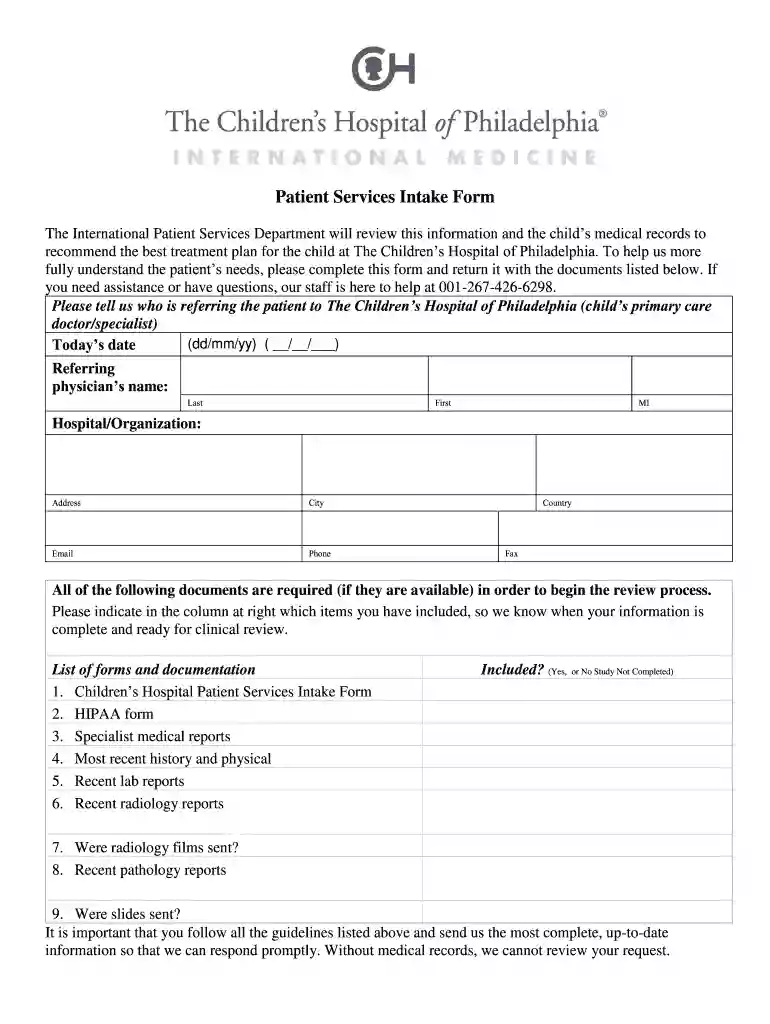
children's hospital discharge papers Preview on Page 1

Here's how it works

01. Edit your children's hospital discharge papers online
Type text, add images, blackout confidential details, add comments, highlights and more.

02. Sign it in a few clicks
Draw your signature, type it, upload its image, or use your mobile device as a signature pad.

03. Share your form with others
Send discharge form hospital via email, link, or fax. You can also download it, export it or print it out.

How to use or fill out children's hospital discharge papers with our platform

Form edit decoration
9.5
Ease of Setup
DocHub User Ratings on G2
9.0
Ease of Use
DocHub User Ratings on G2
  1. Click ‘Get Form’ to open the children's hospital discharge papers in the editor.
  2. Begin by filling in the patient information section. Enter the child's last name, first name, date of birth, age, gender, and citizenship.
  3. Next, complete the parent information fields for both parents or guardians. Include their names, dates of birth, and contact details.
  4. In the 'Additional Medical Information' section, provide any specific medical questions you have regarding your child's condition or care.
  5. Fill out the payment information section accurately. Indicate your method of payment and insurance details if applicable.
  6. Review all sections for completeness and accuracy before submitting. Ensure that all required documents are attached as indicated.

Start using our platform today to easily fill out your child's hospital discharge papers for free!

See more children's hospital discharge papers versions

We've got more versions of the children's hospital discharge papers form. Select the right children's hospital discharge papers version from the list and start editing it straight away!
Versions Form popularity Fillable & printable
2013 4 Satisfied (30 Votes)
be ready to get more

Complete this form in 5 minutes or less

Get form

Got questions?

We have answers to the most popular questions from our customers. If you can't find an answer to your question, please contact us.
Contact us

Signing documents on a mobile device is fast, easy, and doesn’t require software installation when you have an account with DocHub. Sign in from any browser, complete your empty fields with your information, and click on Sign → Create your signature. You can draw your eSignature just as you usually do on paper, add its picture to your discharg card children, or type in your name and stylize its look. Whatever option you choose, your form will be valid.

If you store your papers in Google Drive, there is no need to download your discharge certificate from hospital on your computer and upload it back to our editor. A much simpler way is to install a browser extension developed by DocHub to streamline this flow. The extension allows editing PDFs in your internet browser. Alternatively, you can integrate your DocHub and Gmail accounts for more efficient editing.

When the person is discharged, this makes a bed available to another person who needs a high level of care. You will still receive care after leaving the hospital. After discharge, you'll go through a transition of care. That means you will now have a different level of medical care outside of the hospital.
Information for the patient. Most discharge letters include a section that summarises the key information of the patient's hospital stay in patient-friendly language, including investigation results, diagnoses, management and follow up. This is often given to the patient at discharge or posted out to the patient's home ...
Even though discharge summaries are not required by all companies, I highly recommended writing them even if you do not take insurance and only accept private pay clients. They are useful for the client and can protect you from legal action. There are all kinds of issues that could lead to legal involvement.

Security and compliance

At DocHub, your data security is our priority. We follow HIPAA, SOC2, GDPR, and other standards, so you can work on your documents with confidence.

Learn more
ccpa2
pci-dss
gdpr-compliance
hipaa
soc-compliance

People also ask

A discharge summary is a collection of information about events during care of a patient by a provider or organisation. The document is produced during a patient's stay in hospital as either an admitted or non-admitted patient, and issued when or after the patient leaves the care of the hospital.
482.24(b) and (c)), discharge summaries must include the outcome of the hospitalization, the disposition of care, medications, adverse reactions, complications, health care-associated infections, provisions for follow-up and a final diagnosis documented within 30 days \u2014 although hospitals are starting to demand it ...
6 Components of a Hospital Discharge Summary Reason for hospitalization: description of the patient's primary presenting condition; and/or. ... Significant findings: ... Procedures and treatment provided: ... Patient's discharge condition: ... Patient and family instructions (as appropriate): ... Attending physician's signature:
On average, our patients are discharged from the ER in 147 minutes. That's 14 minutes faster than the national average!
These are summarized as follows: Reason for hospitalization: description of the patient's primary presenting condition; and/or. ... Significant findings: Primary diagnoses. Procedures and treatment provided: ... Patient's discharge condition: ... Patient and family instructions (as appropriate): ... Attending physician's signature:

discharge paper