




Here's how it works



How to use or fill out SPAD data collection form RT/3119/B (railway undertakings) with our platform

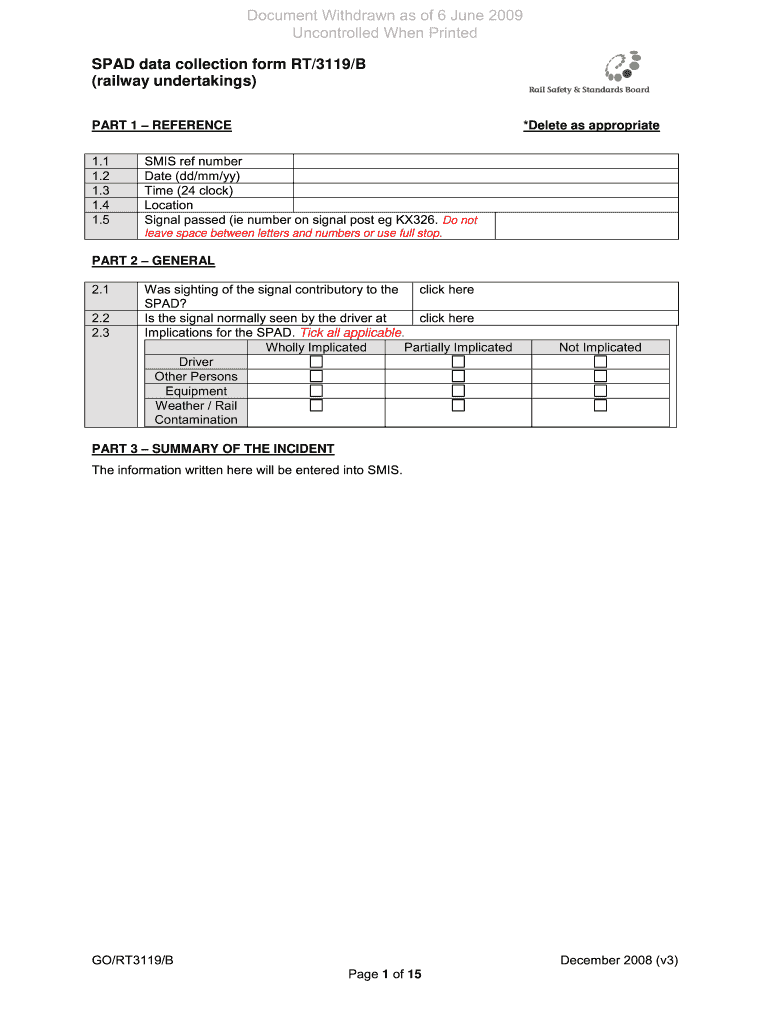
- Click ‘Get Form’ to open the SPAD data collection form RT/3119/B in the editor.
- Begin with Part 1 – REFERENCE. Fill in the SMIS reference number, date, time, location, and signal passed. Ensure accuracy as this information is crucial for incident tracking.
- Move to Part 2 – GENERAL. Answer questions regarding the sighting of the signal and implications for the SPAD by ticking all applicable boxes.
- In Part 3 – SUMMARY OF THE INCIDENT, provide a concise summary of the incident details that will be entered into SMIS.
- Continue through each part of the form systematically, ensuring all fields are completed accurately. Use our platform's features to add comments or notes where necessary.
- Once all sections are filled out, review your entries for completeness and accuracy before submitting.
Start using our platform today to fill out your SPAD data collection form efficiently and for free!
It's free
See more SPAD data collection form RT/3119/B (railway undertakings) versions
Got questions?
Can I complete and sign my SPAD data collection form RT/3119/B (railway undertakings) online?
Sure, and it’s really straightforward! DocHub is a web-based PDF editor with advanced document management functions that allow you quickly adjust your paperwork, complete empty fields and drop new ones for other people to fill out, and create electronic signatures in several ways. Import your SPAD data collection form RT/3119/B (railway undertakings), provide information as required, and decide how you want to eSign your document - by typing your name, drawing your signature, uploading its image, or utilizing a QR code.
How do you edit SPAD data collection form RT/3119/B (railway undertakings) on Android?
Document editing with DocHub is equally convenient on desktop and mobile devices. You only need an internet browser to revise your SPAD data collection form RT/3119/B (railway undertakings) on Android. Open our website and sign in to access the instruments you need. Add your document and introduce your intended changes. After that, you can keep your form in your document storage or send it out instantly.
Security and compliance
At DocHub, your data security is our priority. We follow HIPAA, SOC2, GDPR, and other standards, so you can work on your documents with confidence.
Learn more




