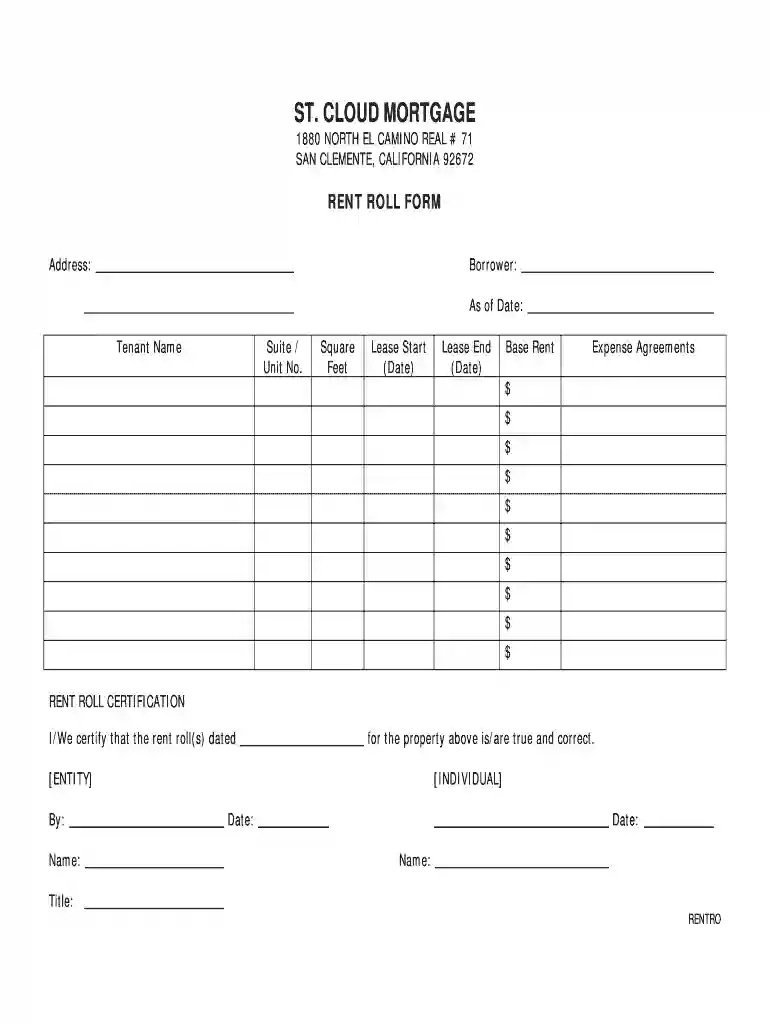
rent roll form pdf Preview on Page 1

Rent roll form 2026

Here's how it works

  • 01. Edit your rent roll form pdf online

    Type text, add images, blackout confidential details, add comments, highlights and more.

  • 02. Sign it in a few clicks

    Draw your signature, type it, upload its image, or use your mobile device as a signature pad.

  • 03. Share your form with others

    Send what is a rent roll via email, link, or fax. You can also download it, export it or print it out.

How to use or fill out rent roll form with our platform

Form edit decoration
9.5
Ease of Setup
DocHub User Ratings on G2
9.0
Ease of Use
DocHub User Ratings on G2
  1. Click ‘Get Form’ to open the rent roll form in the editor.
  2. Begin by entering the property address at the top of the form. This is essential for identifying the location associated with the rent roll.
  3. Fill in the 'Borrower' field with the name of the individual or entity responsible for the property.
  4. Specify the 'As of Date' to indicate when this rent roll information is accurate.
  5. In the tenant section, list each tenant's name along with their corresponding suite or unit number.
  6. Input the square footage for each unit, followed by lease start and end dates to track lease terms.
  7. Detail the base rent for each unit and any expense agreements that apply, ensuring all financial aspects are clearly documented.
  8. Finally, complete the rent roll certification section by signing and dating it, confirming that all information provided is true and correct.

Start using our platform today to streamline your document editing and make filling out forms easier than ever!

See more rent roll form pdf versions

We've got more versions of the rent roll form pdf form. Select the right rent roll form pdf version from the list and start editing it straight away!

VersionsForm popularityFillable & printable
20044.6 Satisfied (61 Votes)

be ready to get more

Complete this form in 5 minutes or less

Got questions?

We have answers to the most popular questions from our customers. If you can't find an answer to your question, please contact us.

Rolling or periodic tenancies A periodic tenancy has no end date. Your tenancy becomes periodic if you: stay after your fixed term. do not sign a new agreement.
What is the difference between a rent roll and a profit and loss (PL) statement? A rent roll shows detailed rental income and tenant information, while a PL statement summarizes overall income and expenses to show a propertys profitability.
A rent roll provides a snapshot of your rental income and clearly shows current and projected revenue. This key tool simplifies income tracking and supports better financial planning, property performance evaluation, and goal setting.
A rent roll is a list of a propertys current tenants and how much they pay in rent. In practice, a rent roll is perhaps the best way to determine the true income of an existing commercial property.
A rent lease form is a legal document that outlines the terms and conditions of renting a property. It serves as a binding contract between the landlord and tenant, specifying essential details like rent, duration of the lease, deposit, and property maintenance.

Security and compliance

At DocHub, your data security is our priority. We follow HIPAA, SOC2, GDPR, and other standards, so you can work on your documents with confidence.

People also ask

noun. : a register of rents including the names of tenants and the amounts due. also : the total income indicated by such a register.

rent roll pdf

Texas Tenant Relocation Assistance Toolkit

Proof of delivery of the notice to tenants and the Tenant Relocation Rent Roll Form must be received by the City of Austin Neighborhood Housing and Community.Read more

Learn more
Form HUD-93104

the rent roll) must show the basic rental charge for each unit and the amount collected as rent in excess of the basic rental charge for each unit. ThisRead more

Learn more
If you believe that this page should be taken down, please follow our DMCA take down process here