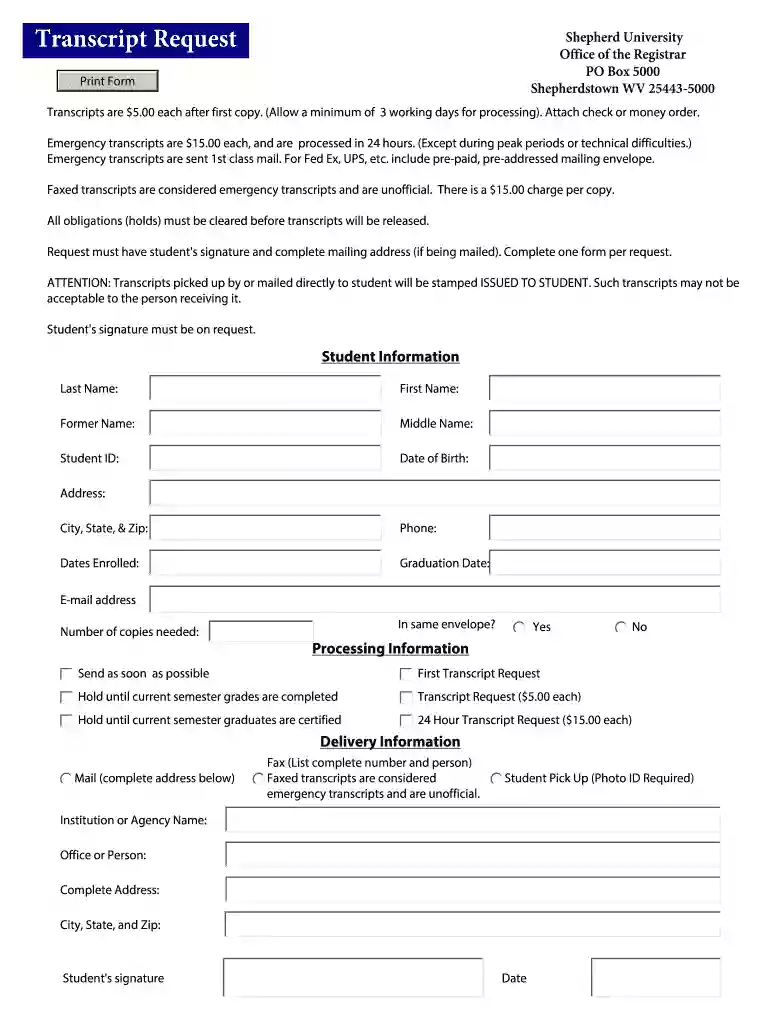
shepherd university transcript request Preview on Page 1

Download Request for Transcript Form - Shepherd University - shepherd 2026

Here's how it works

  • 01. Edit your shepherd university transcript request online

    Type text, add images, blackout confidential details, add comments, highlights and more.

  • 02. Sign it in a few clicks

    Draw your signature, type it, upload its image, or use your mobile device as a signature pad.

  • 03. Share your form with others

    Send shepherd university request via email, link, or fax. You can also download it, export it or print it out.

How to use or fill out Download Request for Transcript Form - Shepherd University with our platform

Form edit decoration
9.5
Ease of Setup
DocHub User Ratings on G2
9.0
Ease of Use
DocHub User Ratings on G2
  1. Click ‘Get Form’ to open the Download Request for Transcript Form in our editor.
  2. Begin by filling out your personal information in the 'Student Information' section. Include your last name, first name, former name (if applicable), middle name, student ID, date of birth, and current address including city, state, and zip code.
  3. Provide your contact details by entering your phone number and email address. Specify the dates you were enrolled and your graduation date.
  4. Indicate the number of copies needed and whether they should be sent in the same envelope. Choose your processing preference: standard or emergency transcript request.
  5. Complete the delivery information section by providing the mailing address or fax number where you want the transcripts sent. If picking up, ensure you have a photo ID ready.
  6. Finally, sign and date the form to authorize your request before submitting it through our platform.

Start using our platform today to easily fill out and submit your transcript request form for free!

See more shepherd university transcript request versions

We've got more versions of the shepherd university transcript request form. Select the right shepherd university transcript request version from the list and start editing it straight away!

VersionsForm popularityFillable & printable
20124.8 Satisfied (83 Votes)
20124 Satisfied (46 Votes)

be ready to get more

Complete this form in 5 minutes or less

Security and compliance

At DocHub, your data security is our priority. We follow HIPAA, SOC2, GDPR, and other standards, so you can work on your documents with confidence.

Related links

Requesting Student Records and Transcripts

Former students must print and fill out the Student Records Request Form, below, to make a request for records, including transcripts.Read more

Learn more
Honors Application And Forms

To use a Word form, download it to your computer (right click the link and Please print out this form, complete it by referring to your transcriptRead more

Learn more
Listing of All Files from GEnie Apple II Roundtable Bulletin

Jan 8, 2013 Listing of All Files from GEnie Apple II Roundtable Bulletin Boards. File: AllGEnieFiles. Page 1. Report: TimeOut Print2PDF. January 8, 2013.Read more

Learn more
If you believe that this page should be taken down, please follow our DMCA take down process here