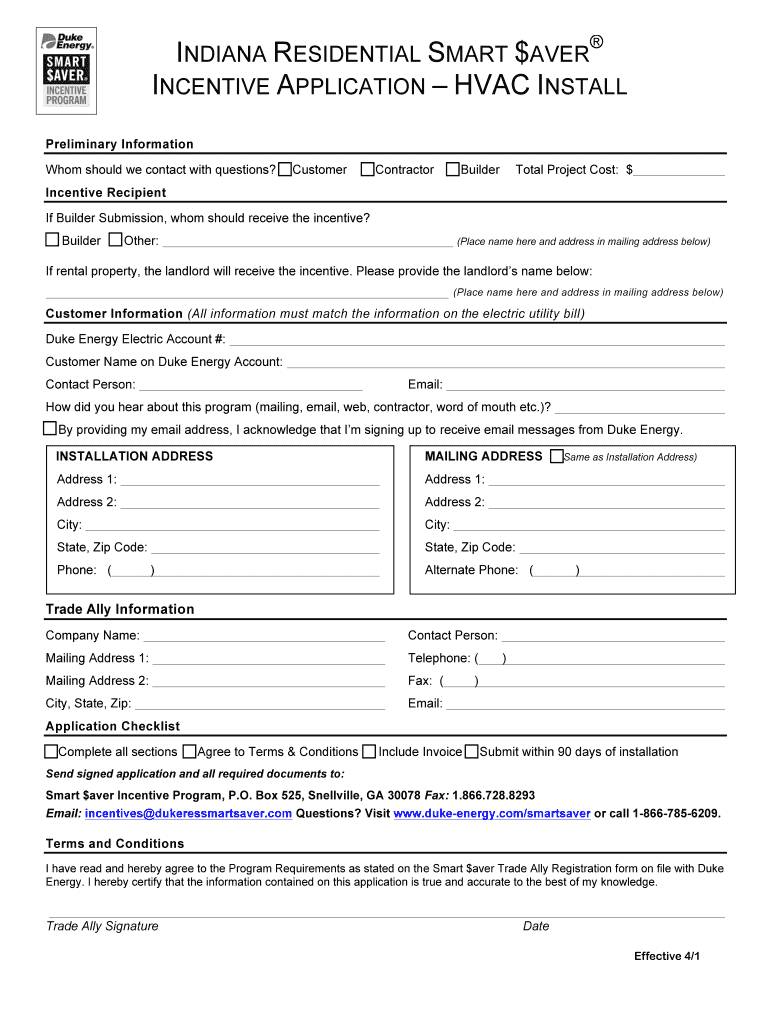
Revised HVAC Install Incentive Application - Indiana - Thermo-Scan ... 2025

Get Form
Revised HVAC Install Incentive Application - Indiana - Thermo-Scan ... Preview on Page 1

Here's how it works

01. Edit your form online
Type text, add images, blackout confidential details, add comments, highlights and more.
02. Sign it in a few clicks
Draw your signature, type it, upload its image, or use your mobile device as a signature pad.
03. Share your form with others
Send it via email, link, or fax. You can also download it, export it or print it out.

How to use or fill out Revised HVAC Install Incentive Application - Indiana - Thermo-Scan with our platform

Form edit decoration
9.5
Ease of Setup
DocHub User Ratings on G2
9.0
Ease of Use
DocHub User Ratings on G2
  1. Click ‘Get Form’ to open the Revised HVAC Install Incentive Application in the editor.
  2. Begin by filling out the Preliminary Information section. Indicate whether you are the customer, contractor, or builder and provide the total project cost.
  3. In the Incentive Recipient section, specify who should receive the incentive. If applicable, include landlord details for rental properties.
  4. Complete the Customer Information section with your Duke Energy Electric Account number and ensure all details match your utility bill.
  5. Fill in the Installation Address and Mailing Address fields accurately. If they are the same, check the box provided.
  6. Provide Trade Ally Information including company name and contact details to ensure proper processing of your application.
  7. Review the Application Checklist to confirm all sections are complete, agree to Terms & Conditions, and attach any required documents before submission.

Start using our platform today to streamline your application process for free!

See more Revised HVAC Install Incentive Application - Indiana - Thermo-Scan ... versions

We've got more versions of the Revised HVAC Install Incentive Application - Indiana - Thermo-Scan ... form. Select the right Revised HVAC Install Incentive Application - Indiana - Thermo-Scan ... version from the list and start editing it straight away!
Versions Form popularity Fillable & printable
2013 4.9 Satisfied (270 Votes)
2012 4 Satisfied (58 Votes)
be ready to get more

Complete this form in 5 minutes or less

Get form

Got questions?

We have answers to the most popular questions from our customers. If you can't find an answer to your question, please contact us.
Contact us

Upload your Revised HVAC Install Incentive Application - Indiana - Thermo-Scan ... to DocHub (after you’ve created an account for this). If you need to fill out fields in it, use proper tools from the upper pane. For instance, add Signature Fields, assign each to specific party, and click on Sign → Request signatures from others. Change your message for your recipients and click Send Request. You can also send your document by fax or as a Signing link instead of using email (you’ll locate these options by navigating to the Menu → Send)

Having a swift editing platform like DocHub, you do not need anything but a web browser and connection to the internet to modify your Revised HVAC Install Incentive Application - Indiana - Thermo-Scan ... online quickly. Add your document or get the relevant form in DocHub’s catalog, open our editor with one click, and complete it digitally. To edit your forms anytime, sign up a free profile with DocHub.