




Here's how it works



How to use or fill out return shindigz with our platform

- Click ‘Get Form’ to open the return shindigz in the editor.
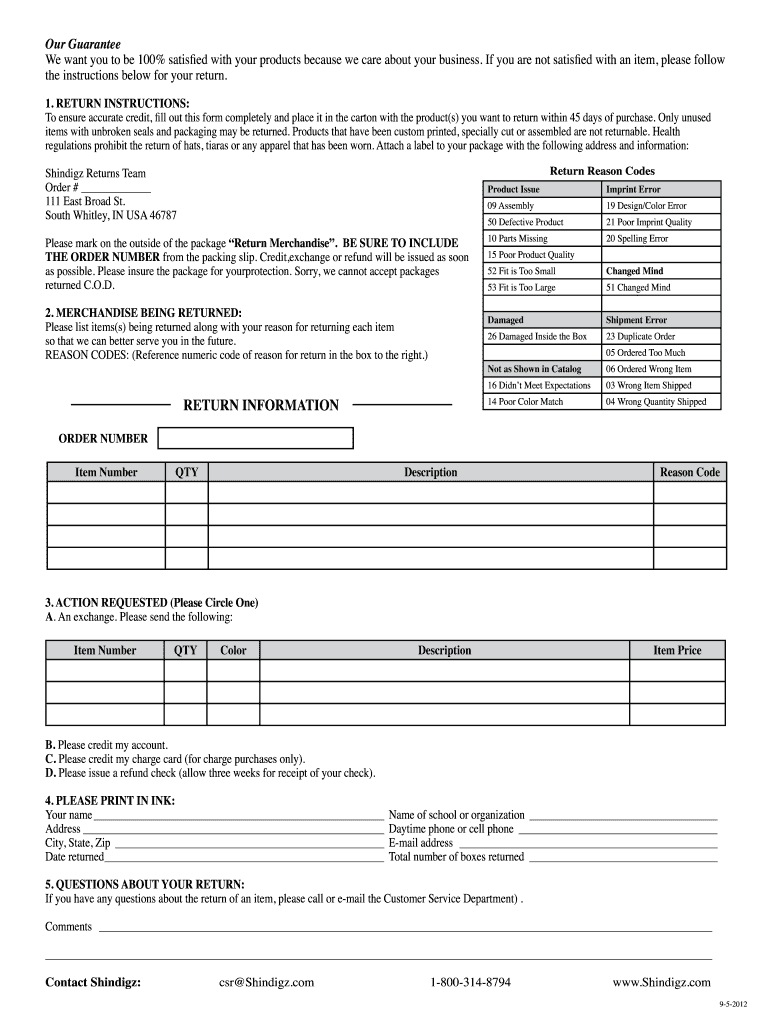
- Begin by filling out the 'RETURN INSTRUCTIONS' section. Ensure you complete all fields accurately, including your order number and reason for return. This information is crucial for processing your request.
- In the 'MERCHANDISE BEING RETURNED' section, list each item you are returning along with its corresponding reason code. Use the provided codes to streamline your submission.
- Next, move to the 'ACTION REQUESTED' section. Circle your preferred option: exchange, credit account, credit charge card, or refund check. Provide any additional details required.
- Complete the 'PLEASE PRINT IN INK' section with your personal information. Make sure all details are clear and legible to avoid delays.
- Finally, review all entries for accuracy before saving and exporting your completed form for submission.
Start using our platform today to simplify your return process effortlessly!
It's free
See more return shindigz versions
| Versions | Form popularity | Fillable & printable |
|---|---|---|
| 2012 | 4.8 Satisfied (163 Votes) |
Got questions?
Is it safe to sign my shindigz coupons electronically?
You need to use only trusted software solutions with strong data protection compliance to approve your documents electronically. DocHub is just the type of service you need! It stores data on Amazon Web Servers and complies with all essential security requirements and eSignature laws, so it’s a reliable way to electronically sign your shindigz coupons or other forms with this tool.
How do you complete return shindigz on Android?
It is a no-brainer on a computer or via a mobile phone to complete a return shindigz with DocHub. All you need to do is open any installed browser on your smartphone and go to the DocHub site. Once authenticated, add your file and open it in editing mode. Use our toolbar to make your edits and save changes. Optionally, keep your file in your files or send it to a recipient immediately.
Security and compliance
At DocHub, your data security is our priority. We follow HIPAA, SOC2, GDPR, and other standards, so you can work on your documents with confidence.
Learn more


