




01. Edit your form online
Type text, add images, blackout confidential details, add comments, highlights and more.

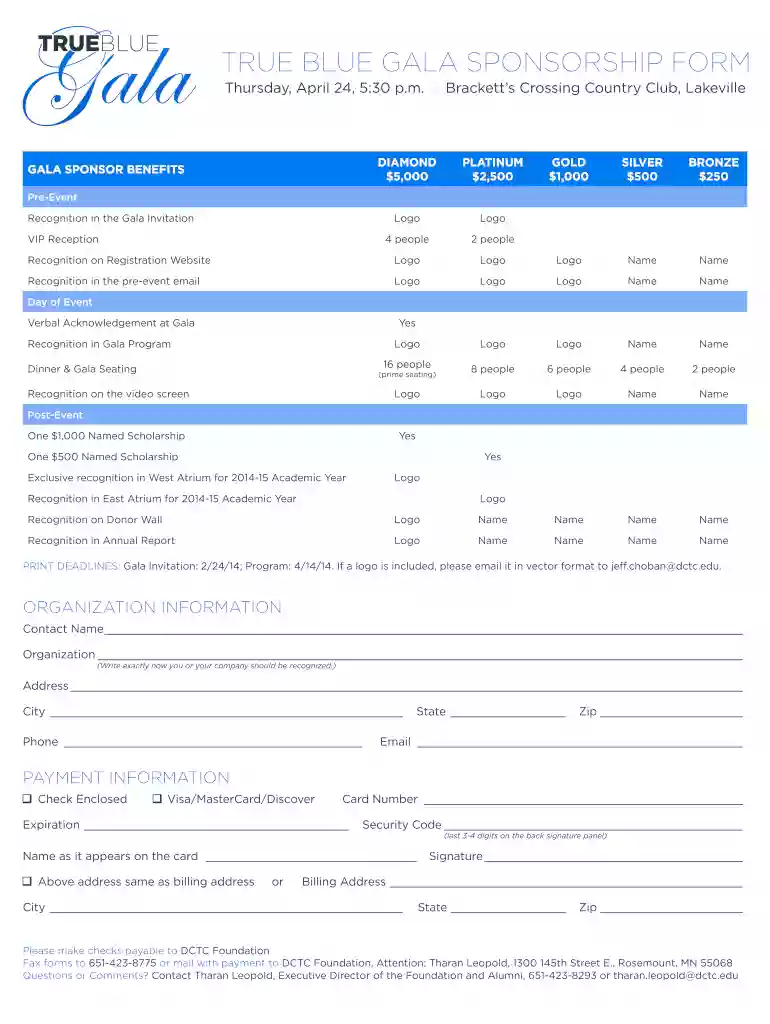
Type text, add images, blackout confidential details, add comments, highlights and more.

Draw your signature, type it, upload its image, or use your mobile device as a signature pad.

Send it via email, link, or fax. You can also download it, export it or print it out.

Start using our platform today to effortlessly complete your TRUE BLUE GALA SPONSORSHIP FORM!
We've got more versions of the TRUE BLUE GALA SPONSORSHIP FORM - dctc form. Select the right TRUE BLUE GALA SPONSORSHIP FORM - dctc version from the list and start editing it straight away!
With DocHub, you can rapidly approve your TRUE BLUE GALA SPONSORSHIP FORM - dctc or any other document on iOS, even without setting up extra programs. You can access your DocHub account from any internet-connected browser and fill out and sign your form in any way you like with just a couple of clicks.
You can easily edit and complete your TRUE BLUE GALA SPONSORSHIP FORM - dctc on any iOS gadget. Open an internet browser of your choice, go to the DocHub website, authorize or create a new account, upload your file for editing, and make your desired adjustments. Our service is mobile-friendly, so using its functions on your smartphone will be a no-brainer, even on the first try.
At DocHub, your data security is our priority. We follow HIPAA, SOC2, GDPR, and other standards, so you can work on your documents with confidence.
It is nearly impossible to know who is benefiting from the tax code because it lacks any real transparency or accountability. This is not unintentional. TheRead more
Sep 30, 2016 BLUE LINE PLANNING, INC. 15,000.00 COUNCIL OF THE DISTRICT OF DCTC-Cabconnect, Inc. 20160226. CompetitiveSealedProposal-. RFP.Read more


