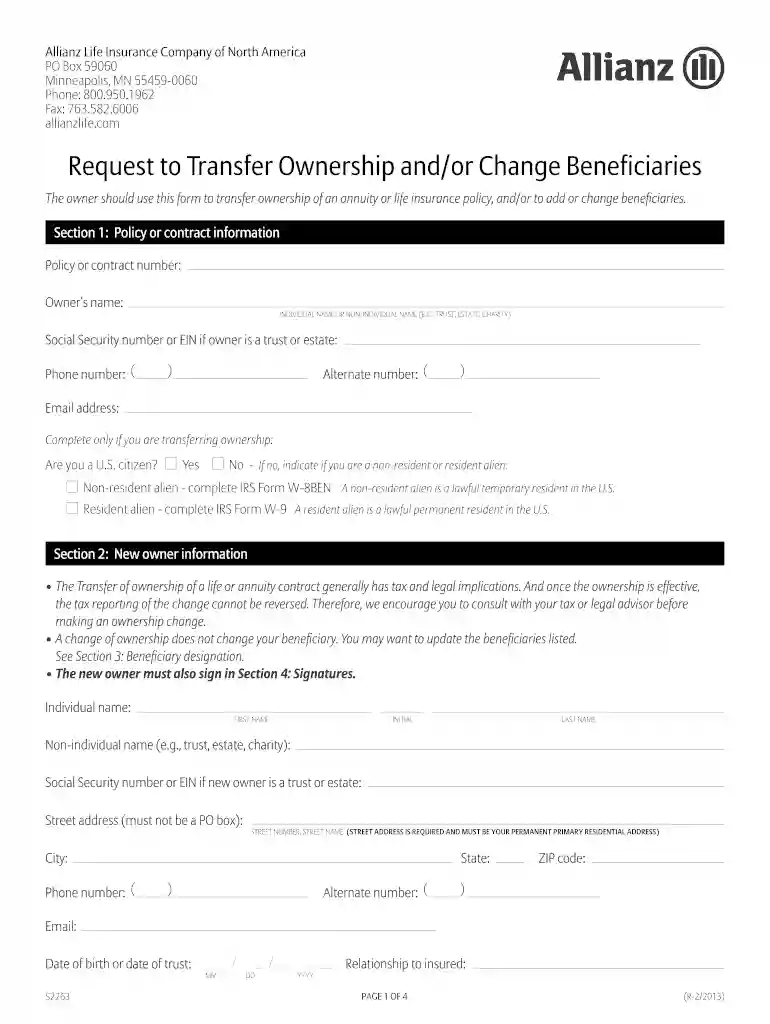
Gauteng city region academy unemployment database form 2013-2026

Get Form
gauteng unemployed educators database list pdf Preview on Page 1

Here's how it works

01. Edit your gauteng unemployed educators database list pdf online
Type text, add images, blackout confidential details, add comments, highlights and more.

02. Sign it in a few clicks
Draw your signature, type it, upload its image, or use your mobile device as a signature pad.

03. Share your form with others
Send gauteng unemployed educators database link via email, link, or fax. You can also download it, export it or print it out.

How to use or fill out gauteng city region academy unemployment database form 2013

Form edit decoration
9.5
Ease of Setup
DocHub User Ratings on G2
9.0
Ease of Use
DocHub User Ratings on G2
  1. Click ‘Get Form’ to open it in the editor.
  2. Begin with Section 1, where you will enter your personal information. Fill in your name, contact details, and social security number or EIN if applicable.
  3. In Section 2, provide the new owner's information. Ensure that all fields are completed accurately, including their relationship to the insured.
  4. Proceed to Section 3 for beneficiary designation. Specify each beneficiary's name and percentage share, ensuring that the total equals 100%.
  5. Finally, complete Section 4 by signing and dating the form. This step is crucial for processing your request.

Start using our platform today to fill out your form easily and for free!

See more gauteng city region academy unemployment database form 2013 versions

We've got more versions of the gauteng city region academy unemployment database form 2013 form. Select the right gauteng city region academy unemployment database form 2013 version from the list and start editing it straight away!
Versions Form popularity Fillable & printable
2015 4.9 Satisfied (58 Votes)
2013 4.4 Satisfied (71 Votes)
be ready to get more

Complete this form in 5 minutes or less

Get form

Got questions?

We have answers to the most popular questions from our customers. If you can't find an answer to your question, please contact us.
Contact us

Of course, you’ll find numerous apps for this on the web. Nonetheless, if you need to eSign your unemployed educators database gauteng without installing extra software, DocHub is the best choice you can make. This powerful editor works on mobile devices just like on desktops. Open our editor in your preferred internet browser, register or log in to your account, and start processing your paperwork.

If you use Chrome, there are two simple methods to modify your gauteng unemployed educators database online. First, go to the DocHub site, add your document, and modify it using our toolbar. You can also install our Chrome extension and modify any document by dragging and dropping it in your web browser window.

According to the expanded unemployment definition, 47% of the labour force in Gauteng is unemployed (Figure 3). Although unemployment is a challenge across most municipalities, it is more severe in some municipalities than in others. Unemployment rates range from a low of 35% in Midvaal to a high of 55% in Lesedi.
The Gauteng Department of Education database application form is a vital component of the educational administrative system in Gauteng. It ensures that student data is accurately captured and managed, facilitating effective school placements, resource allocation, and policy implementation.
To qualify for benefits, you must register as a work seeker. You must apply for the UIF benefits as soon as you become unemployed or within six months of the termination of your employment. Find out more about unemployment benefits or contact the UIF.

Security and compliance

At DocHub, your data security is our priority. We follow HIPAA, SOC2, GDPR, and other standards, so you can work on your documents with confidence.

Learn more
ccpa2
pci-dss
gdpr-compliance
hipaa
soc-compliance

People also ask

If you want to claim from the UIF you need to go to your nearest Labour Office or register and claim online. There you will be asked to sign the unemployment register. You will be told when you need to come back and sign the register again.
Are you a #workseeker? - use the Department of Employment and Labours Employment Services of South Africa database (ESSA). For registration as a work seeker, members of the public can register on ESSA database using the link essa.labour.gov.za/EssaOnline/Web
Generic bursary opportunity from Gauteng City Region Academy (GCRA) You must be a South African citizen. You must be between 18 to 35 years old. You must reside within the Gauteng province. You must have completed Matric in Gauteng.
For registration, members of the public can register on the database using the following website: .

gauteng department of education unemployed educators database