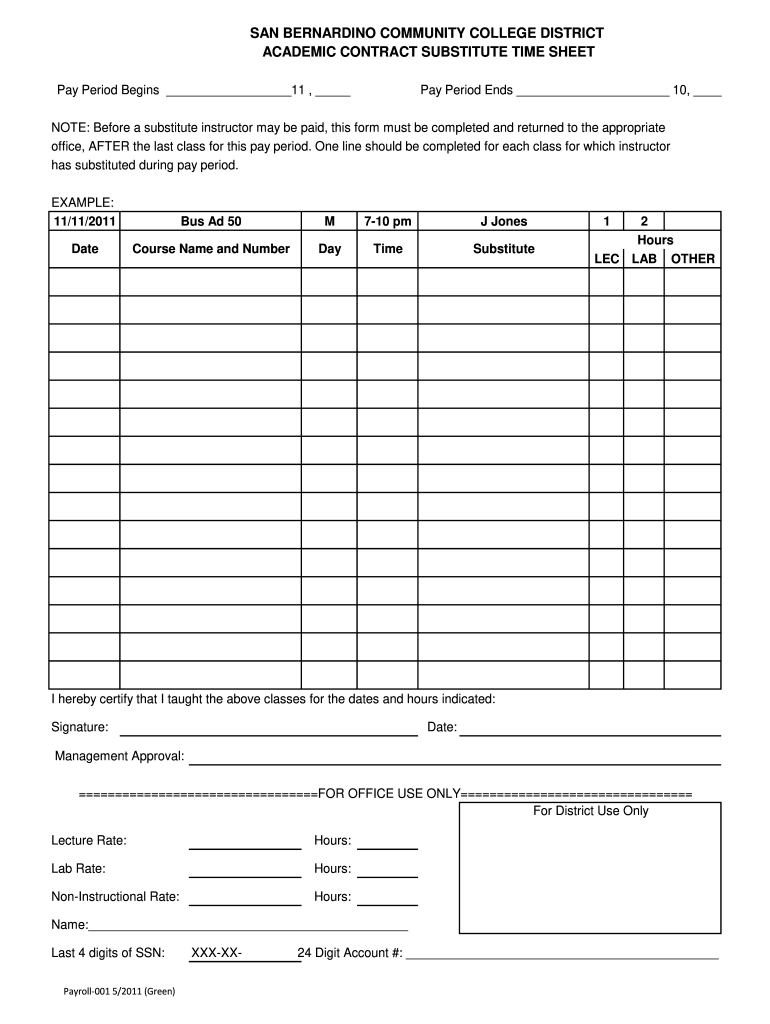
Acad hrly sub timesheet - San Bernardino Community College District 2026

Get Form
planetbids san bernardino Preview on Page 1

Here's how it works

01. Edit your planetbids san bernardino online
Type text, add images, blackout confidential details, add comments, highlights and more.
02. Sign it in a few clicks
Draw your signature, type it, upload its image, or use your mobile device as a signature pad.
03. Share your form with others
Send san bernardino community college district jobs via email, link, or fax. You can also download it, export it or print it out.

How to use or fill out Acad hrly sub timesheet - San Bernardino Community College District with our platform

Form edit decoration
9.5
Ease of Setup
DocHub User Ratings on G2
9.0
Ease of Use
DocHub User Ratings on G2
  1. Click ‘Get Form’ to open the Acad hrly sub timesheet in the editor.
  2. Begin by entering the pay period start date and end date at the top of the form. Ensure these dates accurately reflect the time frame for which you are submitting your hours.
  3. For each class you substituted, fill in a separate line. Start with the date you taught, followed by the course name and number, day of the week, and time of the class.
  4. Indicate the total hours worked for each class in the designated fields: LEC (Lecture), LAB (Laboratory), and OTHER as applicable.
  5. Sign and date at the bottom of the form to certify that you taught the classes listed. This step is crucial for processing your payment.
  6. Ensure that management approval is obtained before submitting. This may involve additional signatures or verification from your department.

Start using our platform today to easily complete your Acad hrly sub timesheet online for free!

See more Acad hrly sub timesheet - San Bernardino Community College District versions

We've got more versions of the Acad hrly sub timesheet - San Bernardino Community College District form. Select the right Acad hrly sub timesheet - San Bernardino Community College District version from the list and start editing it straight away!
Versions Form popularity Fillable & printable
2011 4.8 Satisfied (103 Votes)
be ready to get more

Complete this form in 5 minutes or less

Get form

Got questions?

We have answers to the most popular questions from our customers. If you can't find an answer to your question, please contact us.
Contact us

eSignatures are a great alternative to traditional signing, as they save time, effort, and costs people spend on printing, scanning, and paper delivery. You can electronically sign your san bernardino community college district planetbids using a reliable and robust online document processing services like DocHub. It complies with main eSignature regulations (ESIGN and UETA), so all documents approved there are legally binding and have the same validity as manually signed ones.

It is a no-brainer on a computer or via a mobile phone to fill out a Acad hrly sub timesheet - San Bernardino Community College District with DocHub. All you need to do is open any installed web browser on your smartphone and go to the DocHub website. Once authenticated, add your file and open it in editing mode. Use our toolbar to make your edits and save adjustments. Optionally, keep your file in your files or send it to a recipient immediately.

Security and compliance

At DocHub, your data security is our priority. We follow HIPAA, SOC2, GDPR, and other standards, so you can work on your documents with confidence.

Learn more
ccpa2
pci-dss
gdpr-compliance
hipaa
soc-compliance