What is an interim report form for state of kansas 2004-2025

Get Form
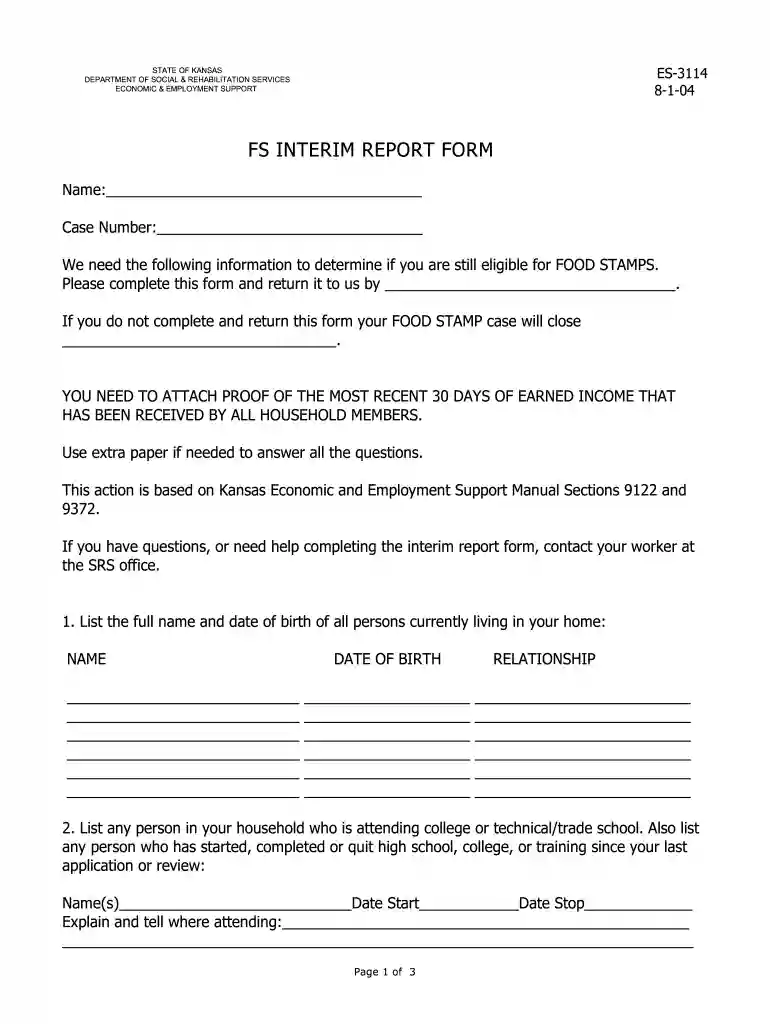
kansas food assistance interim report form Preview on Page 1

Here's how it works

01. Edit your kansas food assistance interim report form online
Type text, add images, blackout confidential details, add comments, highlights and more.

02. Sign it in a few clicks
Draw your signature, type it, upload its image, or use your mobile device as a signature pad.

03. Share your form with others
Send dcf interim report online via email, link, or fax. You can also download it, export it or print it out.

How to use or fill out what is an interim report form for state of kansas 2004 with DocHub

Form edit decoration
9.5
Ease of Setup
DocHub User Ratings on G2
9.0
Ease of Use
DocHub User Ratings on G2
  1. Click ‘Get Form’ to open it in the editor.
  2. Begin by entering your name and case number at the top of the form. This information is crucial for identifying your application.
  3. In Section 1, list the full names and dates of birth of all household members. Ensure accuracy as this affects eligibility.
  4. Section 2 requires details about any household members attending school. Include their names, start and stop dates, and the institution's name.
  5. For Section 3, provide information on all working individuals in your home. Attach proof of earned income for the last 30 days as specified.
  6. In Sections 4 and 5, document child support received and any other income sources, ensuring to include amounts and frequency.
  7. Section 6 asks for details on household assets. List all cash, accounts, and property values accurately.
  8. Complete Sections 7 through 10 regarding your living situation, expenses, legal obligations for child support, and any additional information that may be relevant.
  9. Finally, review your entries for completeness before signing at the bottom of the form to certify accuracy.

Start using our platform today to fill out your interim report form quickly and efficiently!

See more what is an interim report form for state of kansas 2004 versions

We've got more versions of the what is an interim report form for state of kansas 2004 form. Select the right what is an interim report form for state of kansas 2004 version from the list and start editing it straight away!
Versions Form popularity Fillable & printable
2014 4.8 Satisfied (100 Votes)
2013 4.3 Satisfied (66 Votes)
2004 4.3 Satisfied (151 Votes)
be ready to get more

Complete this form in 5 minutes or less

Get form

Got questions?

We have answers to the most popular questions from our customers. If you can't find an answer to your question, please contact us.
Contact us
An Interim Report is a mid-point check-in to review your case for any changes. Your county JFS office will. use the information you give to make sure that you are still eligible and that you are getting the correct. amount of benefits. Reported changes may result in an increase, decrease, or ending of benefits.
The intention of an interim report is to give an early(er) glimpse into the final findings and potential recommendations. An interim report can use data that has been gathered regularly throughout a project or it can use data from a dedicated interim phase of the project.
As a former food stamps worker--$23 is probably the minimum issuance, which means you were approved but the system calculated it to out to be so close to the income cutoff that you just got the minimum. People would often say that they would have rather got denied because it felt like a slap in the face.
Access and complete the Interim Report on the Self Service Portal. 1 Log-in to your Self Service Portal Account at 2 Once logged into your account, click Access my benefits. 3 Access my benefits drop-down menu displays, click Interim Reporting.
How to fill out the SNAP Assistance Interim Report Form Instructions? Read the information on the form carefully. Gather necessary documents to support your information. Fill out each section of the form accurately. Sign and date the form before submitting. Submit the form by mail, fax, or online by the deadline.

Security and compliance

At DocHub, your data security is our priority. We follow HIPAA, SOC2, GDPR, and other standards, so you can work on your documents with confidence.

Learn more