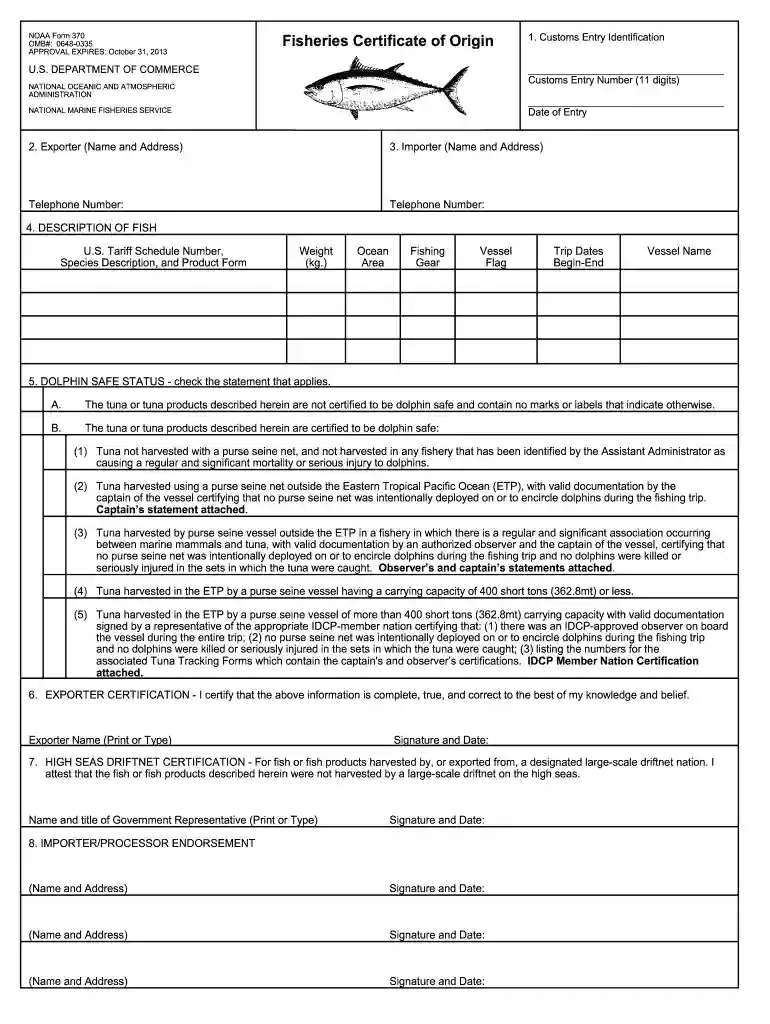
form 370 Preview on Page 1

NOAA Form 370 Tuna Fish Certificate of Origin ... - Beacon Fisheries 2026

Here's how it works

  • 01. Edit your form 370 online

    Type text, add images, blackout confidential details, add comments, highlights and more.

  • 02. Sign it in a few clicks

    Draw your signature, type it, upload its image, or use your mobile device as a signature pad.

  • 03. Share your form with others

    Send how to fill out a certificate of origin via email, link, or fax. You can also download it, export it or print it out.

How to use or fill out NOAA Form 370 Tuna Fish Certificate of Origin ... - Beacon Fisheries with Our Platform

Form edit decoration
9.5
Ease of Setup
DocHub User Ratings on G2
9.0
Ease of Use
DocHub User Ratings on G2
  1. Click ‘Get Form’ to open the NOAA Form 370 in our editor.
  2. Begin by entering the Customs Entry Number and Date of Entry in the designated fields. Ensure the number is exactly 11 digits.
  3. Fill in the Exporter section with your company name, address, and a contact telephone number for a responsible representative.
  4. Complete the Importer section similarly, providing the name, address, and contact number of the importer or consignee.
  5. In the Description of Fish section, input the U.S. Tariff Schedule Number, species description, product form, total weight in kilograms, ocean area of catch, fishing gear used, vessel flag, trip dates (begin-end), and vessel name.
  6. Select the appropriate Dolphin Safe Status by checking one statement that applies to your tuna or tuna products.
  7. Sign and date the Exporter Certification section to confirm that all provided information is accurate.
  8. If applicable, complete the High Seas Driftnet Certification with details from a government representative and ensure all importers/processors endorse by signing and dating their respective sections.

Start using our platform today to fill out your NOAA Form 370 easily and for free!

See more form 370 versions

We've got more versions of the form 370 form. Select the right form 370 version from the list and start editing it straight away!

VersionsForm popularityFillable & printable
20194.9 Satisfied (40 Votes)
20164.4 Satisfied (160 Votes)
20133.9 Satisfied (48 Votes)

be ready to get more

Complete this form in 5 minutes or less

Got questions?

We have answers to the most popular questions from our customers. If you can't find an answer to your question, please contact us.

Yes, you can utilize DocHub for signing any business and personal paperwork, including your noaa 370. All eSignatures you create with our tool are legally binding and court-admissible, as DocHub complies with criteria required by ESIGN and UETA. Save your accomplished form with a detailed Audit Trail if necessary.

If you want to edit your noaa 370 form online easily, it does not matter what web browser you employ. DocHub’s straightforward editing tools are available using any internet browser. Just open the appropriate tab in the editor, add your file, and fill it out without stress.

Security and compliance

At DocHub, your data security is our priority. We follow HIPAA, SOC2, GDPR, and other standards, so you can work on your documents with confidence.

noaa form 370

Appendix 5 - Inventory of US Ocean and Coastasl Facilities

Jan 2, 2010 2.1. Marine Transportation System. 2.1.1. Overview of U.S. Waterborne Commerce. 2.1.2. Shipping Vessels. 2.1.3. Trends in Shipping and CargoRead more

Learn more
Report of the Third and Final Meeting to Review Progress

Jul 2, 1992 to the rule; (2) specifying the use of a NOAA. Form 370 Fisheries Certificate of Origin. (FCO) to document the origin and method of harvestRead more

Learn more
If you believe that this page should be taken down, please follow our DMCA take down process here