




Here's how it works



How to use or fill out pbso employee with our platform

- Click ‘Get Form’ to open the pbso employee document in the editor.
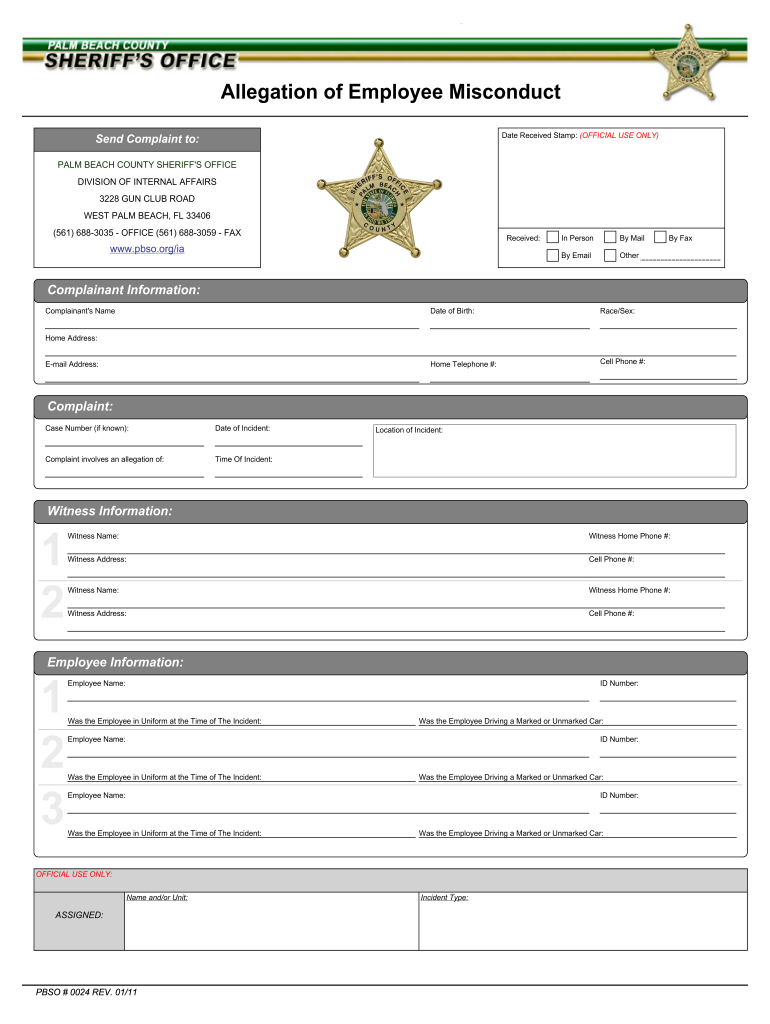
- Begin by filling out the Complainant Information section. Enter your name, date of birth, race/sex, and contact details including home and cell phone numbers, home address, and email address.
- In the Complaint section, provide the case number if known, date and time of the incident, and location. Clearly describe the nature of your complaint against the employee.
- Next, complete the Witness Information section. List up to two witnesses by providing their names, phone numbers, and addresses.
- Fill out the Employee Information section for each involved employee. Include their names, ID numbers, whether they were in uniform at the time of the incident, and if they were driving a marked or unmarked car.
- Finally, review your information for accuracy. Sign where indicated to acknowledge that your statements are true to the best of your knowledge before submitting your form.
Start using our platform today to streamline your document completion process for free!
It's free
See more pbso employee versions
| Versions | Form popularity | Fillable & printable |
|---|---|---|
| 2011 | 4.9 Satisfied (320 Votes) |
Got questions?
How can I create an electronic signature in my pbso oracle login on Android?
Signing documents on a mobile device is quick, simple, and doesn’t require software installation if you have an account with DocHub. Sign in from any browser, complete your blank fields with your data, and click on Sign → Create your signature. You can draw your electronic signature the same way you usually do on paper, add its picture to your pbso oracle login, or type in your name and stylize its look. Whatever option you select, your document will be valid.
How do you fill out pbso employee portal sign in on iOS?
You need only a web connection and a browser to fill out your pbso employee portal sign in on an iOS phone. Open the DocHub website and authenticate. Then, add your document or choose it from the list in your dashboard. Then use our editing instruments to fill out your form and preserve all your adjustments. You can also send it to a dedicated recipient straight away.
Security and compliance
At DocHub, your data security is our priority. We follow HIPAA, SOC2, GDPR, and other standards, so you can work on your documents with confidence.
Learn more


