Form sr-6 - Montgomery County Public Schools - montgomeryschoolsmd 2026

Get Form
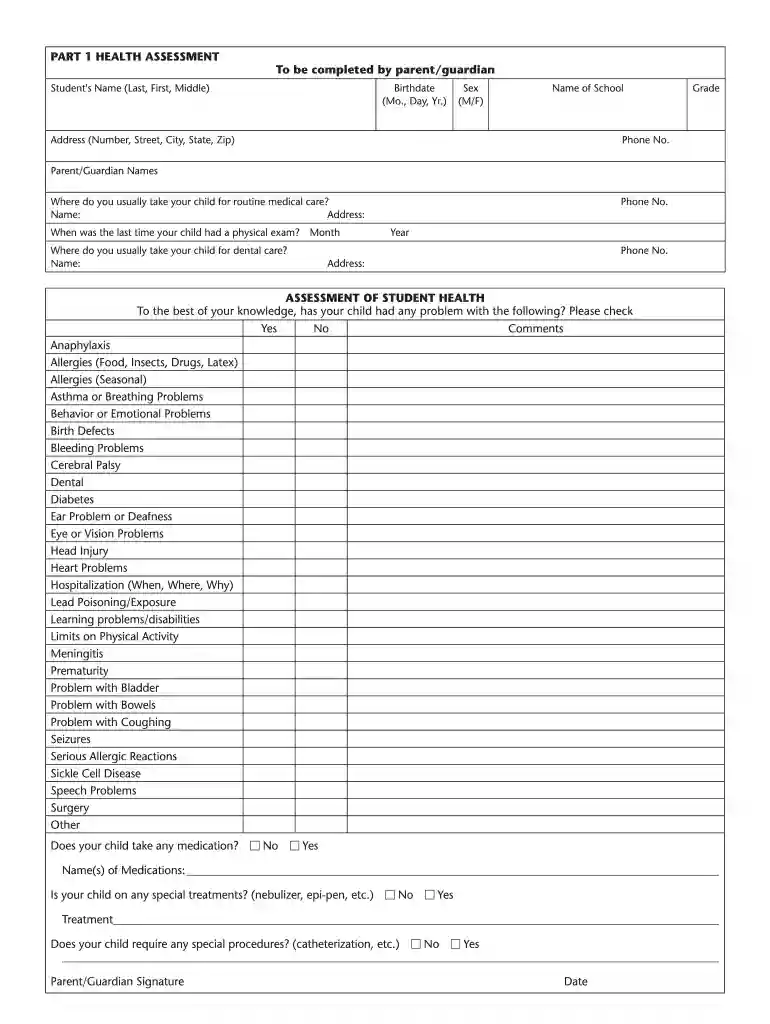
mcps physical form Preview on Page 1

Here's how it works

01. Edit your mcps physical form online
Type text, add images, blackout confidential details, add comments, highlights and more.

02. Sign it in a few clicks
Draw your signature, type it, upload its image, or use your mobile device as a signature pad.

03. Share your form with others
Send record of physical exam sr 6 via email, link, or fax. You can also download it, export it or print it out.

How to use or fill out Form sr-6 - Montgomery County Public Schools - montgomeryschoolsmd

Form edit decoration
9.5
Ease of Setup
DocHub User Ratings on G2
9.0
Ease of Use
DocHub User Ratings on G2
  1. Click ‘Get Form’ to open it in the editor.
  2. Begin with Part I, where you will enter your child's name, birthdate, sex, and school information. Ensure all details are accurate for proper record keeping.
  3. Provide your contact information including address and phone number. This is crucial for communication regarding your child's health.
  4. Complete the health assessment section by checking 'Yes' or 'No' for any health issues your child may have. Add comments where necessary to provide additional context.
  5. If applicable, list any medications your child is taking and any special treatments required. This ensures that school staff are aware of your child's needs.
  6. In Part II, ensure a physician or nurse practitioner completes the required sections regarding medical conditions and evaluations. Their signature is essential for validation.
  7. Review all entries for accuracy before submitting the form back to your child's school promptly.

Start using our platform today to fill out Form sr-6 easily and efficiently!

See more Form sr-6 - Montgomery County Public Schools - montgomeryschoolsmd versions

We've got more versions of the Form sr-6 - Montgomery County Public Schools - montgomeryschoolsmd form. Select the right Form sr-6 - Montgomery County Public Schools - montgomeryschoolsmd version from the list and start editing it straight away!
Versions Form popularity Fillable & printable
2020 4.8 Satisfied (22 Votes)
2018 4.4 Satisfied (96 Votes)
2016 4.4 Satisfied (641 Votes)
2013 4 Satisfied (22 Votes)
be ready to get more

Complete this form in 5 minutes or less

Get form

Got questions?

We have answers to the most popular questions from our customers. If you can't find an answer to your question, please contact us.
Contact us

With DocHub, you can easily approve your mcps sr 6 or any other paperwork on iOS, even without setting up additional applications. You can access your DocHub account from any internet-connected browser and complete and sign your form in any preferred method with just a couple of clicks.

You may quickly fill out, edit, and even eSign your sr 6 form using DocHub. Create a new profile and start your free trial. After that, you can upload the document with the form and easily make all the required edits. No need to print on paper or use a third-party application to sign it, as you can place your electronic signature on your document quicker via DocHub.

A Proof of Residency Letter is a formal document used to verify where a person lives. Its often required for tasks like school enrollment, setting up utilities, and applying for government services. Writing one involves including the residents name, address, move-in date, and a statement of residency.
Common documents include utility bills, lease agreements, property tax bills, and drivers licenses. Its important to check that these documents are current and match the address provided by the students family. 2. Home Visits: Conducting home visits can provide firsthand verification of residency.
To request that prescriptions or over-the-counter medication be given to a child during the school day, parents/guardians must complete MCPS Form 525-13 which includes a signed order from a health care provider.

Security and compliance

At DocHub, your data security is our priority. We follow HIPAA, SOC2, GDPR, and other standards, so you can work on your documents with confidence.

Learn more
ccpa2
pci-dss
gdpr-compliance
hipaa
soc-compliance
be ready to get more

Complete this form in 5 minutes or less

Get form

People also ask

Montgomery Blair High School. Montgomery Blair High School (MBHS) is a public high school in the Four Corners neighborhood of Silver Spring, Maryland, United States. It is operated by Montgomery County Public Schools. Its enrollment of 3,261 students makes it the largest school by population in the state of Maryland.
The following documents must be provided to the school (shown to school staff, the school will not keep the documents): Childs Birth Certificate (Original) Two Proofs of Address (utility bill, deed/lease, tax return, voter registration card) Photo ID for parent registering student.
The grade point average (GPA) is calculated A = 4, B = 3, C = 2, D = 1 and E = 0. The weighted GPA is calculated A = 5, B = 4, C = 3 for all IB, AP, advanced level, and honors courses. Montgomery County Public Schools no longer provides class rank of their students.
For example, a birth certificate or passport with your childs birthday. Immunizations or other health records. These requirements vary by school district. Your income.
The following documents must be provided to the school (shown to school staff, the school will not keep the documents): Childs Birth Certificate (Original) Two Proofs of Address (utility bill, deed/lease, tax return, voter registration card)

montgomeryschoolsmd