




Here's how it works



How to use or fill out tcep questionnaire county online with our platform

- Click ‘Get Form’ to open the tcep questionnaire in the editor.
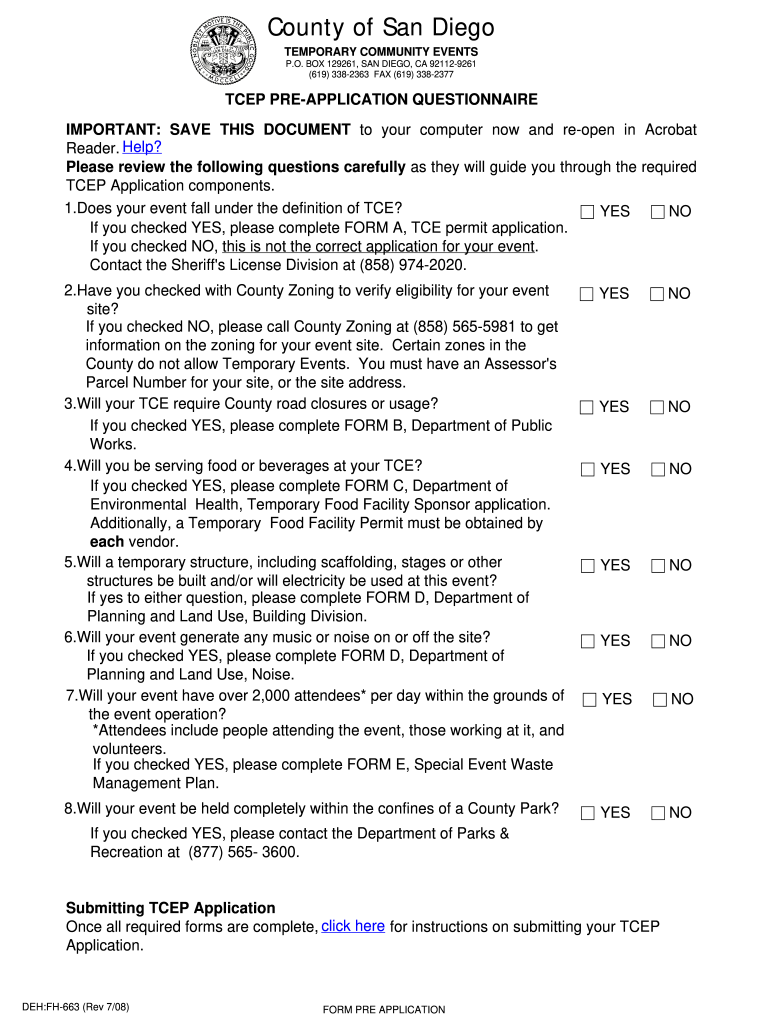
- Begin by answering the initial question regarding whether your event falls under the definition of TCE. Select 'YES' or 'NO' as applicable.
- Proceed to verify eligibility for your event site by checking with County Zoning. If you answer 'NO', contact County Zoning for assistance.
- Continue through each section, responding to questions about road closures, food service, temporary structures, and noise generation. Complete any relevant forms indicated based on your answers.
- Fill in the applicant details including event name, type, date(s), and location. Ensure all required fields are completed accurately.
- Review your responses carefully before submitting. Use our platform's features to save your progress and make edits as needed.
Start filling out your tcep questionnaire today for free using our platform!
It's free
See more tcep questionnaire county online versions
| Versions | Form popularity | Fillable & printable |
|---|---|---|
| 2008 | 4.8 Satisfied (82 Votes) |
Got questions?
How do I sign my tcep questionnaire county online on iOS?
With DocHub, you can quickly sign your tcep questionnaire county online or any other paperwork on iOS, even without setting up extra programs. You can access your DocHub account from any web-connected browser and fill out and sign your form in any way you like with just a few clicks.
Do I need to set up software to modify my tcep questionnaire county online?
When you edit your tcep questionnaire county online with DocHub, you only need a stable web connection and virtually any browser installed on your device. No need to install any third-party software or study tutorials. Simply open a tab with DocHub, drag and drop your file, and edit it on the spot.
Security and compliance
At DocHub, your data security is our priority. We follow HIPAA, SOC2, GDPR, and other standards, so you can work on your documents with confidence.
Learn more




