Form service agreement 2026

Get Form
form service agreement Preview on Page 1

Here's how it works

01. Edit your form service agreement online
Type text, add images, blackout confidential details, add comments, highlights and more.
02. Sign it in a few clicks
Draw your signature, type it, upload its image, or use your mobile device as a signature pad.
03. Share your form with others
Send training form via email, link, or fax. You can also download it, export it or print it out.

How to use or fill out form service agreement with our platform

Form edit decoration
9.5
Ease of Setup
DocHub User Ratings on G2
9.0
Ease of Use
DocHub User Ratings on G2
  1. Click ‘Get Form’ to open it in the editor.
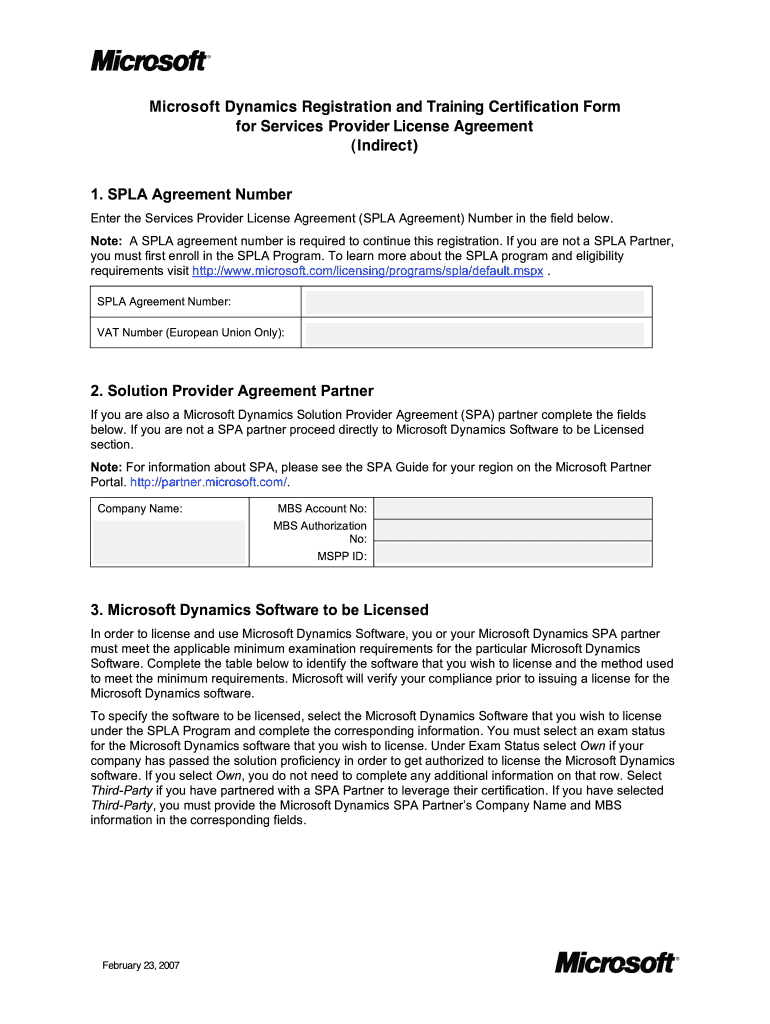
  2. Begin by entering your SPLA Agreement Number in the designated field. This number is essential for registration, so ensure you have it ready.
  3. If applicable, complete the Solution Provider Agreement Partner section by filling in your Company Name and MBS Account No. If you are not a SPA partner, proceed to the next section.
  4. In the Microsoft Dynamics Software to be Licensed section, select the software you wish to license and indicate your exam status. Choose 'Own' if you have passed the necessary exams or 'Third-Party' if partnering with a SPA Partner.
  5. Provide an email address for product license key distribution. Ensure this is an active email as keys will be sent here.
  6. Finally, submit the completed form to your SPLA Reseller as instructed at the end of the document.

Start using our platform today for free and streamline your document editing and signing process!

See more form service agreement versions

We've got more versions of the form service agreement form. Select the right form service agreement version from the list and start editing it straight away!
Versions Form popularity Fillable & printable
2007 4.8 Satisfied (108 Votes)
be ready to get more

Complete this form in 5 minutes or less

Get form

Got questions?

We have answers to the most popular questions from our customers. If you can't find an answer to your question, please contact us.
Contact us
Service agreements help make sure the participant and provider have the same expectations of what supports will be delivered and how they will be delivered. Making a service agreement is a negotiation between the participant and the provider.
A short-form services agreement for the provision of general, non-project-based, non-professional services, drafted in favour of the service provider in a manner that aims to be reasonable. This Standard Document has integrated drafting notes with important explanations and drafting and negotiating tips.
How to write a Service Agreement Information about the service. First, specify how long services are needed (e.g., for a single job, a fixed term, or indefinitely) and where the work will be done (as this affects the laws that apply to your contract). Party details. Payment. Terms and conditions. Final details.
A service agreement is a type of contract that outlines the terms and conditions covering the provision of services between two parties and acts as a reference point for both parties should any questions arise. It serves as a blueprint for the relationship and covers: What work needs to be done and what youll get.
A master service agreement (MSA), sometimes known as a framework agreement, is a contract docHubed between parties, in which the parties agree to most of the terms that will govern future transactions or future agreements.

Security and compliance

At DocHub, your data security is our priority. We follow HIPAA, SOC2, GDPR, and other standards, so you can work on your documents with confidence.

Learn more
ccpa2
pci-dss
gdpr-compliance
hipaa
soc-compliance

People also ask

What is typically included in a contract for services. Description of services. This lays out what professional services you and your company will receive. Payment terms. Ownership rights. Confidentiality clause. Indemnification clause. Amendment. Termination. Dispute resolution.

provider license