Type text, add images, blackout confidential details, add comments, highlights and more.
02. Sign it in a few clicks
Draw your signature, type it, upload its image, or use your mobile device as a signature pad.
03. Share your form with others
Send dominion ebuilder login via email, link, or fax. You can also download it, export it or print it out.
How to use or fill out Dominion East Ohio Request for Landlord Reversion
Ease of Setup
DocHub User Ratings on G2
Ease of Use
DocHub User Ratings on G2
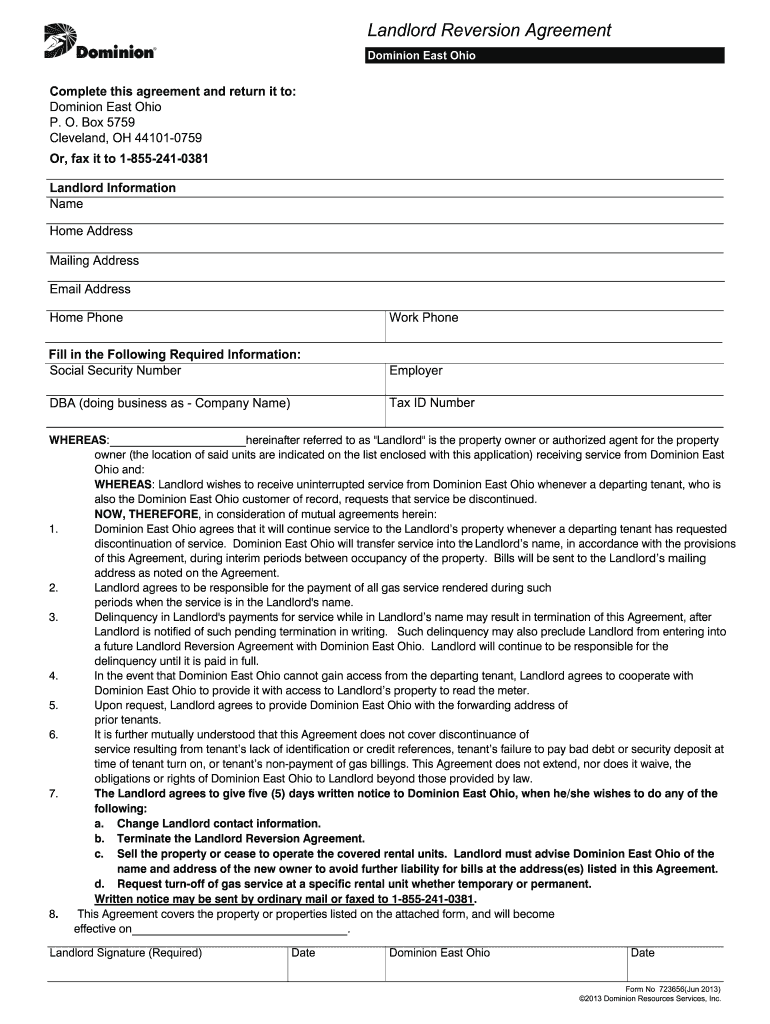
Click ‘Get Form’ to open the Dominion East Ohio Request for Landlord Reversion in our editor.
Begin by filling out the 'Landlord Information' section. Enter your name, home address, mailing address, email address, and both home and work phone numbers.
In the 'Fill in the Following Required Information' section, provide your Social Security Number, employer details, DBA (doing business as) name, and Tax ID Number.
Review the agreement clauses carefully. Ensure you understand your responsibilities regarding service payments and notification requirements.
List all addresses serviced by a separate meter under 'Addresses to be Automatically Transferred.' Include street address, apartment/unit/floor, city/state/zip for each property.
Sign and date the form at the bottom to validate your agreement with Dominion East Ohio.
Start using our platform today to complete your form quickly and efficiently!
Fill out Dominion East Ohio Request for Landlord Reversion online It's free
Dominion east ohio request for landlord reversion phone numberDominion east ohio request for landlord reversion pdfDominion east ohio request for landlord reversion onlineDominion east ohio request for landlord reversion formRevert to Owner agreementDominion Energy Revert to Owner agreementDominion Energy Property Manager portalDominion Energy Third Party Authorization form
Security and compliance
At DocHub, your data security is our priority. We follow HIPAA, SOC2, GDPR, and other standards, so you can work on your documents with confidence.
Title to real property cannot include dominion over the destiny of persons the owner permits to come upon the premises. Landlord has a right of reversion (aRead more
Cookie consent notice
This site uses cookies to enhance site navigation and personalize your experience.
By using this site you agree to our use of cookies as described in our Privacy Notice.
You can modify your selections by visiting our Cookie and Advertising Notice.