Certificate of liability insurance - East Bay Municipal Utility District 2026

Get Form
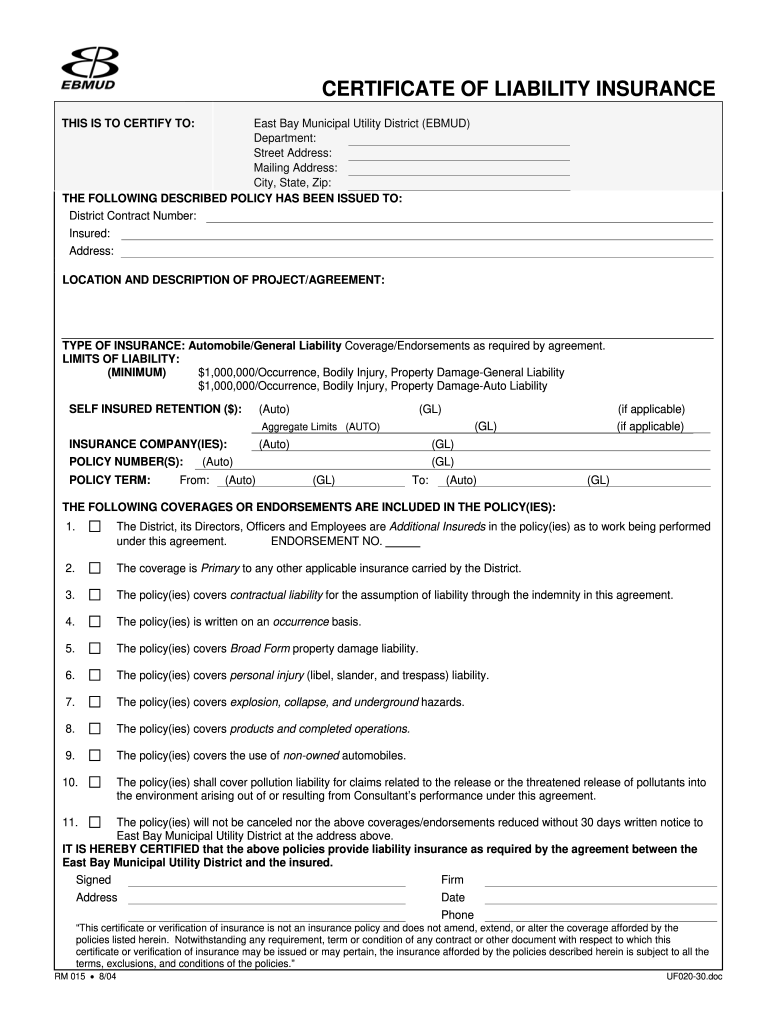
Certificate of liability insurance - East Bay Municipal Utility District Preview on Page 1

Here's how it works

01. Edit your form online
Type text, add images, blackout confidential details, add comments, highlights and more.
02. Sign it in a few clicks
Draw your signature, type it, upload its image, or use your mobile device as a signature pad.
03. Share your form with others
Send it via email, link, or fax. You can also download it, export it or print it out.

How to use or fill out Certificate of liability insurance - East Bay Municipal Utility District

Form edit decoration
9.5
Ease of Setup
DocHub User Ratings on G2
9.0
Ease of Use
DocHub User Ratings on G2
  1. Click ‘Get Form’ to open it in the editor.
  2. Begin by filling in the 'THIS IS TO CERTIFY TO' section with the East Bay Municipal Utility District's details, including Department, Street Address, Mailing Address, and City, State, Zip.
  3. In the 'THE FOLLOWING DESCRIBED POLICY HAS BEEN ISSUED TO' section, enter the District Contract Number and Insured's information along with their address.
  4. Describe the project or agreement in the 'LOCATION AND DESCRIPTION OF PROJECT/AGREEMENT' field clearly and concisely.
  5. Select the type of insurance coverage applicable from options like Automobile or General Liability. Ensure you meet the minimum limits of liability specified.
  6. Fill in policy numbers and terms under 'POLICY NUMBER(S)' and 'POLICY TERM', indicating start and end dates as required.
  7. List any additional coverages or endorsements included in your policy under the relevant section, ensuring all necessary details are captured.
  8. Finally, sign and date at the bottom of the form, providing your firm’s name and contact information before submitting.

Start using our platform today to easily complete your Certificate of liability insurance for free!

See more Certificate of liability insurance - East Bay Municipal Utility District versions

We've got more versions of the Certificate of liability insurance - East Bay Municipal Utility District form. Select the right Certificate of liability insurance - East Bay Municipal Utility District version from the list and start editing it straight away!
Versions Form popularity Fillable & printable
2013 4.9 Satisfied (500 Votes)
2004 4 Satisfied (30 Votes)
be ready to get more

Complete this form in 5 minutes or less

Get form

Got questions?

We have answers to the most popular questions from our customers. If you can't find an answer to your question, please contact us.
Contact us
It helps cover claims that your business caused bodily injury or property damage to someone elses belongings. It can also help cover personal injury, libel and slander claims against your company.
A certificate of insurance is issued to you directly by your insurance company, or in some cases, your agent or broker. Typically a COI does two things: it verifies the existence of your specific insurance policy and it summarizes the conditions of your policy.
In most cases, you can get your documents by contacting your insurer directly and asking them to send your insurance certificate either via email or post.
So again, while an insured cannot issue their own certificate of insurance, obtaining a COI from their insurer is typically quick, simple, and free.
Look through your bank and credit card statements to track down the insurance company or search your email inbox. Contact your insurer and explain the situation. If you cant find your current insurance certificate, youll be able to get a copy of it from your insurer, but you might be charged.

Security and compliance

At DocHub, your data security is our priority. We follow HIPAA, SOC2, GDPR, and other standards, so you can work on your documents with confidence.

Learn more
ccpa2
pci-dss
gdpr-compliance
hipaa
soc-compliance

People also ask

Most insurers now offer the option to download your vehicle insurance certificate online. Heres how: Visit your insurers official website and log in to your account using your registered email or policy number. Navigate to the Policy Documents or My Policies section.

Related links