




Here's how it works



How to use or fill out neqas serology registration form 2022 with our platform

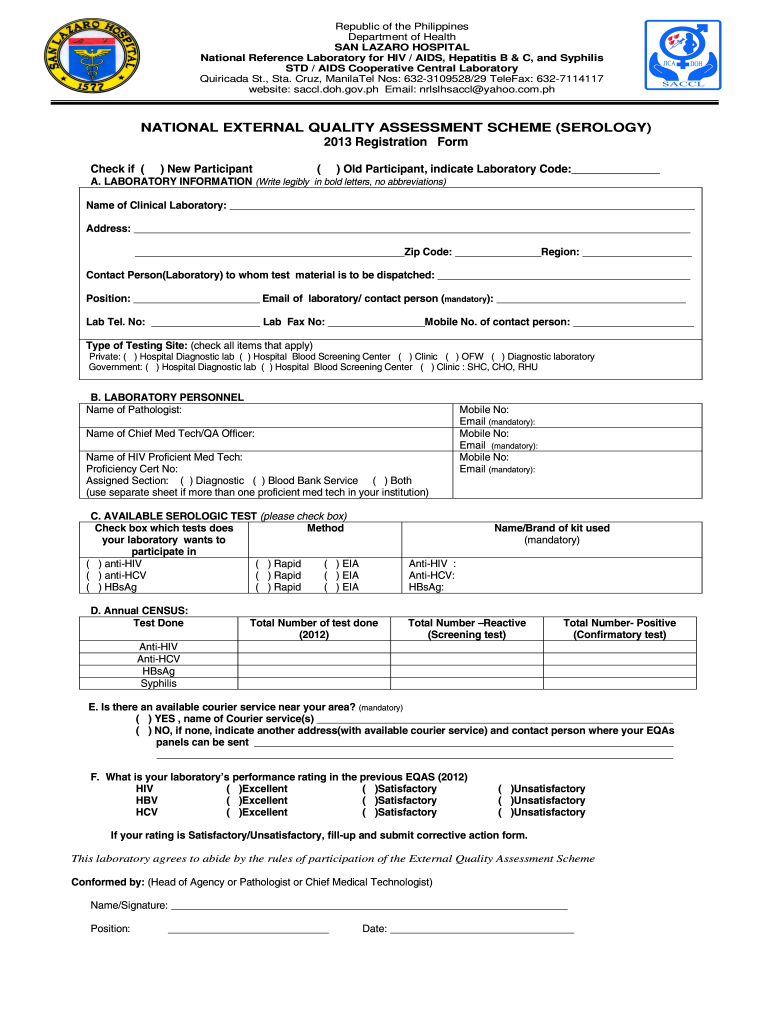
- Click ‘Get Form’ to open the neqas serology registration form 2022 in the editor.
- Begin by filling out the 'Laboratory Information' section. Write your laboratory's name, address, and contact details clearly. Ensure you include a valid email address as it is mandatory.
- In the 'Laboratory Personnel' section, list the names and positions of key personnel, including the pathologist and chief medical technologist. If there are multiple proficient med techs, use a separate sheet.
- For 'Available Serologic Test', check all applicable tests your laboratory wishes to participate in. Be sure to indicate whether you will use rapid or EIA methods.
- Complete the 'Annual CENSUS' section by providing total test numbers and results from the previous year. This includes reactive and positive confirmatory tests.
- Indicate if there is a courier service available for dispatching test materials. If not, provide an alternative address.
- Finally, review your entries for accuracy before signing off on the agreement at the bottom of the form.
Start using our platform today to easily fill out your neqas serology registration form for free!
It's free
See more neqas serology registration form 2022 versions
| Versions | Form popularity | Fillable & printable |
|---|---|---|
| 2013 | 4 Satisfied (25 Votes) |
Got questions?
Can I draw my eSignature to sign my saccl neqas?
Sure, electronically drawing your signature is appropriate, but only if you utilize a tool that complies with industry laws and regulations. Try DocHub, which guarantees eSignature validity under ESIGN and UETA requirements. All you need to eSign your saccl neqas is an account with DocHub and an internet connection. When you open your file in our editor, click Sign and choose the Draw option.
Can I edit serology form on my phone?
As a comprehensive document modifying platform, DocHub is accessible on smart phones. Open DocHub in your choice of mobile internet browser and employ our intelligent mobile-friendly toolset to fill out your serology form.
Security and compliance
At DocHub, your data security is our priority. We follow HIPAA, SOC2, GDPR, and other standards, so you can work on your documents with confidence.
Learn more




