Insights on the DocHub vs. MyFax Rewards comparison
Choose the best editing solution for your business once and for all. Check out the detailed comparison of DocHub and MyFax Rewards
Create free account
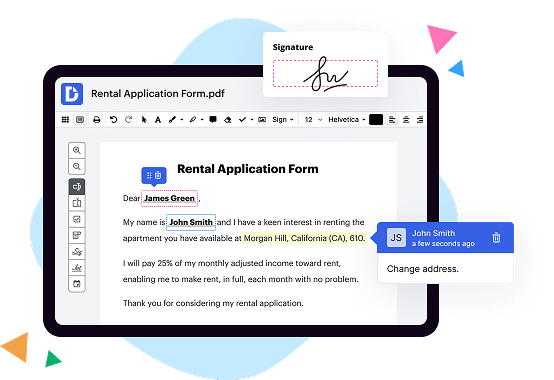
MyFax vs. DocHub Rewards comparison in a nutshell

|
MyFax | |
|---|---|---|
| No Downloads | ||
| Search Form Online | ||
| Fax PDF | ||
| Receive Fax Online | ||
| Email Fax | ||
| Track Fax | ||
| Edit Fax Online | ||
| Sign Fax Online | ||
| Unlimited Cloud Storage | ||
| Get DocHub for free |
Here are the main differences between DocHub and MyFax Rewards
The Bottom Line. MyFax offers a good selection of international fax numbers and an effective mobile app, but it feels dated, lacks a digital signature tool, and has restrictive pricing.
Move from MyFax PDF to DocHub in a few steps
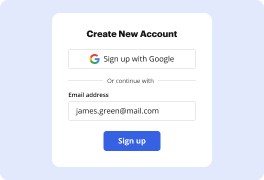
01. Register with DocHub using your email address or Google account. It's fast and easy. No credit card required.
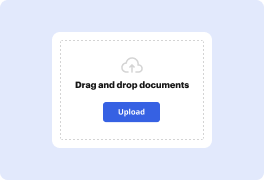
02. Upload the document you need or create it from scratch. Then, customize it by adding images, drawings, and different types of fillable fields.
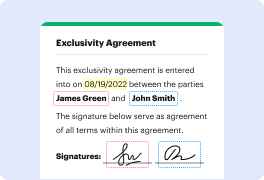
03. Customize your PDF in minutes. Type, highlight, underline, whiteout text, add comments, and sign your document.
04. Share your PDF with others to collaborate in real-time. Export your document, download or print it out.
Switch to DocHub to enjoy premium PDF customization

Online PDF creator and editor
Explore DocHub vs. MyFax comparison data and choose the best platform for getting your perfect document without hassle. Start with a blank document or modify an existing one. Type text, add shapes, drawings, images, and highlight or whiteout information. Whatever you do with a PDF, the result is always high quality, without rasterized text or removed fields.

Diverse PDF management tools
Manage your PDF to perfection. Add, delete, and rearrange document pages or merge them to create a new document. DocHub supports a variety of file types including PDF, DOC, PPT, XLS, TXT, DOCX, and PPTX, which you can easily convert to a PDF.

Powerful PDF tools on your mobile device
Keep your work flowing from any location. Get DocHub, the most powerful MyFax competitor. With DocHub's capabilities on your mobile device, you can edit, annotate, manage, sign, and share PDFs just as easily as you would on a desktop. No need to install the app.

Google integrations
Boost your productivity and deliver an amazing customer experience by managing your PDFs from your favorite Google apps. Import, edit, and sign your documents directly from your Gmail, Google Drive, and Dropbox.

Interactive PDF forms and templates
Get an intuitive and interactive experience when creating PDF forms and reusable document templates. Modify existing fields or create new ones for checkboxes, signatures, initials, and more. Publish forms on your website, social media, or share them via URL to collect data.

Real-time collaboration
Migrate from MyFax to DocHub to collaborate effectively and securely on documents in real-time. Set document permissions to let others view, comment on, edit, and sign your documents. Stay in the loop with instant email notifications or track the status of your documents with court-admissible audit trails.
Industry-leading security and compliance
DocHub implements reasonable measures to comply with industry-leading standards, regulations, and certifications so you can securely edit, fill out, sign, and send documents and forms.

GDPR compliance
Regulates the collection, use, and holding of personal data for EU residents.

PCI DSS certification
Ensures the security of credit and debit card transactions made by a customer.

CPRA compliance
Enhances the privacy rights of California residents while protecting their personal data.

SOC 2 certification
Ensures the security of your data and the privacy of your clients.

HIPAA compliance
Protects privacy, security, and integrity of sensitive healthcare information.
Check out what our customers are saying about their DocHub experience
Great solution for PDF docs with very little pre-knowledge required.

A Valuable Document Signer for Small Businesses.

I can create refillable copies for the templates that I select and then I can publish those.

DocHub and MyFax Rewards comparison FAQ
What is the cost of MyFax?
Base Pricing: MyFax starts at $10 per month for those who need to send and receive fewer than 100 pages. eFaxs only at $18.95 per month for those who need to send and receive up to 200 pages. For the cheapest option, MyFax is the winner. Scalability: For every fax above 200, eFax will charge you $0.10 per page.
What is MyFax used for?
MyFax lets you fax online using your smartphone, mobile app, tablet, or computer, so theres no more searching for a fax near me. Faxes can be delivered to any recipient whether they have a traditional fax machine or internet fax service. To get started, choose a local, toll free, or international fax number.
What is the rate for MyFax?
MyFax FAQs MyFax has 3 different plans: Home Office User at $10.00 per month. Small Business User at $20.00 per month. Power User at $40.00 per month.
Is MyFax app legit?
As long as you are fine with receiving a limited number of features at that price point, MyFax is a great service for those who want to save money with their online faxing service software.
How much is MyFax per month?
MyFax offers a 14-day free online fax trial period to test out the service. MyFax costs $12 per month with no startup or hidden fees. The plan we reviewed includes 200 incoming and 200 outgoing pages per month.
Which is better eFax vs MyFax?
In general, eFaxs better user interface, email-to-fax features, and security features make it a better choice than MyFax.
Is MyFax free?
MyFax offers a free mobile app for iOS and Android devices to make online faxing more convenient: Send receive faxes.