






Definition & Meaning
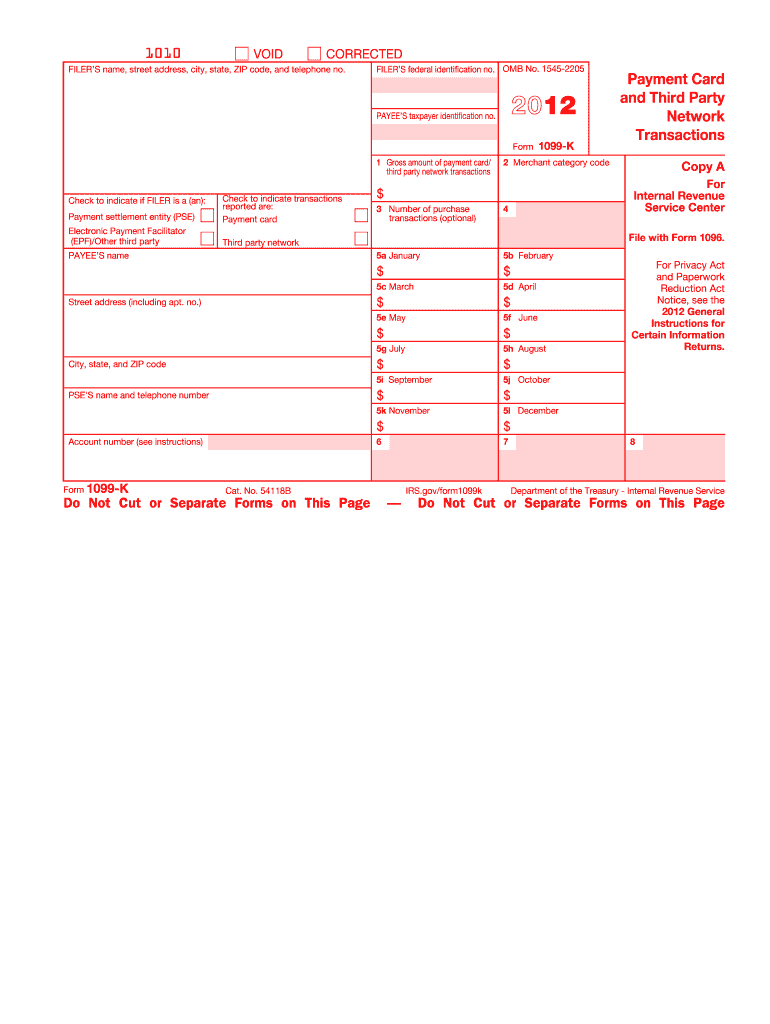
Form 1099-K is an IRS information return used to report payment card and third-party network transactions. Introduced as part of the Housing Assistance Tax Act of 2008, it is specifically designed to improve voluntary tax compliance among businesses and individuals receiving payments through payment cards such as credit and debit cards, as well as third-party payment networks like PayPal. For the tax year 2012, this form was utilized to document total gross sales or transaction amounts processed through these entities. This form is crucial for ensuring that all income is accurately reported to the IRS, even if it does not come from traditional, reportable income sources.
How to Use the 1099-K 2012 Form
To use Form 1099-K effectively, businesses and individuals must first understand the purpose of the form and its components. The form details the total income received through payment cards and third-party networks, providing this information to both the IRS and the payee. It's essential for record-keeping and tax reporting purposes. Recipients of this form should compare the gross payment information reported by the payment settlement entity against their own records to ensure accuracy. Any discrepancies should be addressed promptly by contacting the payment settlement entity.
How to Obtain the 1099-K 2012 Form
Forms 1099-K are issued by payment settlement entities and should be provided to merchants and individuals by January 31 of the following year. If a recipient does not receive their form, they should contact the payment settlement entity directly. Additionally, eligible recipients can view and obtain their Form 1099-K through their account management portal if the payment processor provides such access. The IRS does not provide a blank version of this form for download, as it must be issued by the payment processor.
Steps to Complete the 1099-K 2012 Form
- Receive the Form: Obtain the form from your payment settlement entity by January 31.
- Verify Information: Ensure all details—such as tax identification number, gross amounts received, and payer information—are accurate.
- Compare Records: Cross-check the total gross income with your internal records.
- Correct Discrepancies: If there are discrepancies, contact the payment settlement entity to resolve these issues.
- File with Tax Return: Use the information provided on Form 1099-K to accurately complete your tax return. Although the form itself is not submitted with your return, it should support income reported.
Who Typically Uses the 1099-K 2012 Form
Form 1099-K is commonly used by businesses that receive payments through credit/debit card transactions and third-party networks. This includes retailers, restaurants, service providers, gig workers, freelance professionals, and e-commerce vendors. The form is specifically beneficial for entities with a significant volume of transactions through these channels, as it simplifies income tracking and reporting for tax purposes.


Key Elements of the 1099-K 2012 Form
The form is structured to capture the essential details of payment transactions:
- Payer Information: Includes the payment settlement entity's name and Taxpayer Identification Number (TIN).
- Payee Information: Contains the recipient's name, address, and TIN.
- Gross Amounts: Shows the total payment volume processed and the number of transactions.
- Monthly Breakdown: Provides detail for payments received each month of the year, helping businesses reconcile their records.
IRS Guidelines
The IRS stipulates that Form 1099-K is required for entities with gross payments over $20,000 and more than 200 transactions within a calendar year. The payment settlement entities are responsible for issuing this form to both the IRS and the payment recipients. Failure to report the transactions accurately may lead to scrutiny, additional tax assessments, and potential penalties.
Penalties for Non-Compliance
The IRS imposes penalties for various non-compliance issues related to Form 1099-K, including failure to file, late filing, and incorrect or inaccurate information. The penalty amounts increase based on the length of delay and the intent behind the inaccuracies. Ensuring correct filing and reconciliation with personal or business financial records is crucial to avoid these penalties.
Filing Deadlines / Important Dates
Understanding the timelines for Form 1099-K is important:
- January 31: Deadline for payment settlement entities to send Form 1099-K to merchants.
- February 28: Due date to file paper copies with the IRS.
- March 31: Due date for electronic filing with the IRS.
Timely receipt and verification are crucial to ensure accurate tax reporting and compliance.
Form Submission Methods
Form 1099-K itself does not need to be submitted by individual taxpayers. However, it is important for compliance and should be included in records supporting income reported on tax returns. The form is electronically submitted by payment settlement entities to the IRS.
Digital vs. Paper Version
Payment settlement entities may offer Form 1099-K in digital format, providing quicker access and easier record-keeping. Some businesses prefer paper versions for physical filing. Regardless of format, it’s essential the content remains unchanged and accurate, ensuring consistency for tax records.