Type text, add images, blackout confidential details, add comments, highlights and more.
02. Sign it in a few clicks
Draw your signature, type it, upload its image, or use your mobile device as a signature pad.
03. Share your form with others
Send it via email, link, or fax. You can also download it, export it or print it out.
How to use or fill out FL-625 with our platform
Ease of Setup
DocHub User Ratings on G2
Ease of Use
DocHub User Ratings on G2
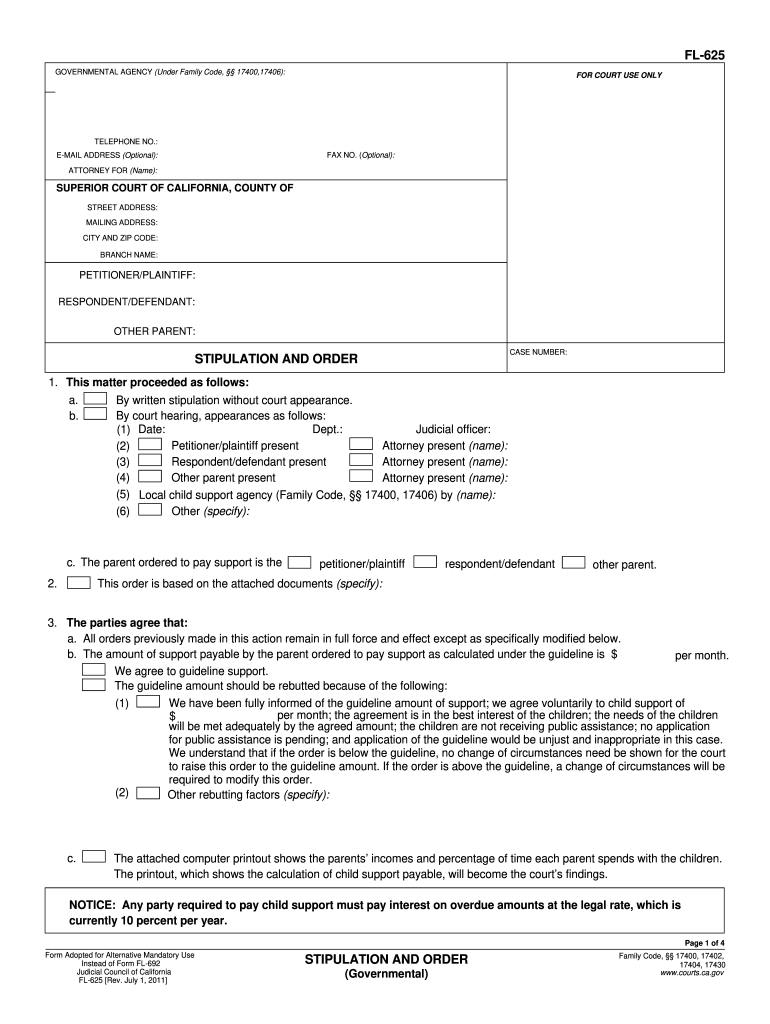
Click ‘Get Form’ to open FL-625 in the editor.
Begin by entering your contact information, including telephone number, fax number (optional), and email address (optional) at the top of the form.
Fill in the details for the petitioner/plaintiff, respondent/defendant, and other parent, along with the case number.
In Section 1, indicate how the matter proceeded—either by written stipulation or court hearing—and provide necessary details such as dates and names of attorneys present.
Complete Section 2 by identifying who is ordered to pay support and specify any attached documents that support this order.
In Section 3, detail the agreed child support amount and any rebutting factors if applicable. Ensure all calculations are clear and accurate.
Finalize by signing the document where indicated. Make sure all parties involved have signed before submission.
Start using our platform today to easily fill out FL-625 for free!
FL-625 Stipulation and Order (Govermental) - California Courts
Jan 1, 2020 NOTICE: Any party required to pay child support must pay interest on overdue amounts at the legal rate, which is currently. 10 percent per year.Read more
Chapter 62-625 - PRETREATMENT REQUIREMENTS FOR EXISTING AND OTHER SOURCES OF POLLUTION. State Regulations; Compare. 62-625.100 - Scope/Intent/PurposeRead more
Cookie consent notice
This site uses cookies to enhance site navigation and personalize your experience.
By using this site you agree to our use of cookies as described in our Privacy Notice.
You can modify your selections by visiting our Cookie and Advertising Notice.