
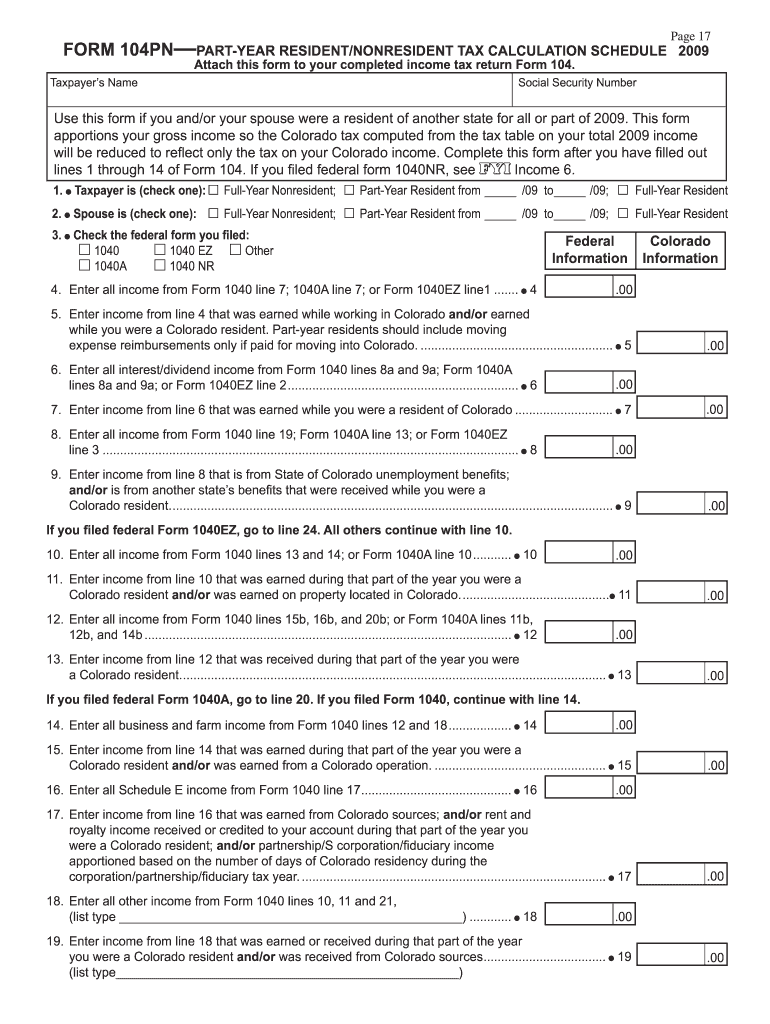







Definition and Purpose of Form 104PN
Form 104PN is a part-year resident and nonresident tax calculation schedule used by individuals in Colorado for years such as 2009 through 2014. This form is crucial in apportioning income earned in Colorado, determining the state's tax liability accurately based on residency status. It's specifically designed for taxpayers who did not reside in Colorado for the entire tax year and need to detail all sources of income both from within and outside of the state.
Key Elements
- Residency Status: Important to define whether you are a part-year resident or nonresident.
- Income Apportioning: Calculate income earned in Colorado vs. outside for the given tax year.
- Details Section: Includes sections for adjusted gross income and deductions specific to Colorado regulations.
How to Use the 2 Form 104PN
Using Form 104PN involves a step-by-step process to ensure precise calculation. Here are the simplified steps to use this form:
- Determine Residency: Establish your residency status for the tax year in question.
- Collect Income Information: Gather all records of income earned both in and out of Colorado.
- Fill Out Adjustments: Input any deductions and credits applicable to Colorado.
- Complete Form 104PN After Form 104: Ensure that you have filled in the relevant lines on your Colorado Individual Income Tax Return, Form 104, before completing Form 104PN.
- Double-Check: Review each section for accuracy before submission.
How to Obtain the 2 Form 104PN
To get your hands on this form, there are multiple avenues available:
- Online Download: Access the Colorado Department of Revenue website for a downloadable PDF.
- Tax Software: Common tax preparation software such as TurboTax or QuickBooks may include this form in their options.
- Tax Professional: Reach out to a certified tax professional who can provide a printed or electronic copy of the form.
Steps to Complete the 2 Form 104PN
Completing this form requires attention to detail:
- Input Personal Information: Begin with your personal data, including SSN and address.
- Document Income Sources: Clearly segregate income as earned inside or outside Colorado.
- Fill All Applicable Lines: Follow instructions for each line item, indicated by your main Form 104.
- Compute Adjustments: Calculate any necessary adjustments that impact your state tax liability.
- Review and Submit: Cross-check entries and submit alongside your Colorado income tax return.
Who Typically Uses the 2 Form 104PN
This form is commonly used by:
- Part-Year Residents: Individuals who migrated to or from Colorado during the tax year.
- Nonresidents: Those who earned income in Colorado but do not reside in the state.
- Dual-State Earners: Those who have income from multiple states with one of them being Colorado.


State-Specific Rules for the 2 Form 104PN
Colorado-specific regulations impact how Form 104PN is completed:
- Adjustments to Income: Colorado rules may require modifications to gross income figures.
- State-Specific Credits: Identification and application of credits specific to Colorado tax policies.
- Tax Rate Variations: Understanding how rates apply to apportioned income, given the residency type.
Examples of Using the 2 Form 104PN
Consider hypothetical scenarios:
- Example 1: A resident who moved to Colorado part-way through the year must report employment income earned in another state up until they relocated.
- Example 2: A nonresident with a short-term contract in Colorado needs to declare those earnings while maintaining domicile elsewhere.
IRS Guidelines for Form 104PN
While Form 104PN is specific to the state of Colorado, it must align with broader IRS guidelines:
- Consistency with Federal Return: Ensure your state figures map accurately to your federal return.
- Adherence to Apportioning Rules: Follow tax code standards for income apportioning and reporting.
- Filing Returns: Submit both federal and state returns accurately to avoid discrepancies.
Filing Deadlines and Important Dates
- April Deadline: Typically, the Colorado tax return, including Form 104PN, is due by April 15.
- Extensions: If needed, apply for an extension, but remember it doesn't delay tax payment.
- Back Taxes: Understand the regulations for amending returns if necessary.
Form Submission Methods
Form 104PN can be submitted in various ways:
- Online: Via the Colorado Department of Revenue's e-file system.
- Mail: Send a printed copy to the provided state address.
- In-Person: Submission directly to a Colorado Department of Revenue office if assistance is necessary.
Penalties for Non-Compliance
Failing to accurately complete or submit Form 104PN could result in:
- Penalties: Financial penalties for failure to file or inaccurate reporting.
- Interest Charges: Accrued on unpaid taxes due to form submission errors.
- Legal Consequences: Potential for audits and legal review by state tax officials.
This guide ensures comprehensive understanding and accurate completion of the 2 Form 104PN, facilitating compliance and optimizing tax reporting for part-year and nonresident taxpayers.




