Type text, add images, blackout confidential details, add comments, highlights and more.
02. Sign it in a few clicks
Draw your signature, type it, upload its image, or use your mobile device as a signature pad.
03. Share your form with others
Send mv 104an 7 11 codes via email, link, or fax. You can also download it, export it or print it out.
How to use or fill out mv 104b with our platform
Ease of Setup
DocHub User Ratings on G2
Ease of Use
DocHub User Ratings on G2
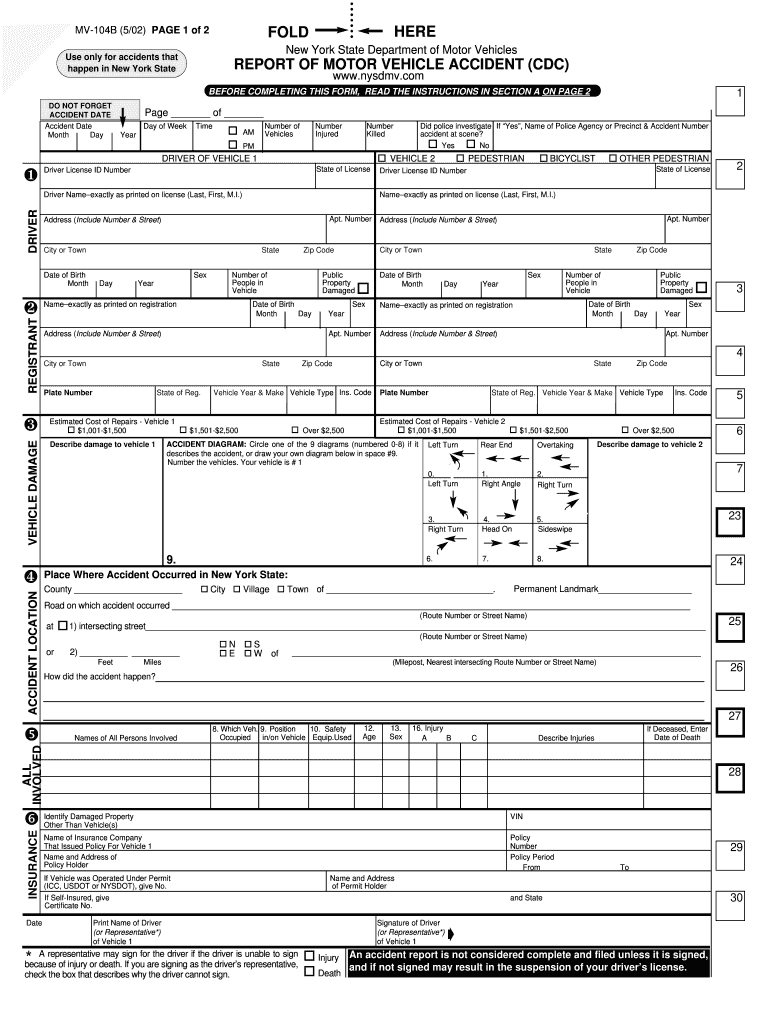
Click ‘Get Form’ to open the MV-104B in the editor.
Begin by entering the accident date, including month, day, and year. Specify the time of the accident and indicate whether it occurred in the AM or PM.
In the DRIVER OF VEHICLE 1 section, input the driver's information exactly as it appears on their license. Include details such as driver license ID number, date of birth, and address.
For VEHICLE DAMAGE, check if damages exceed $1,000 and describe any damage to vehicle 1. Repeat this for vehicle 2 if applicable.
Fill out the ACCIDENT LOCATION section with county, city or town, and specific road names where the accident occurred. Include any permanent landmarks nearby.
Complete the ALL INVOLVED section by listing all persons involved in the accident along with their respective details.
Finally, ensure that you sign at the bottom of page 2 before submitting your report to avoid any penalties.
Start using our platform today for free to simplify your form completion process!
Complete and mail the Report of Motor Vehicle Crash (PDF) (MV-104) form to the address listed on page two of the form. Get a Copy of Your Report. The crashRead more
PEDESTRIAN/BICYCLIST/OTHER PEDESTRIAN ACTION. 1. Crossing, With Signal. 2. Crossing, Against Signal. 3. Crossing, No Signal, Marked Crosswalk.Read more
Cookie consent notice
This site uses cookies to enhance site navigation and personalize your experience.
By using this site you agree to our use of cookies as described in our Privacy Notice.
You can modify your selections by visiting our Cookie and Advertising Notice.